Usually, I encounter issues during testing in the emulator while the actual app works fine. This time, however, it is different.
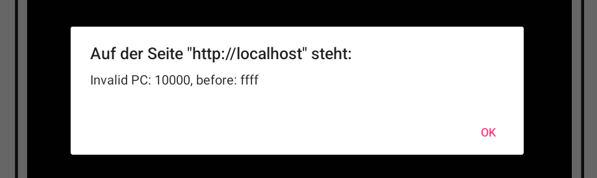
I have created an app, written primarily in JavaScript. It runs flawlessly on my PC. Within AI2, it also works perfectly in the Companion via a USB connection. However, when I build and install the APK file, I receive the following error on my tablet:
I used the workaround described here in the forum to integrate a large number of assets: I exported the project as aia, renamed the file to a .zip archive, created subfolders within the assets directory, placed the files inside them, re-zipped the archive, and then uploaded the project again in AI2. I performed the zipping using Windows' built-in tools. I am not sure if this is relevant, given that the app works correctly in the Companion.
the sub-folder structure is…
assets libs pics ui
Does anyone has any idea what the reason might be?
really… will that be the solution? why does it work in the emulator (not sure for the wording i mean emulating with companion and usb connection). this is the point that it makes me confused.
and i checked the asset directory on device via pc browser. the folder structure is created in the app directory for companion…
I hoped for another reply… I would feel better if there would be a logical reason for that behavior because than I would possibly know what to do. Now unfortunately it is a trial error situation with i encounter often…
I try it… of course. No good situation for going to bed
I have just run a check with a simple compiled app, which does pick up an image file from a sub folder, so looks like this does work after all. Apologies.
Your issue must be elsewhere.
If you want to share your apk by direct message (PM) I can take a look, see if there is anything obvious in your files, paths or links
Can you indicate when the error occurs, on initialisation of the app, or at some other point when using the app?
so… the point is… it works with all file in the asset folder directly. now will copy the apk to another tablet and test it there.
I don’ t like things in IT environment which i do not understand or which a mysthic or not reproduceable.
I hope that it was not a bug in AI2. In the last time I often have the feeling that something goes wrong in browser e.g. deleting projects forever does not refresh or some doubled projects with the same name.
will have a further look tomorrow or better today but after sleeping. It works only on one of my tablets. The other one brings still the error and does not show the pictures (file access problem or they are not found). The same version which runs on the other tablet. It is also strange… when i installed the app first time, i was asked to scan for threats. I deinstalled the app, cleared cache and app data but the question for an app scan does not appear again. It seams that there is still something left on my tablet which is not fully deleted. Try it tomorrow with a new app / project name.
so… did some refactoring and now have an ai2 special version. it works on both mobile devices and also on PC. last one with structed folders (in assets) and without this structure and less data (files) in asset folder directly.
in fact i had to give the projec tfile a new project name. the device with the still problem always associated the new installation with the faulty one. only after doing that the installation process shows the app scan popup (for viruses etc.) again and the app works finally
It is not obvious as to what you actually did to get things working. Did you apply a folder structure in the decompiled apk, or did you just "flatpack" all the files in the assets? or did you do both ?
I followed your solution and put all files in assets directly without subfolders. but for this i had to refactor my javascript logic. it was not simply done with changing the file path because i will benefit from the structed folder layout on PC
 I would feel better if there would be a logical reason for that behavior because than I would possibly know what to do. Now unfortunately it is a trial error situation with i encounter often…