Color Changing Canvases

Another thought before retiring for the night...

AI2 has a text to speech component.

That would help with real time color identification, given the color name.

Sorry, I'm still confused. :frowning:

I'll look into the name per pixel, it will save a lot of time. Thank you.

For the 2nd canvas, I want to be able to turn on/off a mode where users can see how people see the pixel color based on the colorblind setting under it.

For Example: I click on the cube, and Canvas 2 gives the color. Are users able to change how they see Canvas 2? The sliders are the severity.

That would be nice! Thank you. Merry Christmas! Hope you can answer when you are free and tysm for your help today.

When you say "the part where you can get a better name for the RGB color value of the chosen picture pixel. That's easily done in a dozen blocks and a given color name/code file." are you able to send me the code for that if possible please, thank you!

Posting a starter aia file would give me a head start when I get around to it.

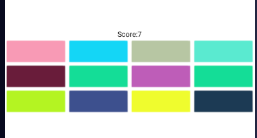
I looked through my collection before starting to code, and I found this color matching game.
It might be useful in diagnosing color blindness.
image

color_match.aia (4.9 KB)

Says couldnt load project, but i'll also look into that code. Are you also working on changing canvas 2 based on the filter if possible? No rush btw. But sorry for late response.

Here's a color guessing game with lookup of closest color.
See the app About for the color table source.
image
color_names_match_game.aia

Everything is proceduralized, for reusability.

(I added a (Cheat) button because I am really bad at this game.)

Which project?

If you want to change the colours in an image in a canvas, you might use this method:

the projects you linked. it just says couldnt load or just shows a bunch of symbols

is it possible to modify it based on colorblindess?

You could do a find and replace by pixel colour value, might be slow on "bigger" images.

I'm just finding a single pixel they tap on. the whole image would be nice. But I don't have lots of coding skill unless it's easy.

so with the codes you gave, it should help me with the names of colors based on the pixel tapped?

Yes, the color file in the Media folder has the names and the RGB values, and I included procedures to hunt through the associated table for the best match against whatever RGB value you get off the Canvas showing your picture.

Maybe you are loading them wrong?

You download the aia file, then use the AI2
Project->Import Project from aia File option to load it.

Oh! Sorry about that.

which color file?

Look in the Media folder after you import the matching game aia I just built.