2.- HC-05. Arduino. AT commands. Turn on/off LED PIO5.
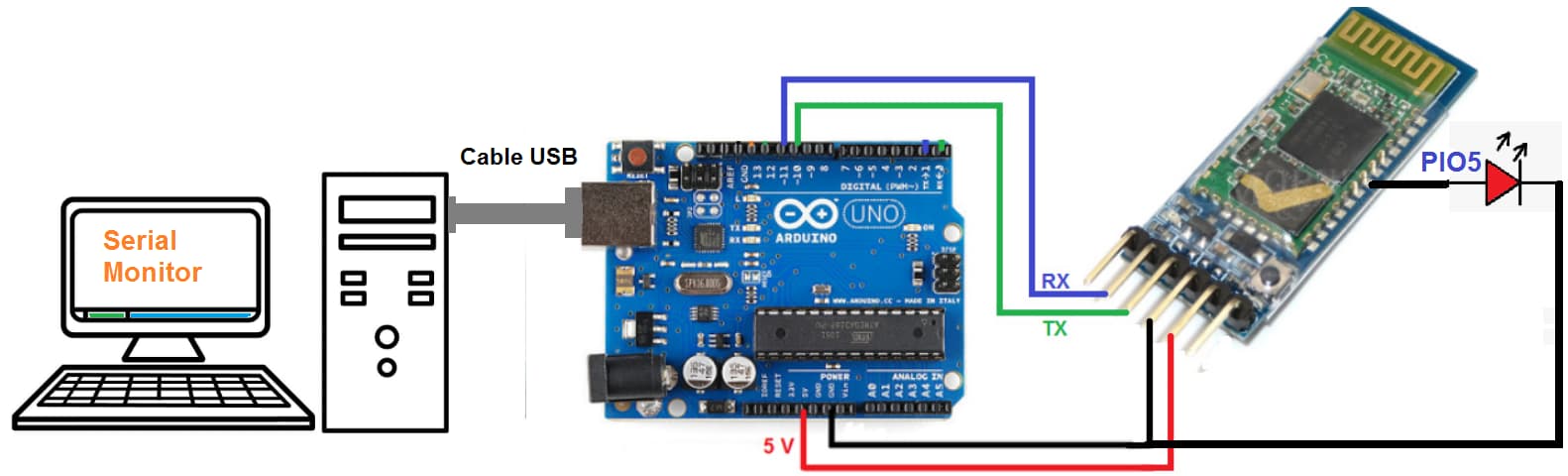
Turn on/off LED PIO5 from Serial Monitor.
#include <SoftwareSerial.h>
SoftwareSerial BT(10,11);

void setup()
{
  BT.begin(38400);
  Serial.begin(38400);
}

void loop(){
  if(BT.available()) {Serial.write(BT.read());}

  if(Serial.available()){BT.write(Serial.read());}
}
We must put the module in Mode 2:
To program in Mode 2, we remove the red wire (5 V) from the module's power supply. We press the small button on the module. We connect the red wire to 5 V by holding down the button. When the red wire is connected, we release the button.
The module's LED will blink slowly.
[In Mode 2 the module always receives the AT information at 38400]
- Serial Monitor. Both NL & CR. 38400 bauds.
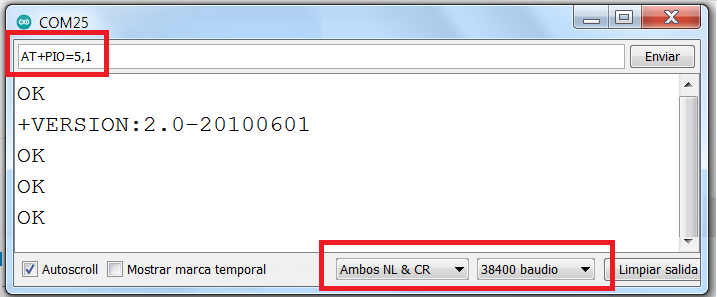
- We write the following codes, the LED (PIO5) will turn off and on.
AT
AT+VERSION
AT+PIO=5,1
AT+PIO=5,0