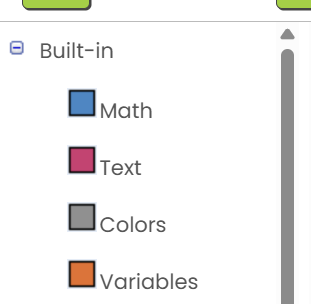
Hi there!
I have a problem with the webversion of MITappinventor where is can see only 4 options as you can see in the picture- if tried scrolling, taking down add blockers and switching from chrome to edge and the problem is still there!
Im always gratefull for help!
TIMAI2
March 30, 2026, 12:04pm
2
Blocks Toolkit
I do have it on default, and that doesnt change my problem. But thank you tho!
TIMAI2
March 30, 2026, 2:07pm
4
Did you refresh your browser, restart Appinventor and re-open your project after setting BlocksToolkit to default ?
Yes i and other students in my school are all having this problem-
ABG
March 30, 2026, 3:02pm
6
Some tutorials automatically restrict the Blocks Toolkit when opened.
Also, show us the URL for "the web version of MIT App Inventor".
Boban
March 30, 2026, 3:22pm
7
Try this, as it works for me 99,9% of the times.
Try switching the interface from Neo to Classic and see what happens.
[bild]
[bild]
Maybe in your case, switching the interface from Classic to Neo.
Hi! thank you for your help, but when i tried this id sadly did not fix the problem
Here’s the URL for the webversion im using: https://ai2a.appinventor.mit.edu/#2739853
But, if you open a brand new project (still empty) and you set “Properties” ,Toolkit” ,“Default” does it work or not ?
EDIT another hint is to clear tha cache of the browser: for example in Chrome Ctrl+Shift+Del and select “cache”
ABG
April 10, 2026, 1:51pm
11
Thank you so much!! via that link it does indeed work!
system
April 18, 2026, 1:14pm
13
This topic was automatically closed 7 days after the last reply. New replies are no longer allowed.