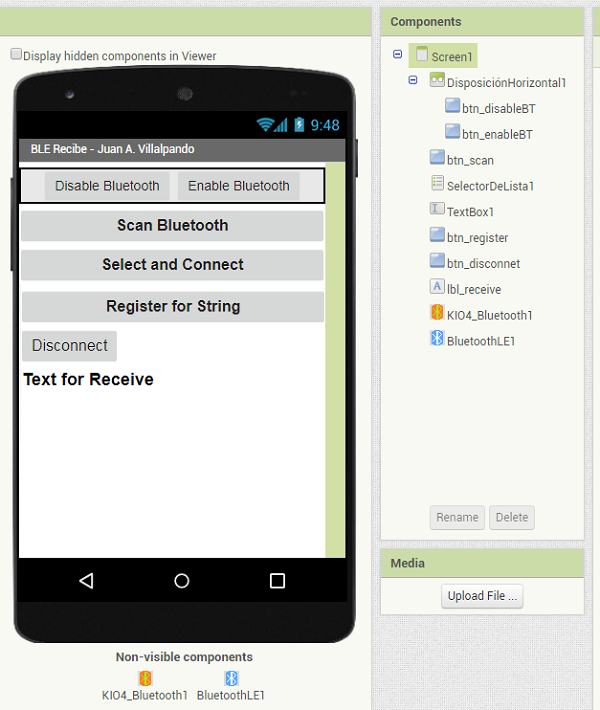
8.- PushButton in ESP2 sends HIGH/LOW to App Inventor. Notify.
p110_esp32_ble_notifica_Pulsador.aia (185.0 KB)
-
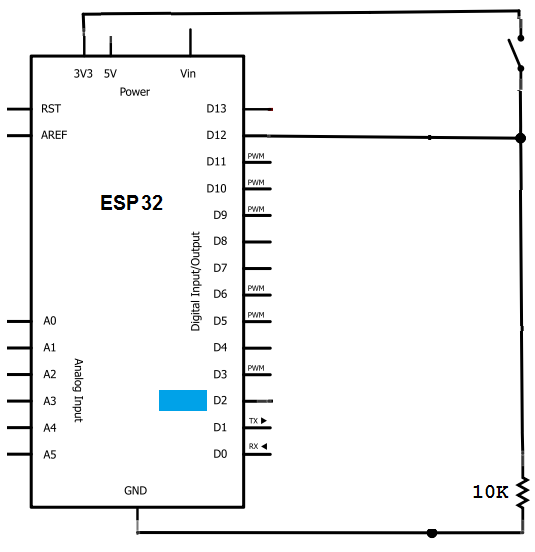
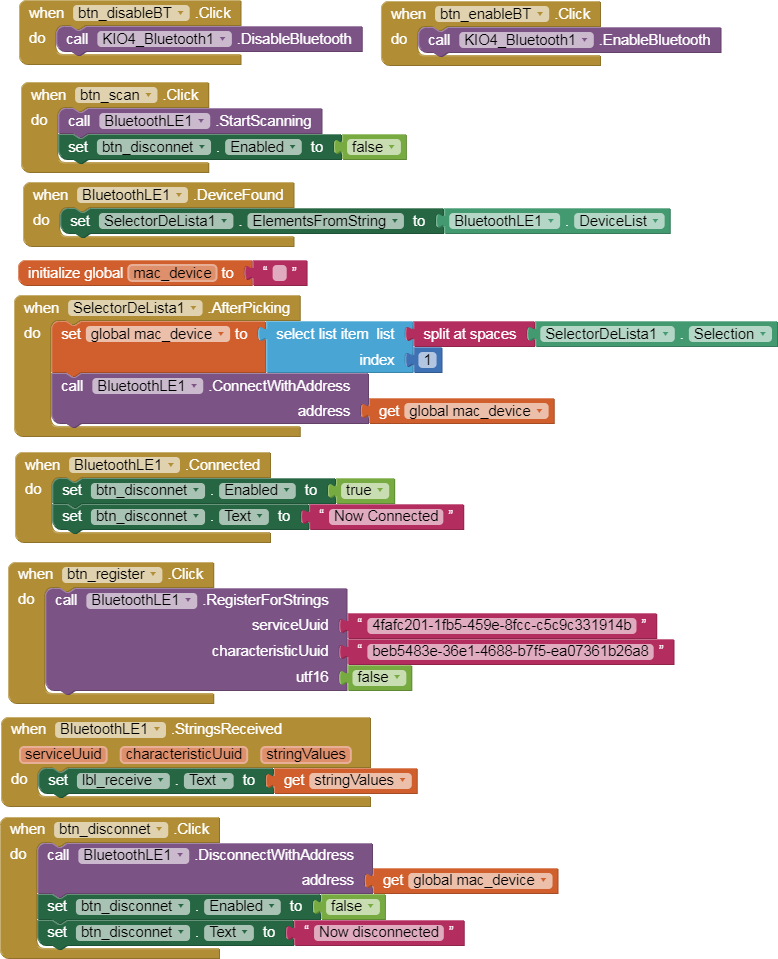
PushButton in pin12 of ESP32 sends "HIGH" or "LOW" to App Inventor by BLE Notify.
-
It also turns ON/OFF LED2 of the ESP32 (it is a LED_BUILTIN)
  /*    Based on Neil Kolban example for IDF:
     https://github.com/nkolban/esp32-snippets/blob/master/cpp_utils/tests/BLE%20Tests/SampleNotify.cpp
     Ported to Arduino ESP32 by Evandro Copercini updated by chegewara
     Create a BLE server that, once we receive a connection, will send periodic notifications.
     A connect hander associated with the server starts a background task that performs notification
     every couple of seconds. */

  // Modificado por Juan A. Villalpando
  // http://kio4.com/arduino/160i_Wemos_ESP32_BLE.htm

  #include <BLEDevice.h>
  #include <BLEServer.h>
  #include <BLEUtils.h>
  #include <BLE2902.h>
  #define pin12 12 //  pin12 PushButton
  #define pin2 2 //  pin2  LED2
  int valor12; // Status PushButton
  String output ="LOW"; // Output to App. Notify.

  BLEServer* pServer = NULL;
  BLECharacteristic* pCharacteristic = NULL;
  bool deviceConnected = false;
  bool oldDeviceConnected = false;
  uint32_t value = 0;

  #define SERVICE_UUID        "4fafc201-1fb5-459e-8fcc-c5c9c331914b"
  #define CHARACTERISTIC_UUID "beb5483e-36e1-4688-b7f5-ea07361b26a8"

  class MyServerCallbacks: public BLEServerCallbacks {
  void onConnect(BLEServer* pServer) {
    deviceConnected = true;
  };

  void onDisconnect(BLEServer* pServer) {
    deviceConnected = false;
  }
  };

  void setup() {
  pinMode(pin12, INPUT); // pin12 PushButton
  pinMode(pin2, OUTPUT); // pin2 LED2
  Serial.begin(115200);

    // Create the BLE Device
    BLEDevice::init("MyESP32");

    // Create the BLE Server
    pServer = BLEDevice::createServer();
    pServer->setCallbacks(new MyServerCallbacks());

    // Create the BLE Service
    BLEService *pService = pServer->createService(SERVICE_UUID);

    // Create a BLE Characteristic
    pCharacteristic = pService->createCharacteristic(
                    CHARACTERISTIC_UUID,
                    BLECharacteristic::PROPERTY_READ   |
                    BLECharacteristic::PROPERTY_WRITE  |
                    BLECharacteristic::PROPERTY_NOTIFY |
                    BLECharacteristic::PROPERTY_INDICATE
                  );

    // Create a BLE Descriptor
    pCharacteristic->addDescriptor(new BLE2902());

    // Start the service
    pService->start();

    // Start advertising
    BLEAdvertising *pAdvertising = BLEDevice::getAdvertising();
    pAdvertising->addServiceUUID(SERVICE_UUID);
    pAdvertising->setScanResponse(false);
    pAdvertising->setMinPreferred(0x0);  // set value to 0x00 to not advertise this parameter
    BLEDevice::startAdvertising();
    Serial.println("Waiting a client connection to notify...");
  }

  void loop() {
  // notify changed value
  if (deviceConnected) {
    pCharacteristic->setValue(output.c_str()); // Output
    pCharacteristic->notify();

  valor12 = digitalRead(pin12); // Read  pin12 --> valor12. ( 0 or 1)
  if (valor12 == HIGH) {
  digitalWrite(pin2, HIGH); // if valor12 is HIGH, set pin2 HIGH
  Serial.println("Pulsado");
  output ="HIGH"; // Notify HIGH
  }

  if (valor12 == LOW) {
  digitalWrite(pin2, LOW); // If valor12 is LOW, set pin2 LOW
  Serial.println("No Pulsado");
  output ="LOW"; // Notify LOW
  }
  delay(100); // bluetooth stack will go into congestion, if too many packets are sent.
  }
  // disconnecting
  if (!deviceConnected && oldDeviceConnected) {
      delay(500); // give the bluetooth stack the chance to get things ready
      pServer->startAdvertising(); // restart advertising
      Serial.println("start advertising");
      oldDeviceConnected = deviceConnected;
  }
  // connecting
  if (deviceConnected && !oldDeviceConnected) {
      // do stuff here on connecting
      oldDeviceConnected = deviceConnected;
  }
  }