when I try to open the backpack, only a square opens at the top left where all the components in the backpack are overlapped and it is not possible to use them
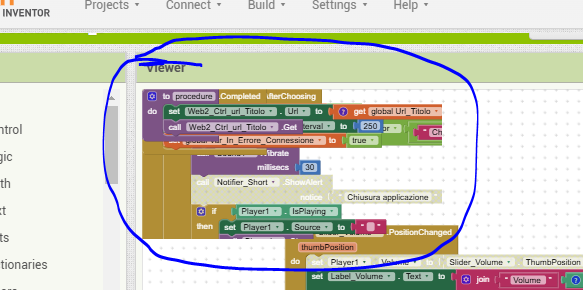
Empty the backpack, reload AI2, all should be well (although you will need to add blocks back to the backpack)
but why if i open a older project it work well and if i create a new project next this, doing "save as" it not work?

sorry my english...
I wanted to say that if I do a save using "save AS" and then create a new project with another name the problem also occurs on this project, while if I try to open a project from 2 months ago this problem does not occur, even though the blocks in the backpack are the same
I am not seeing any issue using "save as" to save a "new" existing project to a new name...
the issue is the backpack ... not the "saving"
I am not seeing a backpack issue with the above either.
I also had a problem with the backpack when I switched to the new interface. It would not do what I thought it should and my project got stuck until I switched back to the old interface. I am not taking my chances since.
Hello
App inventor dont work anymore one time again, the very useful backpack dont allow to take out blocks.
So i cannot work on my app, very disapointing.
regards
Try emptying the backpack and restarting AI2 in your browser ?
Taifun
1 Like
Hello
Thank you Taifun, unfortunatelly that doesnt work, i have erased cookies and cache, i have tried also with Chrome.
My PC use Windows 8.1, something could be wrong with that ?
Regards
So you're the one.
Did I mention the code server?
???
Taifun
Hello Taifun
Thanks, it seems to work properly.
And now what will appen ? version 220b will it be updated ?
Regards
yes, at the given time the App Inventor team will update the main server, don't worry...
Taifun
Hello,
I have the same problem with Backpack !
Trying to catch some blocks from a project done 2 month ago thru backpack does not work properly : I can put blocks in the backpack, but I am unable to get them back in the new project (see picture of Marco_M on Feb 2025).
Then when I come back to the current project after closing the older one, I have an empty screen (no blocks visibles in the editor), until I force to refresh Chrome.
Current version seen in the "About" box :
Built: December 31 2025 Version: nb203-ai2a
Use Companion: Use Companion: 2.77 or 2.77u
Hi, the only way I found to solve the problem was to empty the backpack... 
Hello Marco_M, I done it, but each time I place a block from another project in it, the problem appear again !