May be impossible answer this within seeing some code blocks, but worth a try describing problem in general terms and see if there are any obvious answers …
My app uses the Connectivity->Web component to interact with an ESP32 (programmed using Arduino IDE). The app issues GET requests to the ESP32 *(using the Get method) and waits for a GotText event to access the returned data. The response is very slow; I believe the GotText event is delayed, because the resulting actions (typically using responseContent to populate the text of various Labels) are very straightforward. Some I get “unable to get a response”.
The other peculiar thing is that when I go to another screen, the screen.initialize block issues several GET requests, to fetch data to populate the screen, and the responses don’t seem to seem to occur in the same sequence as the GET requests were issued (as evidenced by the order in which the Label texts are populated). It seems like this is because the GotText events somehow occur out of sequence.
I’m pretty sure that the ESP32 is not the problem, because (on my laptop) I have a Perlscript that can send similar GET requests and print the responses, and it is very quick.
Ok, thanks. That would deal with the sequence issue. Might it also address the slowness issue ? Actually, I’m pretty sure it wouldn’t, because one of my screens only issues one GET when initlializing, and it too is very slow (like 5 seconds or more, whereas issuing the same GET with the Perlscript yields a response in less than a second).
I don’t think the ESP32 is the issue, because I have a little Perlscipt (that runs in Terminal in MacOS) that issues the same GET requests, and the response is typically within one second.
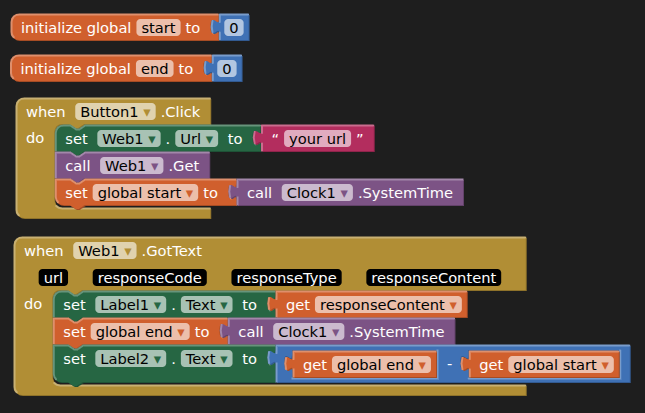
The little test yields numbers generally less than 1000 ms. I guess next step is to make that test a new screen in my app, and see if it’s still fast or not. Might not get to that tonight.
The app will complain if it can’t find item #24 in responseWords, and it’s not doing it.
Ok, this is interesting. I made the “little test” a new screen in my app (I don’t put an initialize block in the new screen, I just literally put the same thing as the little test). Sometimes when I click Button1 it takes several seconds, sometimes it takes less than one. It ALWAYS takes several seconds the first time I click it.
Even if I get rid of all the other screens (besides the “startup” screen) in my app, and just leave the screen with the little test, it’s still slow (when I click Button1).
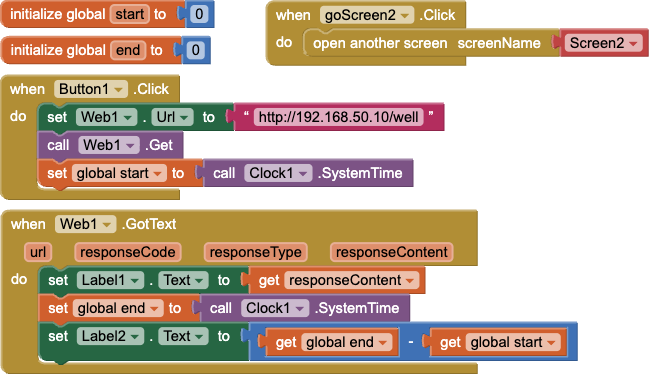
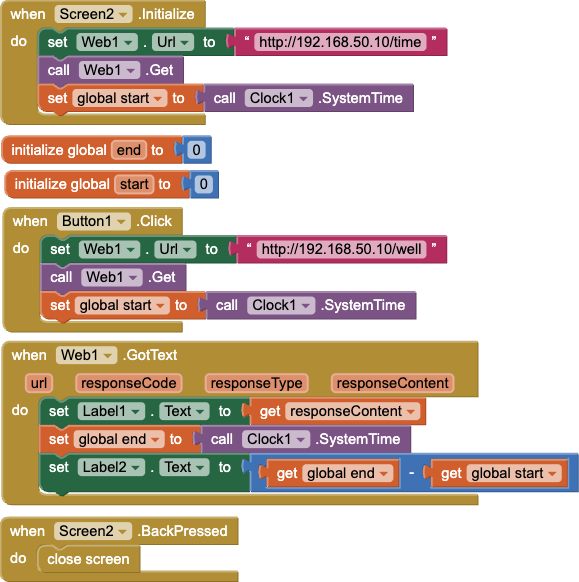
So I’ve tried to devise a test closer to what my app is doing. The startup screen is the little test suggested by @TIMAI2 above. Then another button goes to a 2nd screen which contains the exact same test. It also has an initialize block that makes a different GET request to the Arduino.
For all three GET requests, prompted by - the button in the startup screen, the initialization of the 2nd screen, and the button in the 2nd screen - the response time is less than 1 second.
So I’m at a loss. There’s some more subtle issue with my app that’s slowing things down.
FWIW, looking at my app more, it seems to be the GET requests that are called by the sub-screen initlialize block that get very slow responses; ones called by buttons within the sub-screen are reasonably fast.
Here are the blocks for the startup screen (for my latest test) …
I’m thinking it has something to do with GET requests getting stacked up in the startup screen, thus delaying the ones called in the initialize block of the sub-screen.
Is there an easier way to do this, than simply for each GotText block to “know” what the next GET request (in the sequence to initialize the screen) is, and issue it ?
I guess set a flag when issuing the GET and GotText clears it.
The "little test" response times should be reasonably consistent wherever you put them.
Not sure if the other things you are doing before and after you make a GET request are causing you timing problems?
Screen.initialise has quite a lot to do before it starts processing the blocks provided, probably not a fair test against a button click once the screen is up and running...