Hello, I hope you're doing well. Sorry if something is unclear; English is not my first language.
I need to create an app that uploads text (data) and an image to a Google Sheet. Honestly, I’m not sure whether the issue is with my blocks (although I doubt it, since with a script the image uploads correctly to Google Drive) or with the script itself, because neither the text nor the image is uploading to Google Sheets.
Please help me, it’s for a school project 
It can be useful to post blocks ( left mouse click + select " download blocks as image " ) and an image of the screen . Also , can you explain better the problem ? ( Do you get any notify of errors , for example ? )
-From GIE
This is my project. If you can check it and give me some feedback, I’d really appreciate it.
I followed the same block structure from the link "set the image into the cell", but it’s not uploading the image to Google Sheets neither drive.
app_image.aia (301.8 KB)
Can you confirm that your google apps script is correctly deployed?
On review of my guide, the QR code section will not work in the script, as google's QRCode maker is now deprecated and gone!

This needs to be a full cell reference, e.g. H2
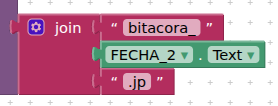
Should still work, but would be better if you use the correct file extension - .jpg
You should only need to uriEncode the base64 String, the other texts will be OK as they are.
Hi, thanks for your help. I made the changes you suggested:
- Fixed the file extension to
.jpgin the image name. - I'm only encoding (
UrlEncode) theimageData(base64), the other parameters are sent without encoding.
But the script still won't upload the image to Drive. No file appears in the folder. The script I'm using is this:
var FOLDER_ID = '19em-evusbRhLs-biAJEVZY6CWmT5EizM';

function doPost(e) {
  try {
    var fila = e.parameter.fila;
    var imageData = e.parameter.imageData;
    var imageName = e.parameter.imageName || 'imagen.jpg';

    if (!imageData) throw new Error("Falta imageData");

    var clean = imageData.split(',')[1] || imageData;
    clean = clean.replace(/\s/g, '');
    var bytes = Utilities.base64Decode(clean);
    var blob = Utilities.newBlob(bytes, 'image/jpeg', imageName);

    var folder = DriveApp.getFolderById(FOLDER_ID);
    var archivo = folder.createFile(blob);
    archivo.setSharing(DriveApp.Access.ANYONE_WITH_LINK, DriveApp.Permission.VIEW);

    return ContentService.createTextOutput(archivo.getId());
  } catch (error) {
    return ContentService.createTextOutput("ERROR: " + error.message);
  }
}
Your naming in the script is incorrect:
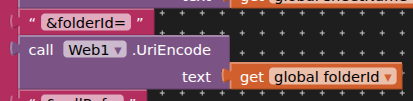
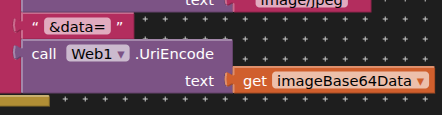
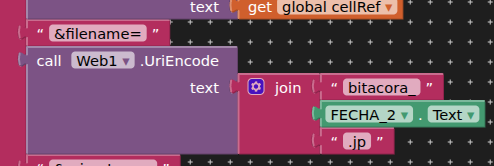
You also do not need to do any of this:
The base64 string is just that, not a datauri.
I already changed the script completely (following the “set image to cell” example), and now the image uploads to Drive, but it still doesn’t upload to the Sheet.
I’ve come to the conclusion that the problem might be that I don’t know how to structure the fieldId correctly in the blocks.
I believe you need to do as follows:
- Upload the image to google drive and return the file ID to your app
- Modify the upload data to google sheet script to include the set image to cell code
- Upload the data to the google sheet (including the image File ID, separately) and set the data and the image to the cell.
I will see if I can rework both scripts for you (and put it all together as one), but unfortunately I am unable to test this at present.
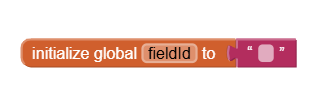
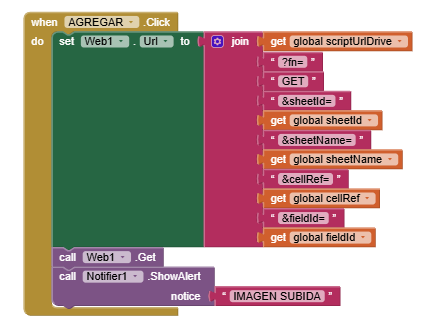
This is the part where the fieldId is supposed to be sent, but I’m not sure how to connect the “initialize global” block to get the fieldId from the image after it’s uploaded to Drive.
What data / texts do you want to set on the sheet with the image, and in what order do you want everything in a row? Please provide an example.

This is the order I want to use to send the data to the Sheet, and the last column is for the image.
I have the code that sends the data, but I’m missing the part of the script that actually writes the data into Google Sheets.
Thank you so much for helping me


You are still uriEncoding everything! 
I had already worked up an example with just three text elements:
Here is the script:
function doPost(e) {

   var contents  = JSON.parse(e.postData.contents.replace(/\n/g, ""));
   var fileName  = contents.filename;
   var folderId  = contents.folderId;
   var ss        = SpreadsheetApp.openById(contents.sheetId);
   var sh        = ss.getSheetByName(contents.sheetName);
   var text1     = contents.text1;
   var text2     = contents.text2;
   var text3     = contents.text3;
   var data      = Utilities.base64Decode(contents.file);
   var blob      = Utilities.newBlob(data, e.postData.type, fileName);
   var fileId    = DriveApp.getFolderById(folderId).createFile(blob).getId();

   sh.appendRow([text1,text2,text3]);
   var lr = sh.getLastRow();
   var image = SpreadsheetApp.newCellImage().setSourceUrl('https://drive.google.com/uc?id=' + imageId).setAltTextDescription('[' + fileId + ']').toBuilder().build();
   sh.getRange("D" + lr).setValue(image);

   return ContentService.createTextOutput('Image and data set to spreadsheet');

}
and the blocks:
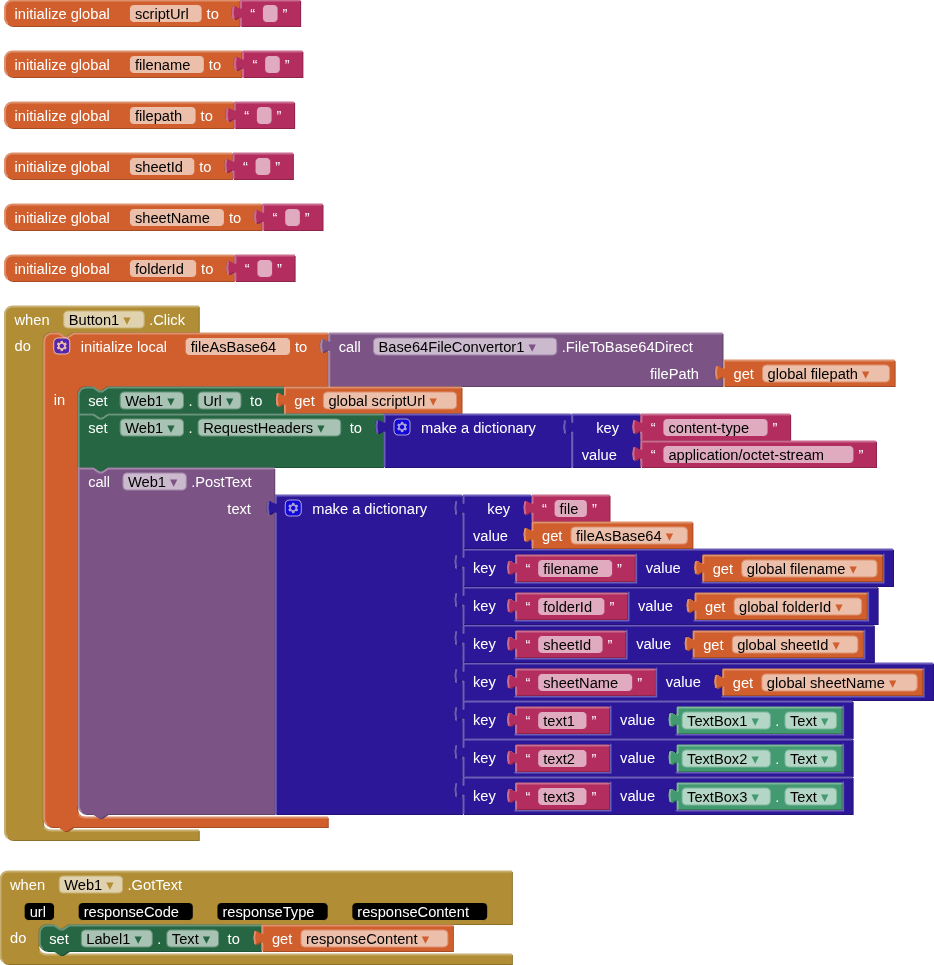
You should be able to edit both the script and the blocks to accommodate your data
As I said i have not been able to test this.
Sorry to bother you again. I followed what you told me, but it still didn’t work
The app still uploads the image to Drive, but it doesn’t upload the image to Google Sheets.
Does it append the textbox values to a row in the spreadsheet ?
[EDIT] - spotted an omission in my script:
var ss = contents.sheetId;
should be:
var ss = SpreadsheetApp.openById(contents.sheetId);
(will update now!)