I made a browser with AI integrated and connected it with the TaifunScreenshot extension. But the AI doesnt recognize the screenshot. i replaced "file://" with nothing and even used base64 encoder but it still doesnt work. the tts and ai works but the ai wont see the screenshot. the screenshot doesnt even save eventhough when i used notifier for a test it gave me a filepath. can someone help me?
browser2.aia (71.9 KB)
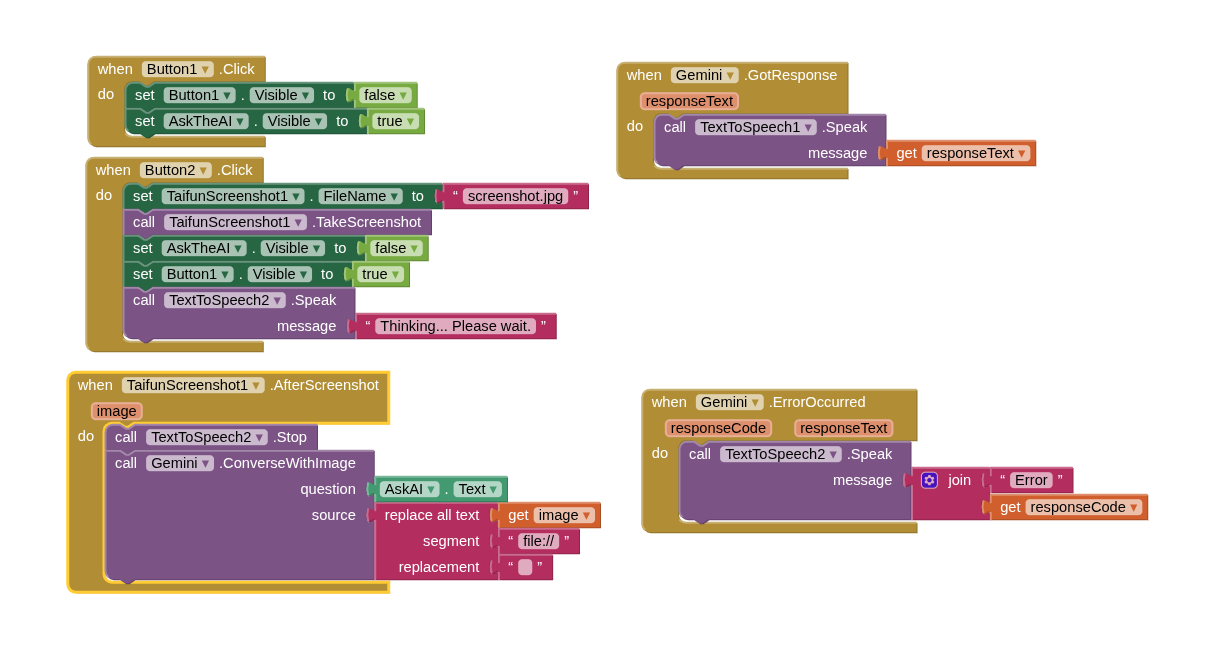
If you are asking for help, I recommend you to make it as easy for others to be able to help you ...
You probably will get more feedback then...
which means in your case post a screenshot of your relevant blocks...
To download the aia file, upload it to App Inventor, open it, do some bug hunting for you, etc... this takes time, and most people will not do that...
Thank you.
Taifun
Trying to push the limits! Snippets, Tutorials and Extensions from Pura Vida Apps by  Taifun.
See also Q1 here App Inventor Extensions: Take Screenshot | Pura Vida Apps
Q1 : I am unable to get the screenshot of a web page. When I open it with web viewer, it shows perfectly but when I use the screenshot extension to share the screenshot of that, the chart area is removed automatically. Please let me know about any other ways or extensions which i could you for this.
A : Try the Component to Image Screenshot Extension by Jerin Jacob, which also can take screenshots of a webviewer page.
Taifun