I'd like to use the "when BluetoothLE1.recievedBytes" block, but I'm not getting anything from the "stringsValue" block. In fact, it seems like the "when BluetoothLE1.recievedBytes" isn't even triggering at all.
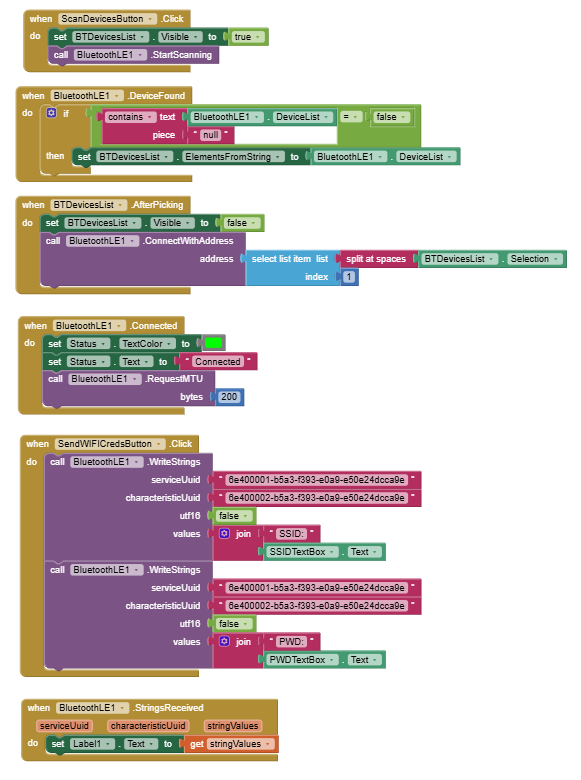
After connecting, you have to register for strings to set up for getting strings received events.
Dear @MasterfulMatthew,
what @ABG has already said is all that you need, but in case you want an example remember the link I've posted to a previous question of yours.
In that example I send and receive strings.
I had a look at your code, so here's my newest version:
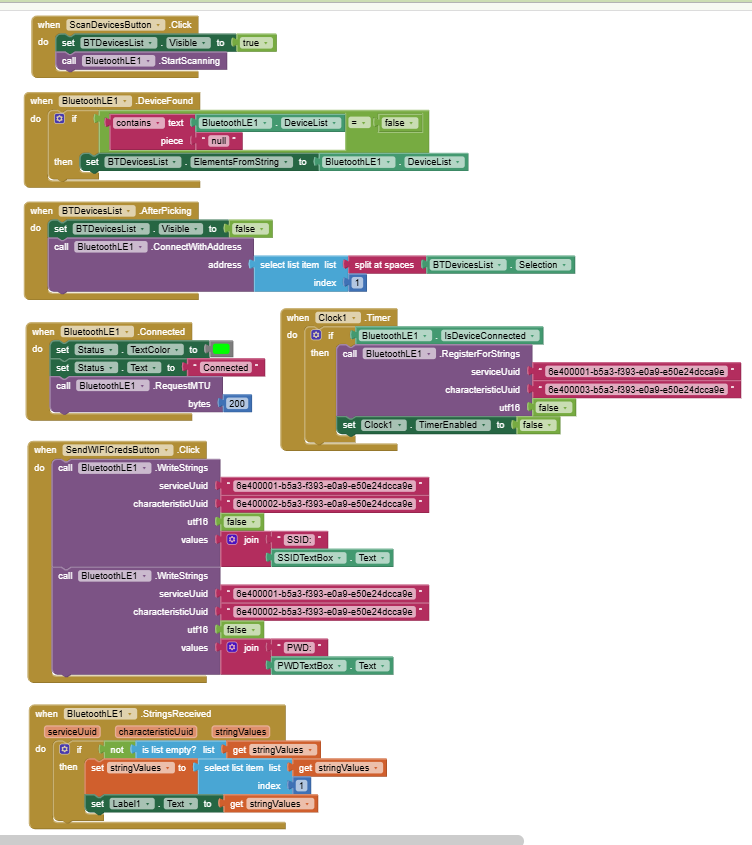
After connecting to my BLE device from my phone, I get this large error:
java.lang.NullPointerException: Attempt to invoke virtual method 'java.util.UUID android.bluetooth.BluetoothGattCharacteristic.getUuid()' on a null object reference at edu.mit.appinventor.ble.BluetoothLEint$BLEOperation.registerPendingOperation(BluetoothLEint.java:245) at edu.mit.appinventor.ble.BluetoothLEint$BLEReadOperation.subscribe(BluetoothLEint.java:344) at edu.mit.appinventor.ble.BluetoothLEint$BLEReadOperation.run(BluetoothLEint.java:313) at android.os.Handler.handleCallback(Handler.java:938) at android.os.Handler.dispatchMessage(Handler.java:99) at android.os.Looper.loop(Looper.java:257) at android.app.ActivityThread.main(ActivityThread.java:8192) at java.lang.reflect.Method.invoke(Native Method) at com.android.internal.os.RuntimeInit$MethodAndArgsCaller.run(RuntimeInit.java:626) at com.android.internal.os.ZygoteInit.main(ZygoteInit.java:1015)
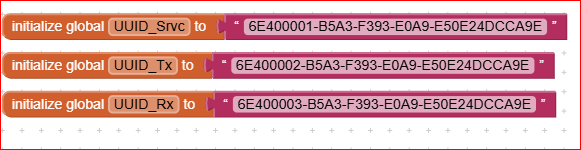
Honestly I don't know the cause of the error. Anyway I suggest a more condensed transmission, like:
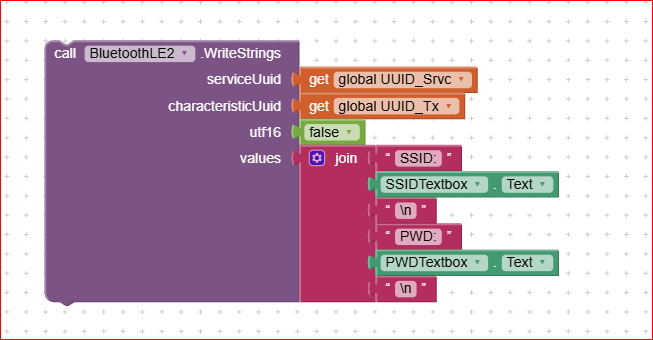
Uh... that part of the code isn't even the problem. I'm having trouble receiving strings, the WriteStrings has always worked fine, specifically the problem is caused by the RegisterForStrings block, but I don't know what I'm doing wrong.
Yep, I agree:, my suggestion was only for "readability" of the Tx code.
Anyway another, yet trivial, hint is: are the UUID's the same between AI2 app and the .ino code ?
I don't remember whether you've already told which Arduino board are you using, so to be sure that there aren't some ghosts inside...(i.e. allowed/not allowed services ?).
In the BLE examples of the Arduino IDE there is one called "UART mode" . You can try also in that mode, if nothing else works.... 
If the veterans can't help me then I'm cooked!
You think I could've swapped the RX and TX UUID's? Seems unlikely, I double checked, can't always be sure though haha. It's a bit of a bad habit of mine to always be trying to do things there aren't existing guides for!
...veterans....

what about removing this :
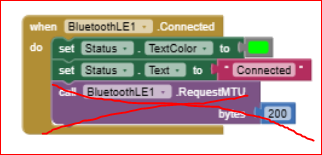
?
If you use the Serial BT Terminal everything works ?
Would you mind to post your .ino file ?
... trying to do things there aren't existing guides for!... this is called : "progress"...
1 Like
Well first off, here's the .ino code in all it's glory:
#include <WiFi.h>
#include <esp_now.h>
#include <WebServer.h>
#include <ESPmDNS.h>
#include "BLEDevice.h"
#include <BLE2902.h>

// ======================================================
//                    GLOBAL STATE
// ======================================================
String bleSSID = "";
String blePassword = "";
bool wifiConnected = false;

// ======================================================
//                RELAY + HTTP Definitions
// ======================================================
#define RELAY_PIN 4
WebServer server(80);

// ======================================================
//                  BLE UUID Definitions
// ======================================================
#define SERVICE_UUID  "6e400001-b5a3-f393-e0a9-e50e24dcca9e"
#define RX_UUID       "6e400002-b5a3-f393-e0a9-e50e24dcca9e"
#define TX_UUID       "6e400003-b5a3-f393-e0a9-e50e24dcca9e"

BLEServer *bleServer;
BLECharacteristic *rxChar;
BLECharacteristic *txChar;

// ======================================================
//                    HTTP SERVER
// ======================================================
void startHTTP() {
  server.on("/", []() {
    server.send(200, "text/html",
      "<h2>ESP32 Smart Plug</h2>"
      "<p><a href=\"/on\">ON</a></p>"
      "<p><a href=\"/off\">OFF</a></p>"
    );
  });

  server.on("/on", []() {
    digitalWrite(RELAY_PIN, HIGH);
    server.send(200, "text/plain", "Relay ON");
  });

  server.on("/off", []() {
    digitalWrite(RELAY_PIN, LOW);
    server.send(200, "text/plain", "Relay OFF");
  });

  server.begin();
  Serial.println("HTTP server started");

  if (MDNS.begin("smartplug1")) {
    Serial.println("mDNS active: http://smartplug1.local/");
  } else {
    Serial.println("mDNS failed");
  }
}

// ======================================================
//                BLE IP NOTIFY
// ======================================================
void notifyIP() {
  if (!txChar || WiFi.status() != WL_CONNECTED) return;

  String ip = WiFi.localIP().toString();
  Serial.print("BLE notify IP: ");
  Serial.println(ip);

  txChar->setValue(ip.c_str());
  txChar->notify();
}

// ======================================================
//                WIFI CONNECT HELPER
// ======================================================
void connectWiFi(const String& ssid, const String& pwd) {
  Serial.println("Connecting WiFi...");
  Serial.print("SSID: "); Serial.println(ssid);

  WiFi.mode(WIFI_STA);
  WiFi.begin(ssid.c_str(), pwd.c_str());

  unsigned long start = millis();
  while (WiFi.status() != WL_CONNECTED && millis() - start < 10000) {
    delay(300);
    Serial.print(".");
  }

  if (WiFi.status() == WL_CONNECTED) {
    Serial.println("\nWiFi connected");
    Serial.println(WiFi.localIP());
    wifiConnected = true;
    startHTTP();
    notifyIP();
  } else {
    Serial.println("\nWiFi failed");
    wifiConnected = false;
  }
}

// ======================================================
//                ESP-NOW CALLBACK
// ======================================================
void OnDataRecv(const esp_now_recv_info_t*, const uint8_t *data, int len) {
  if (len != 1) return;
  digitalWrite(RELAY_PIN, data[0] ? HIGH : LOW);
}

// ======================================================
//              BLE RX CALLBACK
// ======================================================
class RXCallback : public BLECharacteristicCallbacks {
  void onWrite(BLECharacteristic *c) override {
    String msg = c->getValue().c_str();
    msg.trim();

    Serial.print("BLE RX: ");
    Serial.println(msg);

    if (msg.startsWith("SSID:")) {
      bleSSID = msg.substring(5);
    }
    else if (msg.startsWith("PWD:")) {
      blePassword = msg.substring(4);
    }
    else {
      Serial.println("Unknown BLE command");
      return;
    }

    if (bleSSID.length() && blePassword.length()) {
      connectWiFi(bleSSID, blePassword);
      bleSSID = "";
      blePassword = "";
    }
  }
};

// ======================================================
//                BLE SERVER CALLBACKS
// ======================================================
class ServerCallbacks : public BLEServerCallbacks {
  void onConnect(BLEServer*) override {
    Serial.println("BLE client connected");
    if (WiFi.status() == WL_CONNECTED) {
      delay(300);
      notifyIP();
    }
  }

  void onDisconnect(BLEServer* s) override {
    delay(200);
    s->getAdvertising()->start();
    Serial.println("BLE advertising restarted");
  }
};

// ======================================================
//                        SETUP
// ======================================================
void setup() {
  Serial.begin(115200);
  delay(200);

  pinMode(RELAY_PIN, OUTPUT);
  digitalWrite(RELAY_PIN, LOW);

  // ---------- Auto WiFi ----------
  WiFi.mode(WIFI_STA);
  WiFi.begin();

  Serial.print("Connecting saved WiFi");
  unsigned long start = millis();
  while (WiFi.status() != WL_CONNECTED && millis() - start < 6000) {
    delay(300);
    Serial.print(".");
  }

  if (WiFi.status() == WL_CONNECTED) {
    Serial.println("\nWiFi restored from flash");
    Serial.println(WiFi.localIP());
    wifiConnected = true;
    startHTTP();
  } else {
    Serial.println("\nNo saved WiFi");
  }

  // ---------- BLE Init ----------
  BLEDevice::deinit(true);
  delay(200);
  BLEDevice::init("SmartPlug1");

  bleServer = BLEDevice::createServer();
  bleServer->setCallbacks(new ServerCallbacks());

  BLEService *service = bleServer->createService(SERVICE_UUID);

  rxChar = service->createCharacteristic(
    RX_UUID,
    BLECharacteristic::PROPERTY_WRITE
  );
  rxChar->setCallbacks(new RXCallback());

  txChar = service->createCharacteristic(
    TX_UUID,
    BLECharacteristic::PROPERTY_NOTIFY
  );
  txChar->addDescriptor(new BLE2902()); // REQUIRED for Android

  service->start();

  BLEAdvertising *adv = bleServer->getAdvertising();
  adv->addServiceUUID(SERVICE_UUID);
  adv->setScanResponse(true);
  adv->start();

  Serial.println("BLE provisioning ready");

  // ---------- ESP-NOW ----------
  if (esp_now_init() != ESP_OK) {
    Serial.println("ESP-NOW init failed");
    while (true) delay(100);
  }
  esp_now_register_recv_cb(OnDataRecv);
}

// ======================================================
//                        LOOP
// ======================================================
void loop() {
  server.handleClient();
}
I'll try your suggestion of removing the requestBytes block soon too. I haven't tried it with BT serial app yet, great suggestion.
Dear @MasterfulMatthew, i see that your .ino starts in a "complicated way". In other words, before mixing WiFi and BLE at the first attempt, please try with a much simpler ino code: with just BLE. For example try with one of the two annexed here below:
Esp32_BLE_Android.ino (20.8 KB)
BLE_uart.ino (4.2 KB)
Best wishes.
Hello Uskiara, just wanted to let you know I'll continue working on this issue probably tomorrow, I just did I few things lately, will be back soon.
I just tried with BTserial app, says no predefined BLE profile, but when I try setting a custom one it says "no services discovered that provide read & write characteristic", so it's not working.
Tried removing requestBytes, no luck.
I tried your Esp32_BLE_Android.ino code (400 lines of code and you call mine complicated?? hahaha ) but I can't get it to compile, tried fixing the errors but I don't know much about some sections. Also can't get BLE_uart.ino to compile.
Dear @MasterfulMatthew,
honestly I didn't know that my code was about 400 lines 
Anyway, I remember that I've stopped to update my Arduino IDE at level 2.3.4 because more updated versions, with more updated versions of the ESP32core libraries were not compatible each others...  and I wasn't capable to compile.
My IDE current settings are:
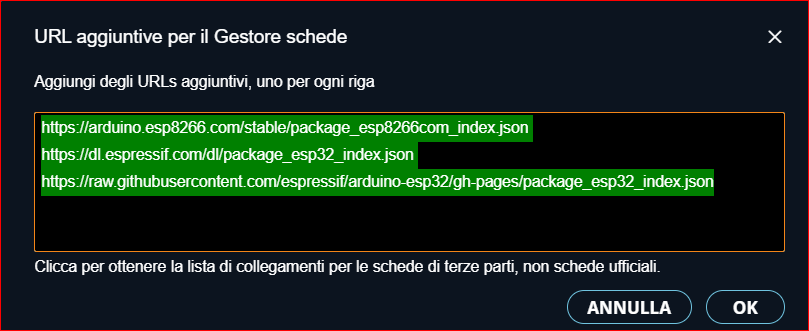
But before running the risk of wasting your time in trying to solve the Arduino compiler problems, may I suggest you to re-focus your attention to the app, instead ?
To this purpose, have you already tried to give a sight to the FAQ managed by @ABG ?
If we are lucky, probably you can find a suggestion therein.
Cheers !
I made this, in first .zip file you found all
bye
1 Like
Dear @gabriele_ponte, I've read your post on the Arduino forum: you are really a Master in Arduino.
Super complimenti e moltissimi auguri di Buon Natale ed un felice Anno Nuovo !!!
Ciao, Ugo.