It is powered by the USB port on my pc, I can't tell how much is it. sorry
EDIT: nothing shows up... it says connected, but no data 
It is powered by the USB port on my pc, I can't tell how much is it. sorry
EDIT: nothing shows up... it says connected, but no data
OK. This may not be 'it' but it is worth trying.
It's possible that there isn't enough power for the UNO. I found this with mine when powered from a PC USB. In fact, on any PC, not all USB ports have enough power to charge your fitness watch for example.
If you don't have a multi-meter to check, do you have an AC to DC Power Adaptor? 9v to 12V max DC output, at least 300mA to 1A max current output. It could have a 2.1mm diameter plug which is centre pin positive, or USB. Another alternative would be a battery pack.
can't I use a powerbank 5V 1A DC? I don't have such power adaptor, all power adaptor I have are 5V 1A DC.
what about this way? What should I do? I can always give a try
You can try your powerbank. The Amperage is OK but the voltage is low. Probably outperforms your PC USB though. 
If you have a battery pack that can output between 9v & 12v with 300mA to 1A, that would be better.
It turns on... but no data.
How should I connect the battery pack to arduino?
Depends on the cable of the pack, 2.1 connector or USB.
.... but I have spotted an omission from the Sketch! Give me a couple of minutes.
Chris. I will never be able to thank you for this help. If it won't work, I'll find another way.
For now, I'll try the battery pack way, it is more efficient than the adaptor for what are my needs.
Do I need some kind of shield? or the onboard fuse is enough?
It's important that the Power Source is simply within the Volt/Amp spec, then there is nothing to worry about.
....... You will need a good power supply, but right now the PC USB power could be enough - the Sketch had a fault (my bad again) so I'm hoping for better results with the fixed version I just uploaded.
Dear @ChrisWard,
I'm almost sure that the HC05 is still set into its default baudrate, which is typically 38400 bps.
But are we sure that it has been paired correctly ?
There are some HC05 clones that are very unfriendly 
I have collected in the past some hints that I've found on the web when I was getting crazy in trying to make them working.
The annexed pdf contains that collection.
@Noobie
please take a look on it, mainly the last two pages.
So before trying to code the AI2 app, verify whether your BT is really sending data to your phone.
Load on the phone a serial BT monitor app (Serial Bluetooth Terminal is a pretty good one) and try to pair the HC05. Once paired you should see the red LED of the shield to stay steady or to blink slowly (it depends upon the shield firmware version  ): until you don't get this step, you will never know if it is the app, the skecth or the HW that isn't working.
HC06 Connection_3_3VDC.pdf (714.6 KB)
Also don't care if my notes are relevant to the HC06, the same applies to the HC05 "clones".
Never give up!!!
Hard to find a definitive rate. 38400 is generally for AT mode. The two most popular that I found were 9600 and 19200. App Inventor Apps have reliability issues with very high rates.
The address list produced by MIT's BT Client only includes paired devices. Noobie's device does get listed and connection is confirmed by the App. The confirmation is reliable with Android 4.0.4 and up. Samsung Galaxy A52 is Android 11 or 12. There might be a Google Security issue.
Edit: So in this case, we know the devices are paired.
Agree with above. Both 9600 and 38400 are mentioned in my documentation. (38400 for AT mode if you need to change HC05 parameters)
I would begin to test the hw HC05 by simply connecting rx and tx. Then use the bt terminal, pair the phone with HC05. Now check that what you type will be sent back (echo).
Then make a simple Arduino sketch to read a char and then write it back to the HC05, to check software serial, connection to the Arduino and baudrate.
When this is ok, write a simple app in AI to send a char and read it back. When all this works, then you can start to test your real application, step by step.
Hi @ChrisWard ,
definitely agreed, if the phone has the HC05 paired, this means that the phone is linked to the HC05, but this does not mean that the Arduino is effectively sending data to the shield.
As far as : App Inventor Apps have reliability issues with very high rates", is concerned, honestly I had different experiences: for example in my OBDII app, I exchange data @115200 from my Arduino Mega to the HC05. The AI2 app that receives the data from BT has no problem at all. I don't miss any character. And I update the data shown by the app every 250 milliseconds. I need such updating speed to avoid flickering. in addition, in my understanding the BT speed is much faster (typically transfer rate is roughly 0.25 MB/second).
Anyway, when I have troubles in finding the correct baudrate between Arduino and shield, I use this chunk of Arduino code:
#include <avr/io.h>
#include <SoftwareSerial.h>
SoftwareSerial mySerial(10, 11); // RX, TX
String command = ""; // Stores response of the HC-06 Bluetooth device
long baud = 115200;
void setup()
{
// Open serial communications:
Serial.begin(115200); // to PC monitor
Serial.println("Checking communication to HC-06");
mySerial.begin(baud);
mySerial.write("AT\r\n");
delay(800);
if(mySerial.available())
{
while(mySerial.available())
{ // While there is more to be read, keep reading.
command += (char)mySerial.read();
}
}
Serial.print("Received: ");
Serial.println(command);
mySerial.write("AT+UART?\r\n");
delay(800);
if(mySerial.available())
{
while(mySerial.available())
{ // While there is more to be read, keep reading.
command += (char)mySerial.read();
}
}
Serial.print("Received: ");
Serial.println(command);
delay(800);
}
void loop()
{
// nothing to do
}
If it does not work, I reduce the baudrate to 57600, then 38400, then 19200, then 9600, until it works.
@Noobie where are you ?
Hi @rkl099,
I'm absolutely with you: before trying anything else we must be sure that a "simple" communication works between Arduino and the phone. To this purpose I suggested to use a Serial BT monitor App. Let's see what happens ... 
That's very handy code Uskiara, which we can put to good use in this case.
The reliability issues may well be influenced by other factors too - since we never have the exact setup in our hands when helping we are very reliant on people's diligence.
...and that's where Noobie comes in. Not currently a confident programmer and has unintentionally got little things wrong even under careful guidance. Has been a very willing learner though and that's why I put together a packaged solution for Noobie to test with. However, my hardware is in mothballs (building work in the house) so I could not test the Arduino side. The Sketch I wrote compiled but it had an error.
So I don't want Noobie to try anything else until the corrected Sketch is tested, as that is the easiest task for him/her. If it fails, then I would like Noobie to use your code to establish the correct baud rate for the HC-05.
What we don't know - is the hardware setup 100% correctly.
Hi @ChrisWard,
Yep, the HW/SW integration can be done as a Big-Bang or as a step-by.step.
The latter being the best approach (for me) to avoid big burnt of pcb's (and headaches). 
Keep in touch,
Ugo.
So, the app still doesn't work.
The bluetooth module will blink slowly after it is paired in the app, but no data, few more days and I will be examinated, so...
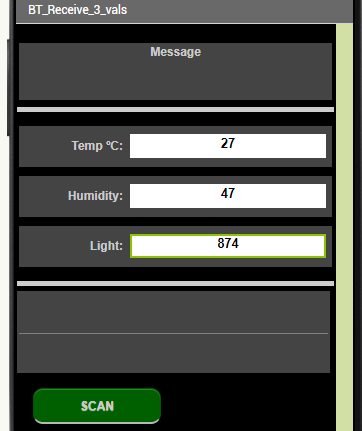
New way: I'd like to print random number in the Data section, like the photo below (that change from 27 to 28 or 26, 47 to 45 or 49, 874 to 852 or 896 or something else), that would change every 6 seconds. The objective now is to give to the examinator an app that shows numbers, even if these numbers are not true. Wouldn't be worse to give an app (like mine) that doesn't show numbers instead of some kind of running app?
P.S. Thanks to everybody looking for giving me an hand in this absurd project. I'll never be an app developer but at least i'll pass this last, final, only, single exam I have.
Dear @Noobie,
I'm really sad that you cannot get the result, but you cannot ask us to help you in making a fake app.
Please also consider that if your examinator is just 0,001 smart and asks you to switch off the Arduino and your app still shows changing numbers, you will be "fired"  with shame.
I believe you don't want that.
But if your examinator can see that you have written a good code for both the Arduino board and the phone I guess he will consider your job anyway successfully (probably the HC05 is broken, or it is set in Master Mode, instead of Slave), therefore it is not working irrespective of all your efforts.
I don't know if Chris has different ideas. One last trial that we can do is : can you please let us have some photos of your HW ? So to see what is the type of HC05 you have (the part number must be visible in the photo) And how the connections are made (pins, resistors, power supply, etc).
There are still so many unknown things, like: are we sure that pins 10 & 11 are good and not broken ? Have you tried perhaps to use pins 2 & 3 ?
Is the HW of yours or is it from the school lab's ?
You see how it's difficult to get rid of this uncertainty.
I'm really sorry.
May I clarify what I mean. From the thread it seems that you don’t know if your problem is the AI2 app, your phone, Bt module HC05, hardware setup, Arduino or your sketch. It can also be multiple problems. That makes it still harder to solve. That is why I suggested a step by step method to verify parts using the old method, divide in parts, verify one part and use that part to verify next part.
Step 1 lets you verify phone, Bt module including serial interface using a wellknown and working tool, Bt terminal. Note it’s independent of module baudrate since rx and tx baudrate are always the same.
Step 2 (when step 1 is ok) lets you verify the Arduino and Bt setup. You can simply change the baudrate in your sketch to match the Bt module.
Step 3 (when step 1 and 2 are ok) lets you verify that the setup in your AI2 app is ok.
When all this is working as expected, then you can add your real app functions to a setup that you know is ok. Remember: the complexity that you can handle is a function of your experience and your skill. If you are new to programming, take small steps.