Honestly, I don't know how to do that.
I'm back trying to help . TinyDB or CloudDB have many tutorials and many asked those questions in community ( I m typing on dmartphone so there can be type errors but I think you'll know what I meant ) So , check the tutorials and then come back . Another method will be using variables on device ( no cloud ) , and saving it like itself on beginning . I tried on another app , but it worked for small time ...
One great tutorial is making one chat app using cloud db : your app is a word game , but the important is learning how to use those instruments
P.S. I don't wait replies but I hope helped you because it's not simple to help somewone with this clever difficult questions
Of course, I watched tutorial videos. However, I couldn't find a video that was similar to the process I wanted to follow. Almost all the videos were about saving and deleting users.
Try with variables like I said . Hope it helps also because I cannot type much more . I'll answer hours later minimum
Now I am momentanly avaliable . U tought about :
Set [Variable] at - [Variable] value for the first value on the app starting . It works sometimes , but can fail if the app is really closen in tabs section ( not "minimized" ) and if passes many time . Hope it helps !
P.S. :
We'll like if when some solution helps you mark it like answer and close this conversation
But if this doesn't work , ask !
( Don't think I'll allways reply because I'm rarely avaible )
I didn't really understand what you said.
I'll explain better when I will type on PC and not on phone . Sorry
It would really help if you provided a screenshot of your relevant blocks, so we can see what you are trying to do, and where the problem may be.
To get an image of your blocks, right click in the Blocks Editor and select "Download Blocks as Image". You might want to use an image editor to crop etc. if required. Then post it here in the community.
And
Taifun
Trying to push the limits! Snippets, Tutorials and Extensions from Pura Vida Apps by  Taifun.
No , sorry ... my error . In one of mine projects I put
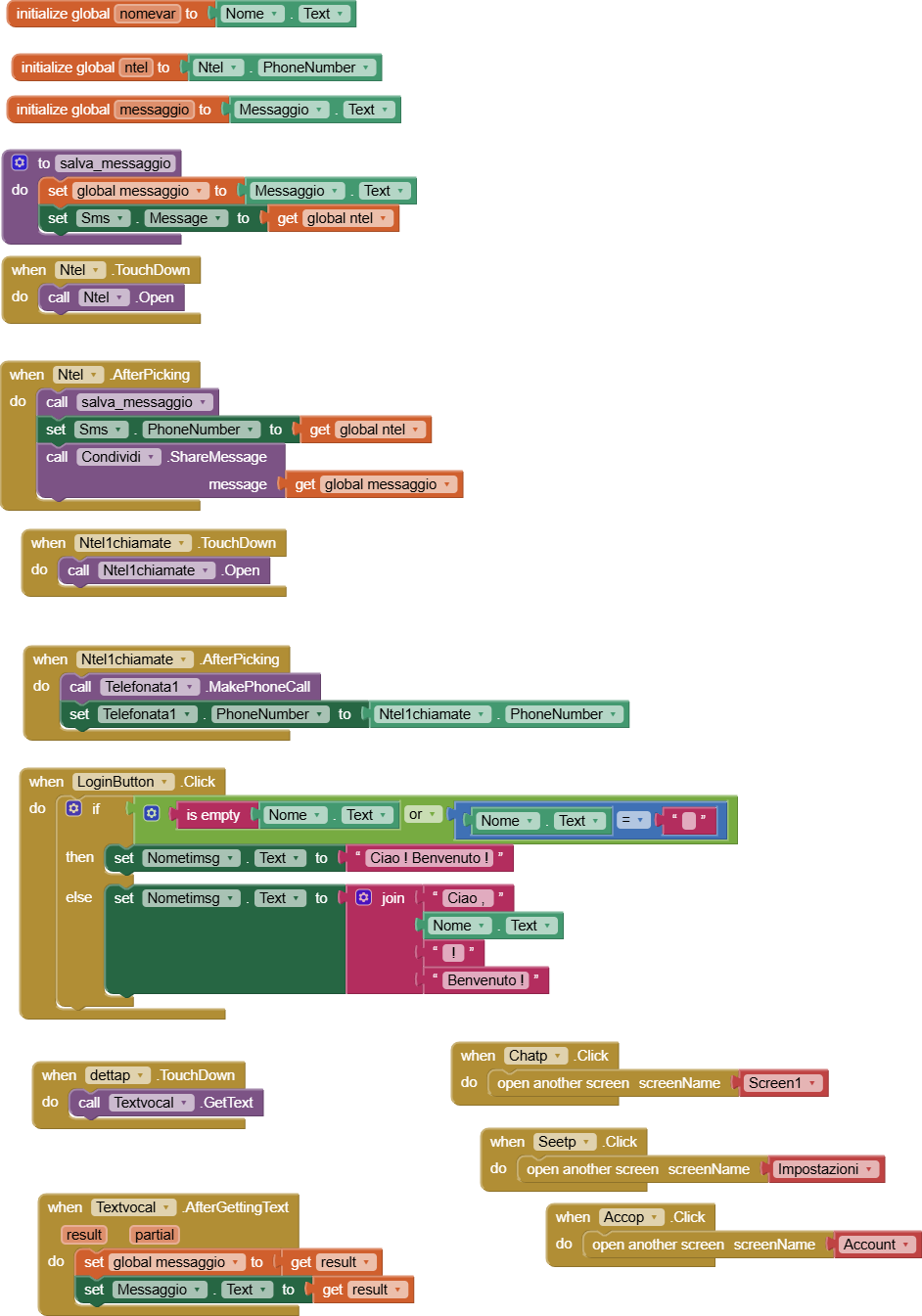
And variables were saved . I don't know if is possible with normal ones ...
There are many ways to save variables : TinyDB , CloudDB , FirebaseDB ...
If you want to be 100% indipendent , you can use your cloud with firebaseDB ( if you want I'll give you an example ) , while TinyDB and CloudDB are of AppInventor , so if and when AppInventor will close , the data saved will be canceled . Even if I think Appinventor will not close because more and more people use it . But is your game a crossword puzzle ? If you publish the blocks image ( left click on mouse and then "save block as image " , and make sure you have not selected blocks ) . Or if you publish the .AIA project somewone of us will help you adding those things .
Ok now taifun typed it too ( for the blocks )
Ok , so , but personally if you upload the AIA I can add those features . Tell me if you want clouddb , tinydb or firebase . ( On firebase there's also an appinventor's one , so I'll use that , and you will change it )
Reply when you'll read this please so I'll know you saw this
It would be very good adding a "read sign" to the community
And for the other thing , I'll tell you later
You see "Mark this as reply" on evry comment , no ?
You can mark the message helped you
I can make a tutorial to @Gurkan how to put a cloud to variables , but it would be better if he provides to us a schreenshot about blocks or the .AIA
Would be better to make a simple tinydb guide.
For example:
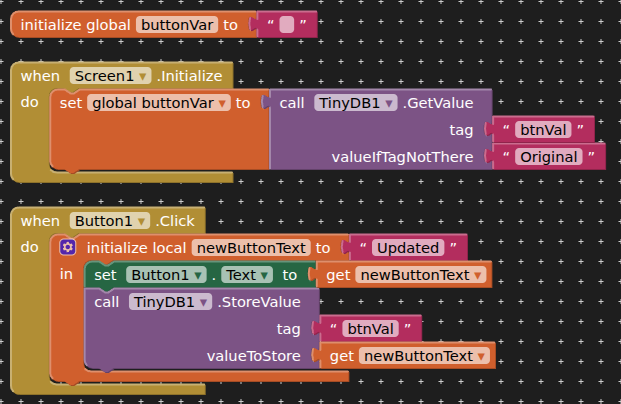
I was making it .
Here are some guides :
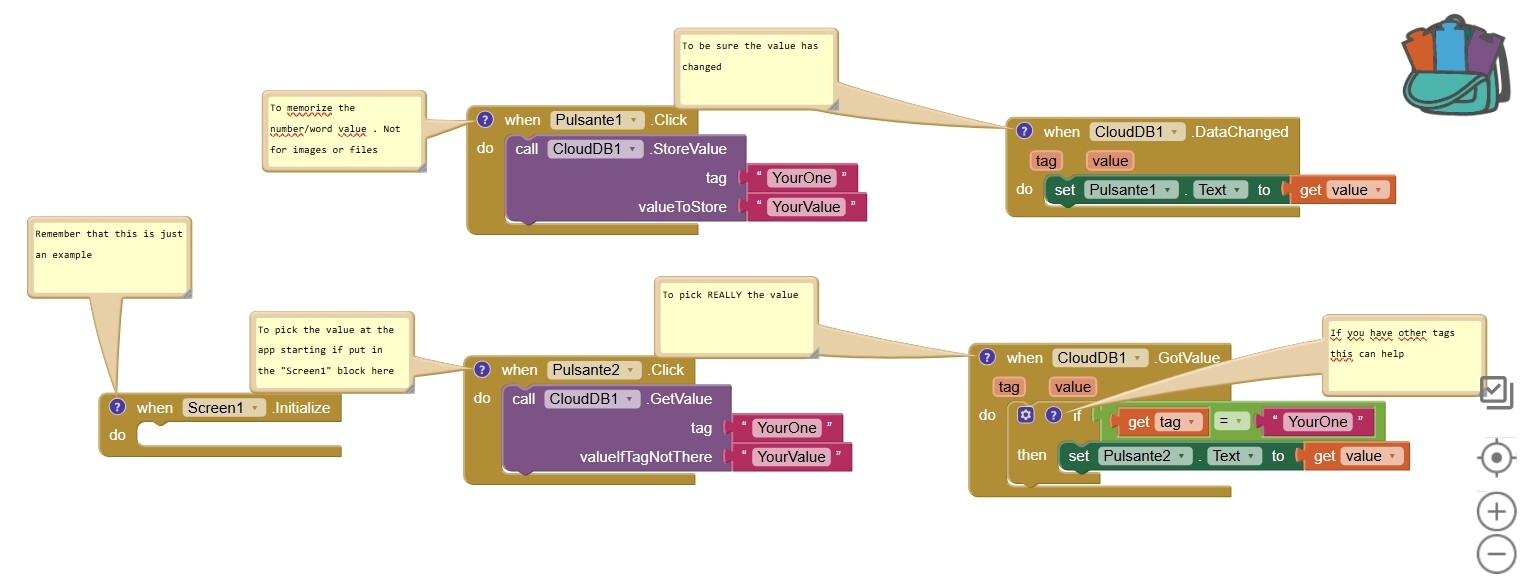
This is for CloudDB
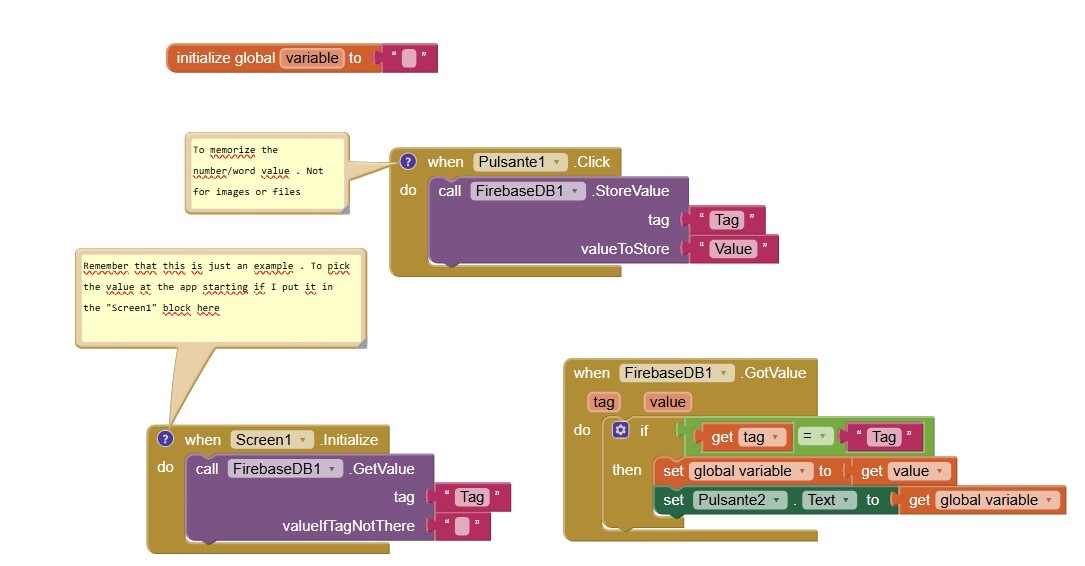
This for Firebase
P.S. : You can do it with variables like suggested TIMAI2
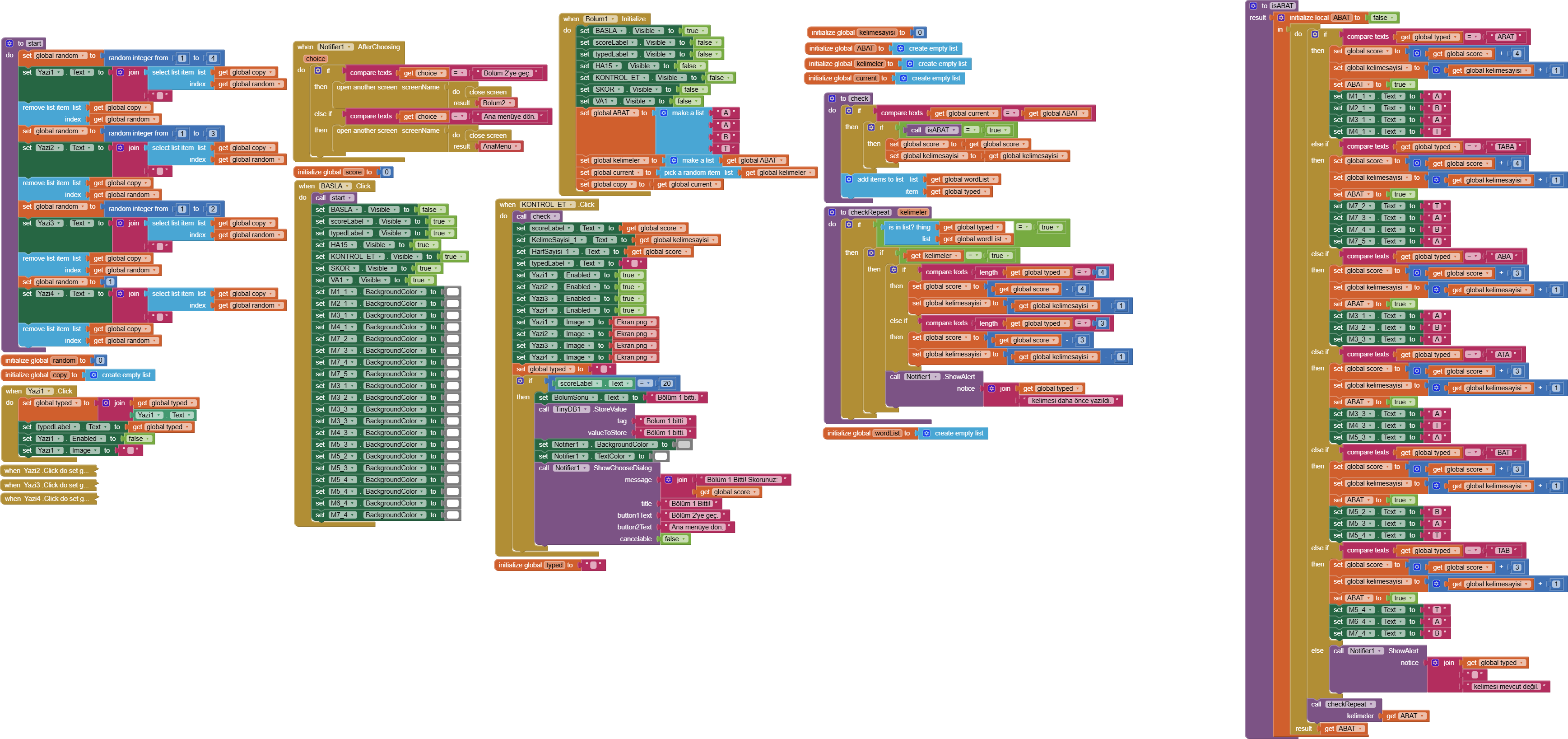
My aim in doing this is both to memorize my scores and to continue from where I left off.
Ok . So I found time to modify the code of your game :
AnaMenu_Screen_community.aia (4.4 MB)
Here is the file . I have not tested it and there are some comments , please don't say I wasted my time .
If you want to thank me , I think you see a " Mark as answer " button to every comment
So if you find this helpful , please mark it as answer because not everyone is so kind to even see the file .aia

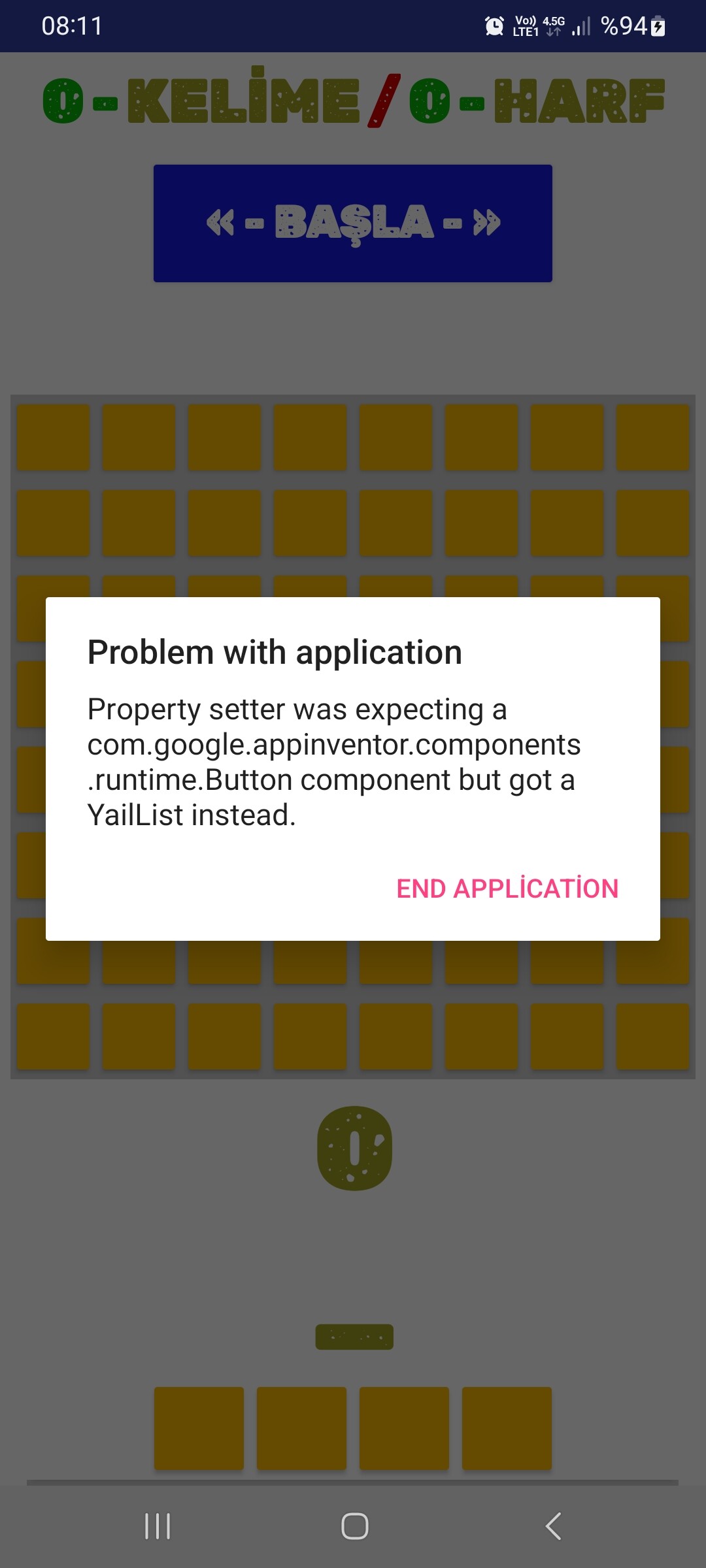
This is probably for the block 'For any button ' , because there I created the variable "Buttons" that is a list ( and it seems is too large ) . You'll find it in Bolum1.start , so remove this block . And the "Buttons" variable , to make lighter your project .
Then put the 'Store'and 'Pock' functions where needed because I don't speak the languahe of the game and I didn't understood where should I put it to make function it lile you wanted
Hope it helps!