Problem with aab and apk file (and with aia!)

I sent you a message.

Your aia loaded and compiled. i installed it to my phone but it crashed on open.

First look at the blocks, this is odd?

I dragged out the default block to show you that the list needs to be RGB values

Try removing all the unnecessary formatting clutter (including the clocks) and see if that installs and runs on your phone.

You could also do a better job with this:

How to do a better job? Explain to me an example please?

This AIA without a clock won't open either.
peqiin_Business (6).aia (1.6 MB)

You could replace that entire procedure with this:

You could also create a list/csv file to avoid having to load all the numbers one by one into the listview (but you have done that already...) - that must have taken forever!

You stuffed all your phone book entries into the Listviewer in the Designer.

I coded some attempts to extract the names and numbers from the ListViewer Elements list at run time in my Companion, to give you a CSV extract you could load from the Media folder at run time and extend with a third column for WhatsApp numbers, but the Right To Left encoding is breaking CSV conversion.
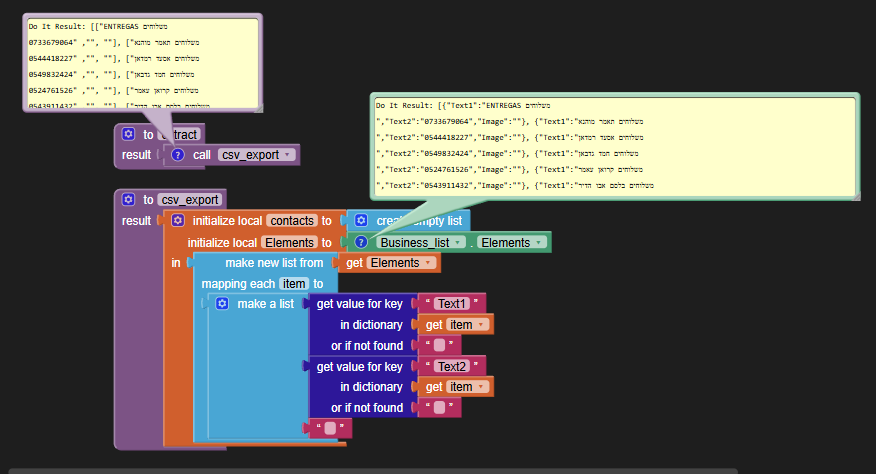
My objective is to divorce blocks from data details.
Your block count should not grow with your data count.

Find a spreadsheet that can handle mixed Right to Left text and fill three columns with

  • name
  • phone number
  • Whatsapp info

Do not attempt to make decisions based on selectionIndex, because you will eventually need to delete items from your contact list and that would move up all the index numbers.

Put your data in the table.

Your horrible blocks:

1 Like

I tried using the Sharing component with a JSOn Encoding of the ListView Elements, and got this mixed result:

phone book.txt (126.4 KB)

I had to route the text through Google Drive into a new text file.
The Companion crashed midway, so this might be incomplete.

I have also been having a look. it seems your listview data is corrupted.

Do you have a file with all these numbers and descriptions in good order ?

I was able to build the app on code.appinventor.mit.edu
if you need immediate relief, while you clean it up for the future.

The RTL text1 content has some long spacers in it, yet to be filtered out.
There is also this wierdness in a Do dump:
RTL Wierdness

My filter attempt:

I managed to handle most of the right to left stuff / any other issues presented in the listview data by grabbing the output from a Do it, pasting it into Geany, changing the filetype to json and tidying it up into a stringified json array. I only did about 20 entries. Saved the file, imported it into the app, used the file component to read the file and then created list elements with main and detailed text. A new listview was used to replace the original. This put the "text" above the number for each element.

Aia project compiled and ran OK when installed.

peqiin.json (1.4 KB)

1 Like

Hello, thank you to the best team
Very true, after I deleted all the profits it worked and the app opened successfully
Now all that's left is to help me build the app using your method, it looks much better....

Can you provide a text file containing all your listview entries ?

Actually, from @ABG's work, should have it here:

phonebook.json (47.5 KB)

Just these blocks required:

The third column of the contacts table is still needed for Whatsapp support.
You need to keep the table in a global variable for Whatsapp lookup, to avoid the big green hacksaw blades you coded.

Use the SelectionIndex to index into the saved three column table to get to your Whatsapp numbers.

I attempted making a list of lists with the data, but it went all righty/lefty on me again, so left it as it is in a "json".

Not sure why one would need a third item, and I showed above a simple solution to the "big green hacksaw blade".

New entries can be added to the json (dictionary) using dictionary blocks, and then rebuild the listview list.

To test for entries/selections do value comparisons (on the phone numbers!) instead of indexes.

Hi, I will upload the app after I delete the spaces.
peqiin_Business (7).aia (1.6 MB)

Now you can continue working on this as I have included @ABG and @TIMAI2 work with json file in your project and removed all hardcoded content from list viewer..

peqiin_Business8.aia (1.6 MB)

Very nice professional work, thank you very much.
If I need to add to the list or delete how can I edit the json file?

JSON is just text, with special punctuation patterns to keep everything separate and in proper order.

You can download the JSON file from AI2 and edit it with a text editor or spreadsheet prograam, then load it back into the Media folder when it is done.

This is a sample run with the free Notepad++ editor:

Here, I have used the JSONTools Plugin to pretty print the JSON text, adding indentation to see what is what.

Unfortunately, this JSON is useful mostly for reloading a ListView.
If you can add more tags to the entries, you might be able to add extra features like Whatsapp info.

It would not hurt you to learn how to use AI2 dictionaries and JSON.