@Joejsanz
Hi, I wanted to ask you something, could you contact me privately?
I tested your radio URL in one of my radio apps and can confirm that the sound stops after 21:49 minutes. My other URLs work fine, and the sound only stops when the battery runs out.
Try connecting the device to the charging cable while streaming to see if the problem persists (in idle mode). If so, it's stream-dependent.
= wrong way!
= the right way
Thanks for your feedback. It's just strange that this only affects one stream. But I can try the option with the charging cable.
Thanks, Peter
Apparently I didn't explain myself well... I know perfectly well that to block the app's timer, you need to block the "clock" in the blocks. I was specifically talking about the application created by Joesanz... When I created the APK file of his application and tested it on my device, if I set the timer to 0, the application crashes. But I'm talking about the APK installed on the device, not the App Inventor blocks...
I hope I made myself clear this time.
1 Like
Calling this block cancels the timer.
In the example I didn't assign the block to a visible button, you'll need to do that and test it.
Let me know if your problem is solved.
1 Like
There should be a function that detects when the stream stops. Unfortunately, AudioFocusLost does not work in this context. This would allow playback to resume.
Peter
I also tried the URL you shared, and it does stop at 22 minutes, but it only lasts for about 3 seconds and then playing again.
It's doing that every 22 minutes.
- The other links I have work fine.
The stream from that URL probably has settings that MediaPlayer doesn't process smoothly.
I've now tested this with Kodular and the ExoPlayer, and playback doesn't stop after about 22 minutes, but continues uninterrupted. I'm currently testing it with the AudioExoPlayer extension by @Patryk_F...
I'm pretty sure it will work there as well.
And it does work.
Thank you for testing. When the player stops for me, it doesn't continue playing. I've now solved the problem by setting a variable. This allows it to resume playing automatically.
Thanks, Peter
Then show your relevant blocks.


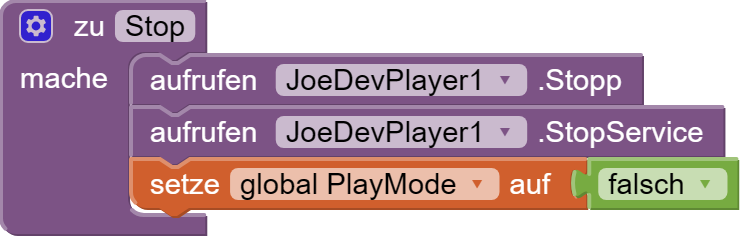
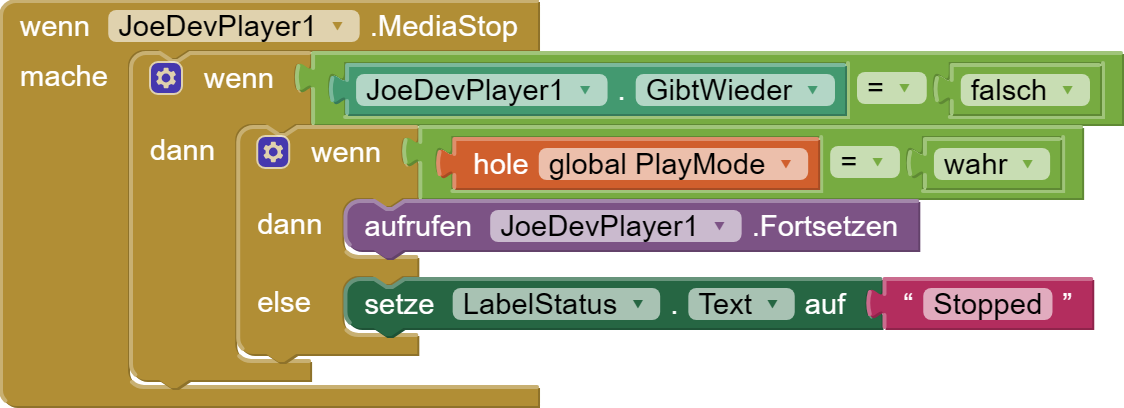
Hmm, why would that trigger the MediaStop event if the sound stops accidentally?
That's a good question. At least, that's how it is for me.
Maybe it doesn't matter whether I stop the stream or it stops on its own. @Joejsanz would have to be able to comment on that.
Ok, but then the sound stops again after ~22 min and resume without any interruption?
That's right. Of course, there is a brief interruption when the stream breaks off.
When it's interrupted, it shouldn't trigger the MediaStop event. What it does on my device is interrupt at 22 minutes and then, after 3 seconds, it resumes playback on its own.
The link is to an Icecast or Shoutcast stream?
Exactly, why should it.
Yes, I just tested it with your extension and can confirm it (Android 16).
Btw, the sound doesn't stop if the screen is on while streaming. So it must be an issue with Doze/Foreground service and/or stream type.