Welcome
Do you really mean altitude and longitude? or perhaps latitude and longitude? Altitude can be one of your criteria too.
Use the LocationSensor.LocationChanged event handler to determine altitude, latitude and or longitude.
Also use the event handler to cue a Player component (to play the music)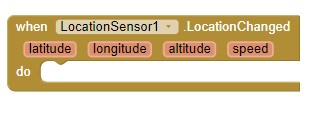
Use a routine like Location sensor (ringed fence / circular ringed fence) - #2 by SteveJG to establish you are at the coordinates you want to play your music. If you are within the 'ring fence' play the music; if not, do not play.
Is this what you wanted to know?
We want you to have fun with App Inventor. Here are some resources to help you learn to use the AI2 tools. A very good way to learn App Inventor is to read the free Inventor's Manual here in the AI2 free online eBook App Inventor 2 Book: Create Your Own Android Apps ... the links are at the bottom of the Web page. The book 'teaches' users how to program with AI2 blocks.
There is a free programming course here Course In A Box and the aia files for the projects in the book are here: App Inventor 2 Book: Create Your Own Android Apps
How to do a lot of basic things with App Inventor are described here: How do you...? .
Also look here App inventor español. Offline. Tutorial. Ejemplos. Instalación. Códigos. Juegos. Curso gratis de App inventor. and here Tutorials for more tutorials.
Learn about components Component Reference
and visit the Library The MIT App Inventor Library: Documentation & Support Help>Library on the MENU