
[PAID] 
 Groq
Groq Compound, GPT-OSS, Qwen 3.6/3.8, Orpheus TTS, and Whisper STT — live models only, with MCP and streaming.
 Extension specifications
| Package | in.sarthakdev.groq |
| Version | 2.0 |
| Price | $7.99 USD |
| Category | AI/ML |
| Updated | 18 September 2026 |
| Platforms | MIT App Inventor, Kodular, Niotron, Android Builder, Thunkable |
| Built using | FAST |
| Store | Groq Extension - AI/ML Extension for MIT App Inventor, Kodular, Niotron | SarthakDev.in |
Paid buyers get this AIX by email after checkout. Import it from Projects → Import extension.
 About
Groq 2.0: Compound, GPT-OSS 20B/120B, Qwen 3.6/3.8, Safeguard, Orpheus TTS, Whisper STT, and Prompt Guard. Drop a component, set ApiKey, and call Ask.
 Features
- Compound and Compound Mini with code interpreter, web search, visit website, and browser automation
- GPT-OSS 20B and 120B with streaming, JSON mode, reasoning, and MCP servers
- Qwen 3.6 27B and Qwen 3.8 27B variants
- GPT-OSS Safeguard 20B for policy-following moderation
- Orpheus English TTS (replaces PlayAI) and Whisper STT
- Chat history, system prompts, and per-request parameter overrides
- Llama Prompt Guard 2 for prompt-injection screening
 Blocks in general
This extension follows the usual MIT App Inventor/Kodular block pattern:
- Methods are action blocks that start an operation, such as
Ask,Transcribe File, orGenerate Speech. - Events are callback blocks that run when an operation finishes, streams data, or encounters an error. They expose the result through values such as
response,chunk,text,json, ormessage. - Properties are configuration values for a component, such as the API key, model, temperature, streaming, history, and tool settings.
- Streaming events provide partial output as it is generated. Use the
chunkvalue to update a label or other UI element, and checkdoneto detect completion. - Error events provide an error code, readable message, and raw response so the app can handle failures.
- History can be enabled where supported so the component maintains previous messages between requests.
- JSON mode returns structured data where supported, while reasoning events expose the model's available reasoning output.
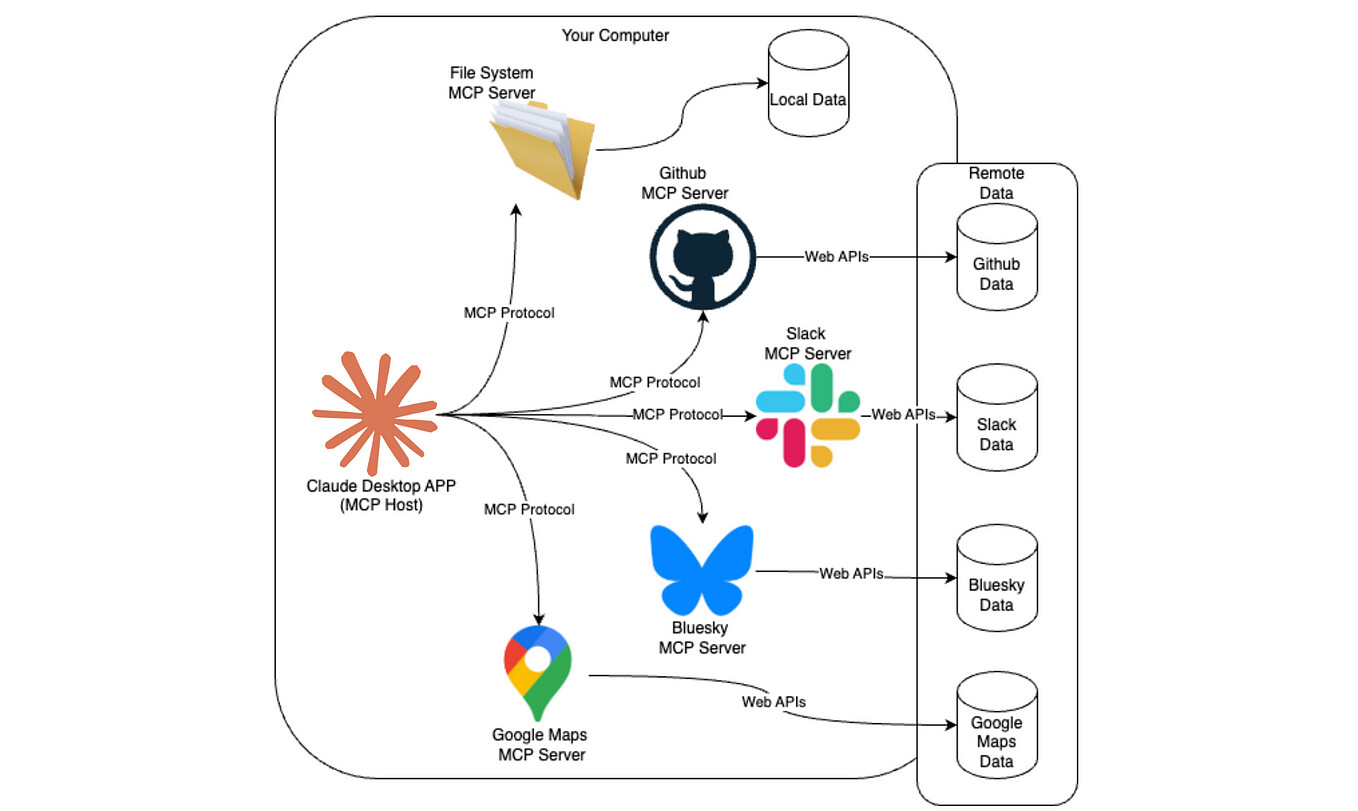
- MCP methods let supported components add, clear, and retrieve MCP servers for tool access.
The exact methods, events, and properties available depend on the component. The sections below document what each block does and what values it accepts or returns.
 Components
- Compound — Groq Compound — per-model chat with built-in tools. Model: groq/compound • Streaming • Tool use (Code Interpreter, Web Search, Visit Website, Browser Automation) • MCP • Reasoning • JSON mode
- CompoundMini — Groq Compound Mini — lightweight per-model chat with built-in tools. Model: groq/compound-mini • Streaming • Tool use (Code Interpreter, Web Search, Visit Website, Browser Automation) • MCP • Reasoning • JSON mode
- GptOss20B — GPT OSS 20B — capable open-source assistant. Model: openai/gpt-oss-20b • Streaming (optional) • JSON mode (optional) • Tool use (browser_search, code_interpreter, MCP servers) • MCP • Reasoning
- GptOss120B — GPT OSS 120B — large open-source assistant. Model: openai/gpt-oss-120b • Streaming (optional) • JSON mode (optional) • Tool use (code_interpreter, browser_search, MCP servers) • MCP • Reasoning
- Qwen — Qwen 3.6 / 3.8 27B — pick a variant, then chat with optional reasoning and MCP. Models: qwen/qwen3.6-27b, qwen/qwen3.8-27b.
- Whisper — Whisper — Fast speech-to-text transcription and translation using OpenAI Whisper via Groq API. Models: whisper-large-v3-turbo, whisper-large-v3 • Multilingual support • Word & segment timestamps • Verbose JSON metadata
- LlamaPromptGuard — Llama Prompt Guard — prompt safety helper. Variants: 22M / 86M • Streaming (optional) • JSON mode • Tool use • MCP • Reasoning
- Orpheus — Orpheus TTS — Canopy Labs English speech on Groq. Model: canopylabs/orpheus-v1-english.
- Safeguard — GPT-OSS Safeguard 20B — policy-following moderation. Model: openai/gpt-oss-safeguard-20b.
Compound
Groq Compound — per-model chat with built-in tools. Model: groq/compound • Streaming • Tool use (Code Interpreter, Web Search, Visit Website, Browser Automation) • MCP • Reasoning • JSON mode
 Events
Got Response
Fired when the complete AI response is ready. Returns the full response text, usage statistics, response time in milliseconds, and model name.
- response (
text) - usage (
dictionary) - latencyMs (
number) - model (
text)
Got Stream
Fired during streaming with each text chunk. Use 'chunk' to append to your label for real-time display. When 'done' is true, streaming has finished.
- chunk (
text) - index (
number) - done (
boolean)
Error Occurred
Fired when an error occurs. Returns error code, human-readable message, and raw error response for debugging.
- code (
text) - message (
text) - raw (
text)
 Methods
Ask
Send a message to the AI and get a response. The prompt is your question or instruction to the AI.
- prompt (
text) → Text prompt sent to the model.
Ask With System
Send a message with a system instruction. System sets the AI's behavior/role, prompt is your question.
- system (
text) → System instruction that sets the model’s role. - prompt (
text) → Text prompt sent to the model.
Add Message
Append a message to the internal history. Role must be user/assistant/system.
- role (
text) - content (
text)
Clear Conversation
Clear all conversation history. Use this to start a fresh conversation with the AI.
Get Streaming Text
Get the accumulated streaming text so far. Useful for displaying the full response as it builds up.
Returns text.
Cancel
Stop the current AI request immediately. Useful for stopping long responses or streaming.
 Properties
Api Key
Type: text
Base Url
Type: text · Default: https://api.groq.com/openai/v1
Temperature
Type: number · Default: 1
Include Temperature
Type: boolean · Default: true
Top P
Type: number · Default: 1
Include Top P
Type: boolean · Default: true
Max Tokens
Type: number · Default: 1024
Include Max Tokens
Type: boolean · Default: true
Stream
Type: boolean · Default: true
Include Stream
Type: boolean · Default: true
Include Stop Null
Type: boolean · Default: false
Include Compound Custom
Type: boolean · Default: true
History Enabled
Type: boolean · Default: false
History Limit
Type: number · Default: 20
Include Model Version Header
Type: boolean · Default: true
Model Version Header Value
Type: text · Default: latest
Tool Code Interpreter
Type: boolean · Default: true
Tool Visit Website
Type: boolean · Default: true
Tool Web Search
Type: boolean · Default: true
Tool Browser Automation
Type: boolean · Default: true
CompoundMini
Groq Compound Mini — lightweight per-model chat with built-in tools. Model: groq/compound-mini • Streaming • Tool use (Code Interpreter, Web Search, Visit Website, Browser Automation) • MCP • Reasoning • JSON mode
Events
Got Response
Fired when the complete AI response is ready. Returns the full response text, usage statistics, response time in milliseconds, and model name.
- response (
text) - usage (
dictionary) - latencyMs (
number) - model (
text)
Got Stream
Fired during streaming with each text chunk. Use 'chunk' to append to your label for real-time display. When 'done' is true, streaming has finished.
- chunk (
text) - index (
number) - done (
boolean)
Error Occurred
Fired when an error occurs. Returns error code, human-readable message, and raw error response for debugging.
- code (
text) - message (
text) - raw (
text)
Methods
Ask
Send a message to the AI and get a response. The prompt is your question or instruction to the AI.
- prompt (
text) → Text prompt sent to the model.
Ask With System
Send a message with a system instruction. System sets the AI's behavior/role, prompt is your question.
- system (
text) → System instruction that sets the model’s role. - prompt (
text) → Text prompt sent to the model.
Add Message
Append a message to the internal history. Role must be user/assistant/system.
- role (
text) - content (
text)
Clear Conversation
Clear all conversation history. Use this to start a fresh conversation with the AI.
Get Streaming Text
Get the accumulated streaming text so far. Useful for displaying the full response as it builds up.
Returns text.
Cancel
Stop the current AI request immediately. Useful for stopping long responses or streaming.
Properties
Api Key
Type: text
Base Url
Type: text · Default: https://api.groq.com/openai/v1
Temperature
Type: number · Default: 1
Include Temperature
Type: boolean · Default: true
Top P
Type: number · Default: 1
Include Top P
Type: boolean · Default: true
Max Tokens
Type: number · Default: 1024
Include Max Tokens
Type: boolean · Default: true
Stream
Type: boolean · Default: true
Include Stream
Type: boolean · Default: true
History Enabled
Type: boolean · Default: false
History Limit
Type: number · Default: 20
Include Stop Null
Type: boolean · Default: false
Include Compound Custom
Type: boolean · Default: true
Include Model Version Header
Type: boolean · Default: true
Model Version Header Value
Type: text · Default: latest
Tool Code Interpreter
Type: boolean · Default: true
Tool Visit Website
Type: boolean · Default: true
Tool Web Search
Type: boolean · Default: true
Tool Browser Automation
Type: boolean · Default: true
GptOss20B
GPT OSS 20B — capable open-source assistant. Model: openai/gpt-oss-20b • Streaming (optional) • JSON mode (optional) • Tool use (browser_search, code_interpreter, MCP servers) • MCP • Reasoning
Events
Got Response
Fired when the complete AI response is ready. Returns the full response text, usage statistics, response time in milliseconds, and model name.
- response (
text) - usage (
dictionary) - latencyMs (
number) - model (
text)
Got Stream
Fired during streaming with each text chunk. Use 'chunk' to append to your label for real-time display. When 'done' is true, streaming has finished.
- chunk (
text) - index (
number) - done (
boolean)
Error Occurred
Fired when an error occurs. Returns error code, human-readable message, and raw error response for debugging.
- code (
text) - message (
text) - raw (
text)
Got JSON
Fired when JSON mode is enabled and response is successfully parsed. Returns structured data as dictionary and raw JSON string.
- json (
dictionary) - raw (
text)
Got Reasoning
Fired when the AI's reasoning/thinking process is available. Shows the model's step-by-step thought process before generating the response.
- reasoning (
text)
Methods
Add Mcp Server
Add an MCP server tool with label, url and headers (YailDictionary).
- serverLabel (
text) - serverUrl (
text) - headers (
dictionary)
Clear Mcp Servers
Remove all MCP servers (tools list).
Get Mcp Servers
Get MCP servers as list of dictionaries.
Returns list.
Ask
Send a message to the AI and get a response. The prompt is your question or instruction to the AI.
- prompt (
text) → Text prompt sent to the model.
Ask With System
Send a message with a system instruction. System sets the AI's behavior/role, prompt is your question.
- system (
text) → System instruction that sets the model’s role. - prompt (
text) → Text prompt sent to the model.
Add Message
Append a message to the internal history. Role must be user/assistant/system.
- role (
text) - content (
text)
Clear Conversation
Clear all conversation history. Use this to start a fresh conversation with the AI.
Get Streaming Text
Get the accumulated streaming text so far. Useful for displaying the full response as it builds up.
Returns text.
Cancel
Stop the current AI request immediately. Useful for stopping long responses or streaming.
Properties
Api Key
Type: text
Base Url
Type: text · Default: https://api.groq.com/openai/v1
Temperature
Type: number · Default: 1
Include Temperature
Type: boolean · Default: true
Top P
Type: number · Default: 1
Include Top P
Type: boolean · Default: true
Max Tokens
Type: number · Default: 8192
Include Max Tokens
Type: boolean · Default: true
Stream
Type: boolean · Default: false
Include Stream
Type: boolean · Default: true
History Enabled
Type: boolean · Default: false
History Limit
Type: number · Default: 20
JSONMode
Type: boolean · Default: false
Reasoning Level
Type: text · Default: medium
Include Reasoning
Type: boolean · Default: true
Include Response Format
Type: boolean · Default: true
Include Stop Null
Type: boolean · Default: false
Include Tools
Type: boolean · Default: true
Tool Browser Search
Type: boolean · Default: true
Tool Code Interpreter
Type: boolean · Default: true
GptOss120B
GPT OSS 120B — large open-source assistant. Model: openai/gpt-oss-120b • Streaming (optional) • JSON mode (optional) • Tool use (code_interpreter, browser_search, MCP servers) • MCP • Reasoning
Events
Got Response
Fired when the complete AI response is ready. Returns the full response text, usage statistics, response time in milliseconds, and model name.
- response (
text) - usage (
dictionary) - latencyMs (
number) - model (
text)
Got Stream
Fired during streaming with each text chunk. Use 'chunk' to append to your label for real-time display. When 'done' is true, streaming has finished.
- chunk (
text) - index (
number) - done (
boolean)
Error Occurred
Fired when an error occurs. Returns error code, human-readable message, and raw error response for debugging.
- code (
text) - message (
text) - raw (
text)
Got JSON
Fired when JSON mode is enabled and response is successfully parsed. Returns structured data as dictionary and raw JSON string.
- json (
dictionary) - raw (
text)
Got Reasoning
Fired when the AI's reasoning/thinking process is available. Shows the model's step-by-step thought process before generating the response.
- reasoning (
text)
Methods
Add Mcp Server
Add an MCP server tool with label, url and headers (YailDictionary).
- serverLabel (
text) - serverUrl (
text) - headers (
dictionary)
Clear Mcp Servers
Remove all MCP servers (tools list).
Get Mcp Servers
Get MCP servers as list of dictionaries.
Returns list.
Ask
Send a message to the AI and get a response. The prompt is your question or instruction to the AI.
- prompt (
text) → Text prompt sent to the model.
Ask With System
Send a message with a system instruction. System sets the AI's behavior/role, prompt is your question.
- system (
text) → System instruction that sets the model’s role. - prompt (
text) → Text prompt sent to the model.
Add Message
Append a message to the internal history. Role must be user/assistant/system.
- role (
text) - content (
text)
Clear Conversation
Clear all conversation history. Use this to start a fresh conversation with the AI.
Get Streaming Text
Get the accumulated streaming text so far. Useful for displaying the full response as it builds up.
Returns text.
Cancel
Stop the current AI request immediately. Useful for stopping long responses or streaming.
Properties
Api Key
Type: text
Base Url
Type: text · Default: https://api.groq.com/openai/v1
Temperature
Type: number · Default: 1
Include Temperature
Type: boolean · Default: true
Top P
Type: number · Default: 1
Include Top P
Type: boolean · Default: true
Max Tokens
Type: number · Default: 8192
Include Max Tokens
Type: boolean · Default: true
Stream
Type: boolean · Default: false
Include Stream
Type: boolean · Default: true
History Enabled
Type: boolean · Default: false
History Limit
Type: number · Default: 20
JSONMode
Type: boolean · Default: false
Reasoning Level
Type: text · Default: medium
Include Reasoning
Type: boolean · Default: true
Include Response Format
Type: boolean · Default: true
Include Stop Null
Type: boolean · Default: false
Include Tools
Type: boolean · Default: true
Tool Code Interpreter
Type: boolean · Default: true
Tool Browser Search
Type: boolean · Default: true
Qwen
Qwen 3.6 / 3.8 27B — pick a variant, then chat with optional reasoning and MCP. Models: qwen/qwen3.6-27b, qwen/qwen3.8-27b.
Events
Got Response
Fired when the complete AI response is ready. Returns the full response text, usage statistics, response time in milliseconds, and model name.
- response (
text) - usage (
dictionary) - latencyMs (
number) - model (
text)
Got Stream
Fired during streaming with each text chunk. Use 'chunk' to append to your label for real-time display. When 'done' is true, streaming has finished.
- chunk (
text) - index (
number) - done (
boolean)
Error Occurred
Fired when an error occurs. Returns error code, human-readable message, and raw error response for debugging.
- code (
text) - message (
text) - raw (
text)
Got JSON
Fired when JSON mode is enabled and response is successfully parsed. Returns structured data as dictionary and raw JSON string.
- json (
dictionary) - raw (
text)
Got Reasoning
Fired when the AI's reasoning/thinking process is available. Shows the model's step-by-step thought process before generating the response.
- reasoning (
text)
Methods
Set Variant
Set Qwen variant (3.6 27B or 3.8 27B).
- variant (
text)
Add Mcp Server
Add an MCP server tool with label, url and headers (YailDictionary).
- serverLabel (
text) - serverUrl (
text) - headers (
dictionary)
Clear Mcp Servers
Remove all MCP servers (tools list).
Get Mcp Servers
Get MCP servers as list of dictionaries.
Returns list.
Ask
Send a message to the AI and get a response. The prompt is your question or instruction to the AI.
- prompt (
text) → Text prompt sent to the model.
Ask With System
Send a message with a system instruction. System sets the AI's behavior/role, prompt is your question.
- system (
text) → System instruction that sets the model’s role. - prompt (
text) → Text prompt sent to the model.
Add Message
Append a message to the internal history. Role must be user/assistant/system.
- role (
text) - content (
text)
Clear Conversation
Clear all conversation history. Use this to start a fresh conversation with the AI.
Get Streaming Text
Get the accumulated streaming text so far. Useful for displaying the full response as it builds up.
Returns text.
Cancel
Stop the current AI request immediately. Useful for stopping long responses or streaming.
Properties
Api Key
Type: text
Base Url
Type: text · Default: https://api.groq.com/openai/v1
Temperature
Type: number · Default: 0.6
Top P
Type: number · Default: 0.95
Max Tokens
Type: number · Default: 4096
System Prompt
Type: text
Stream
Type: boolean · Default: true
History Enabled
Type: boolean · Default: true
History Limit
Type: number · Default: 20
Reasoning Effort
Type: text · Default: default
JSONMode
Type: boolean · Default: false
Include Temperature
Type: boolean · Default: true
Include Top P
Type: boolean · Default: true
Include Max Tokens
Type: boolean · Default: true
Include Stream
Type: boolean · Default: true
Include Reasoning Effort
Type: boolean · Default: true
Include Tools
Type: boolean · Default: true
Include Response Format
Type: boolean · Default: true
Include Stop Null
Type: boolean · Default: false
Variant
Current Qwen variant.
Type: text · Options: Qwen 3.6 27B, Qwen 3.8 27B
Whisper
Whisper — Fast speech-to-text transcription and translation using OpenAI Whisper via Groq API. Models: whisper-large-v3-turbo, whisper-large-v3 • Multilingual support • Word & segment timestamps • Verbose JSON metadata
Events
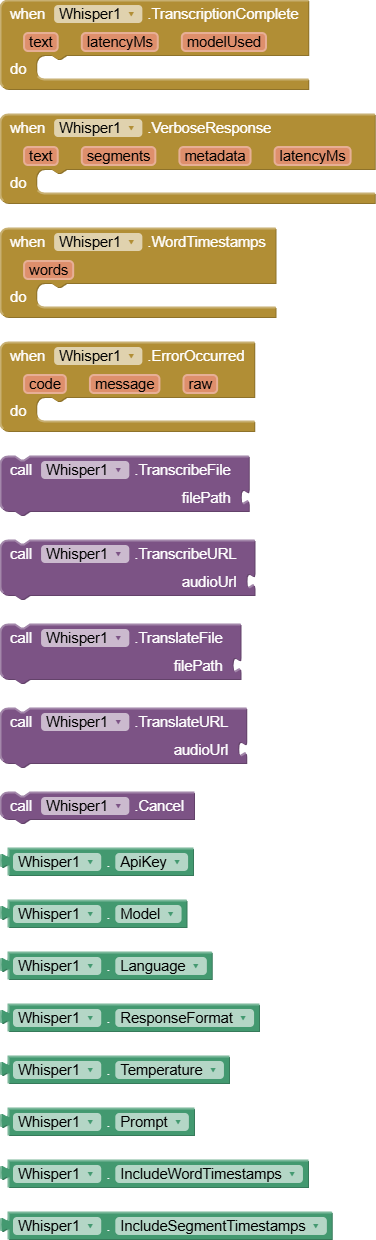
Transcription Complete
Fired when transcription/translation completes successfully. Returns the transcribed/translated text, processing time in milliseconds, and model used.
- text (
text) - latencyMs (
number) - modelUsed (
text)
Verbose Response
Fired when verbose_json format is used. Returns full metadata including segments, timestamps, language, duration, and quality metrics.
- text (
text) - segments (
list) - metadata (
dictionary) - latencyMs (
number)
Word Timestamps
Fired when word-level timestamps are available. Returns list of words with their start and end times.
- words (
list)
Error Occurred
Fired when an error occurs. Returns error code, human-readable message, and raw error response for debugging.
- code (
text) - message (
text) - raw (
text)
Methods
Set Model
Set Whisper model from dropdown.
- modelOption (
WhisperModel)
Transcribe File
Transcribe audio file to text. Provide the full file path to the audio file (supports flac, mp3, mp4, mpeg, mpga, m4a, ogg, wav, webm).
- filePath (
text) → Absolute path to the file on the device.
Transcribe URL
Transcribe audio from URL. Provide the URL to the audio file (can be a direct URL or Base64URL).
- audioUrl (
text)
Translate File
Translate audio file to English text. Provide the full file path to the audio file. Only whisper-large-v3 supports translation.
- filePath (
text) → Absolute path to the file on the device.
Translate URL
Translate audio from URL to English text. Provide the URL to the audio file. Only whisper-large-v3 supports translation.
- audioUrl (
text)
Cancel
Stop the current transcription/translation request immediately.
Properties
Api Key
Type: text
Model
Type: text · Default: whisper-large-v3-turbo
Language
Type: text
Response Format
Type: text · Default: json
Temperature
Type: number · Default: 0.0
Prompt
Type: text
Include Word Timestamps
Type: boolean · Default: false
Include Segment Timestamps
Type: boolean · Default: true
LlamaPromptGuard
Llama Prompt Guard — prompt safety helper. Variants: 22M / 86M • Streaming (optional) • JSON mode • Tool use • MCP • Reasoning
Events
Got Response
Fired when the complete AI response is ready. Returns the full response text, usage statistics, response time in milliseconds, and model name.
- response (
text) - usage (
dictionary) - latencyMs (
number) - model (
text)
Got Stream
Fired during streaming with each text chunk. Use 'chunk' to append to your label for real-time display. When 'done' is true, streaming has finished.
- chunk (
text) - index (
number) - done (
boolean)
Error Occurred
Fired when an error occurs. Returns error code, human-readable message, and raw error response for debugging.
- code (
text) - message (
text) - raw (
text)
Methods
Set Variant
Set Llama Prompt Guard variant.
- variant (
LlamaPromptGuardVariant)
Ask
Send a message to the AI and get a response. The prompt is your question or instruction to the AI.
- prompt (
text) → Text prompt sent to the model.
Ask With System
Send a message with a system instruction. System sets the AI's behavior/role, prompt is your question.
- system (
text) → System instruction that sets the model’s role. - prompt (
text) → Text prompt sent to the model.
Add Message
Append a message to the internal history. Role must be user/assistant/system.
- role (
text) - content (
text)
Clear Conversation
Clear all conversation history. Use this to start a fresh conversation with the AI.
Get Streaming Text
Get the accumulated streaming text so far. Useful for displaying the full response as it builds up.
Returns text.
Cancel
Stop the current AI request immediately. Useful for stopping long responses or streaming.
Properties
Api Key
Type: text
Base Url
Type: text · Default: https://api.groq.com/openai/v1
Temperature
Type: number · Default: 1
Top P
Type: number · Default: 1
Max Tokens
Type: number · Default: 1
Stream
Type: boolean · Default: false
Include Stream
Type: boolean · Default: true
History Enabled
Type: boolean · Default: false
History Limit
Type: number · Default: 20
Include Temperature
Type: boolean · Default: true
Include Top P
Type: boolean · Default: true
Include Max Tokens
Type: boolean · Default: true
Include Stop Null
Type: boolean · Default: false
Orpheus
Orpheus TTS — Canopy Labs English speech on Groq. Model: canopylabs/orpheus-v1-english.
Events
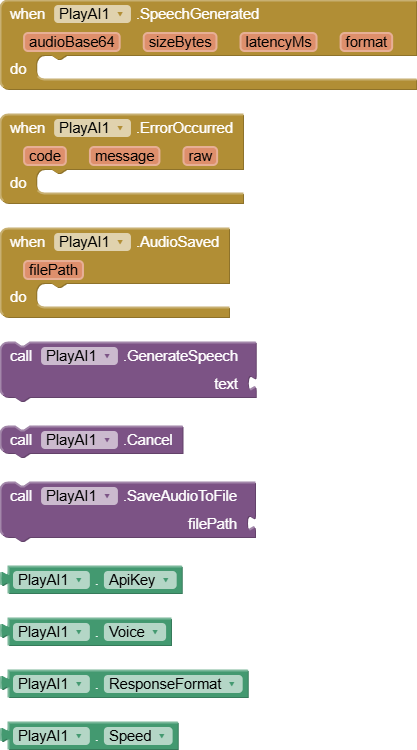
Speech Generated
Fired when speech is successfully generated. Returns base64-encoded audio data, size in bytes, generation time in milliseconds, and audio format.
- audioBase64 (
text) - sizeBytes (
number) - latencyMs (
number) - format (
text)
Error Occurred
Fired when an error occurs. Returns error code, human-readable message, and raw error response for debugging.
- code (
text) - message (
text) - raw (
text)
Audio Saved
Fired when audio file is successfully saved to storage. Returns the full file path where audio was saved.
- filePath (
text) → Absolute path to the file on the device.
Methods
Set Voice
Set PlayAI voice from dropdown.
- voiceOption (
PlayAIVoice)
Generate Speech
Generate speech from text. Returns audio as base64-encoded string in the SpeechGenerated event.
- text (
text)
Cancel
Stop the current speech generation request immediately.
Save Audio To File
Save the last generated audio to a file. Provide full file path (e.g., /storage/emulated/0/Documents/audio.mp3). Automatically requests storage permission if needed.
- filePath (
text) → Absolute path to the file on the device.
Properties
Api Key
Type: text
Voice
Type: text · Default: Aaliyah-PlayAI
Response Format
Type: text · Default: mp3
Speed
Type: number · Default: 1.0
More blocks
Safeguard
GPT-OSS Safeguard 20B — policy-following moderation. Model: openai/gpt-oss-safeguard-20b.
Events
Got Response
Fired when the complete AI response is ready. Returns the full response text, usage statistics, response time in milliseconds, and model name.
- response (
text) - usage (
dictionary) - latencyMs (
number) - model (
text)
Got Stream
Fired during streaming with each text chunk. Use 'chunk' to append to your label for real-time display. When 'done' is true, streaming has finished.
- chunk (
text) - index (
number) - done (
boolean)
Error Occurred
Fired when an error occurs. Returns error code, human-readable message, and raw error response for debugging.
- code (
text) - message (
text) - raw (
text)
Got JSON
Fired with parsed JSON object and original raw content when JSONMode is true.
- json (
dictionary) - raw (
text)
Methods
Ask
Send a message to the AI and get a response. The prompt is your question or instruction to the AI.
- prompt (
text) → Text prompt sent to the model.
Ask With System
Send a message with a system instruction. System sets the AI's behavior/role, prompt is your question.
- system (
text) → System instruction that sets the model’s role. - prompt (
text) → Text prompt sent to the model.
Add Message
Append a message to the internal history. Role must be user/assistant/system.
- role (
text) - content (
text)
Clear Conversation
Clear all conversation history. Use this to start a fresh conversation with the AI.
Get Streaming Text
Get the accumulated streaming text so far. Useful for displaying the full response as it builds up.
Returns text.
Cancel
Stop the current AI request immediately. Useful for stopping long responses or streaming.
Properties
Api Key
Type: text
Base Url
Type: text · Default: https://api.groq.com/openai/v1
Temperature
Type: number · Default: 1
Top P
Type: number · Default: 1
Max Tokens
Type: number · Default: 1024
Stream
Type: boolean · Default: false
Include Stream
Type: boolean · Default: true
History Enabled
Type: boolean · Default: false
History Limit
Type: number · Default: 20
JSONMode
Type: boolean · Default: false
Include Temperature
Type: boolean · Default: true
Include Top P
Type: boolean · Default: true
Include Max Tokens
Type: boolean · Default: true
Include Response Format
Type: boolean · Default: true
Include Stop Null
Type: boolean · Default: false
More blocks
 Get the AIX
Paid extension. Buy it on the store, then import from Projects → Import extension.
Built by Sarthak Gupta · hi@sarthakdev.in · sarthakdev.in
 Future of PlayAI and GroqText Extension!


 Big Update is here!


 SarthakDev.in site!
 . You may claim a coupon code for discount from our site