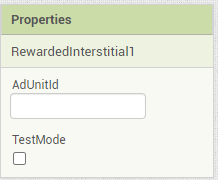
Also, Now AdUnitId is added in designer property.
2 Likes
Nice work @oseamiya 

2 Likes
thank you again. It's very good for me
I'm starting to learn and I couldn't do it anyway, I did everything right.
Could you send me an AIA so I can see the blocks?
Thanks!
POST #11
2 Likes
I am getting this error:
A required meta-data tag in your app's AndroidManifest.xml does not exist. You must have the following declaration within the <application> element:
<meta-data android:name="com.google.android.gms.version" android:value="@integer/google_play_services_version" />
Did I miss something? I have followed the steps.
1 Like
Did you added AdmobSdk extension ? AdmobSdk extension fulfill the requirement of this manifest. See :
Also, This extension doesn't work with companion as companion app don't have required manifest. You should compile the application to see the result.
Thanks oseamiya. Actually I tried with the companion. I compiled and it is working perfectly. Very nice job! Thanks a lot!
1 Like
Very nice extension!
1 Like
I tried adding a banner ad using this extension, but it doesn't work with an error. How can I make good use of this extension? Please let me know along with the aia file.
Warning phrase : Attempt to invoke virtual method 'android.view.ViewParent com.google.android.gms.ads.AdView.getParent()' on a null object reference
Note: You will not see another error reported for 5 seconds.
aia : admob_test.aia (2.0 MB)
Please look over to the documentation properly.
I checked your aia and I found :
- You have not followed this step. You should create a new extension so that you can add meta-datas in your manifest. Please follow this step.
- Also, You were trying to show the banner ad without loading. You should load a banner ad first, If loading is success then only you can show the ad to view like this.
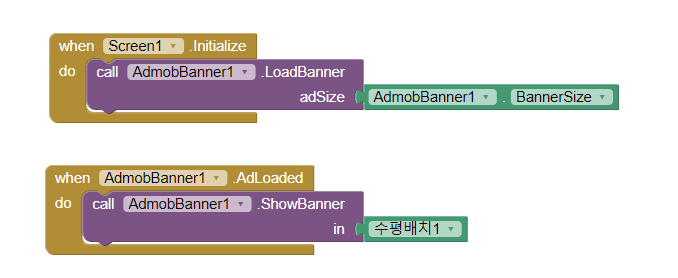
If you have got any other confusions then you can reply here 
2 Likes
@oseamiya I tried the way you said, but this error pops up.
A required meta-data tag in your app's AndroidManifest.xml does not exist. You must have the following declaration within the <application> element:
<meta-data android:name="com.google.android.gms.version" android:value="@integer/google_play_services_version" />
Note: You will not see another error reported for 5 seconds.
What's the problem?
2 Likes
thank you! This extension was really nice! Thanks to this, I am able to monetize my app.
1 Like
hi @oseamiya , do these tags need to be changed before or after initializing sdk?
1 Like
You can set it according to the need. For example, A app for children may require ChildDirectTreatment. So, you can set TagForChildDirectedTreatment to 1.
You can find more about this here 
https://developers.google.com/admob/android/targeting
You can set it after AdmobSdk Initialized successfully.
1 Like
OK thank you very much
2 Likes
hi i got these errors with your aia test
I have upload the meta data tag with my ca-pub-id and i have put my add unit id.
and i have unchecked test mode please help ?
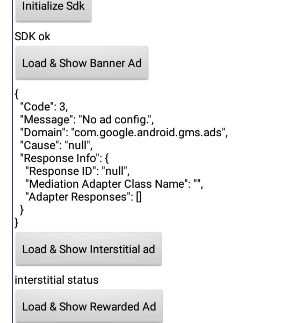
I've got also the Code 1 error building request url.
and this error
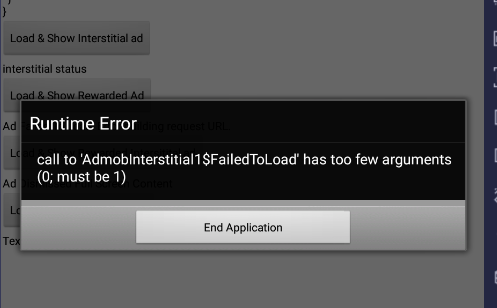
the extension doesn't work in companion try building your app
the error come from apk built not companion