My version of the notifier upgrade.
The goal was to simplify the change of integers and text, with subsequent processing and saving.
Main addition:
- this is a built-in indicator in each block.
- when calling the block, it is possible to set the initial values of digital and text values.
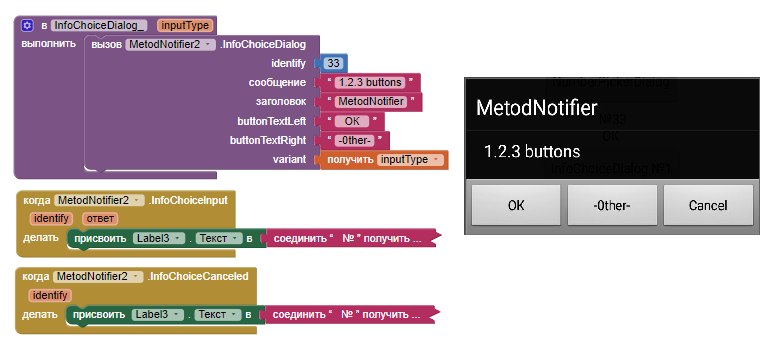
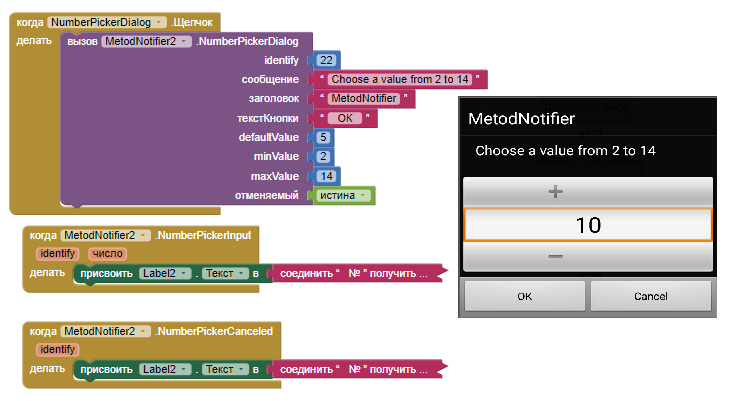

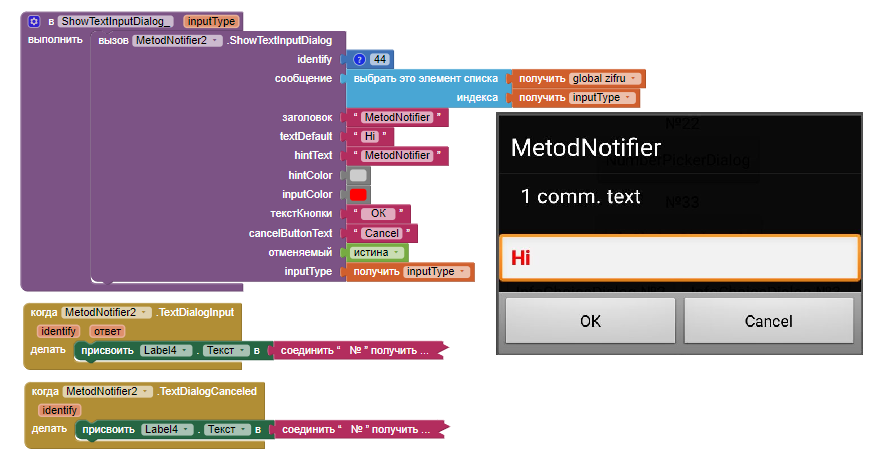
/**
 * Optional upgrade, to extend the notifier, with a little variety to change the variables.
 * notifer in App Inventor, but based upon the original code.
 * Credits: @HalAbelson - MIT who wrote the original notifier code
 * Credits: @Shreyash for the Rush extension builder
 * Credits: @TIMAI2 available source was the basis of the upgrade
 * Credits: @Gordon_Lu available source
 *
 * Additions: @DIY_channel, 18-01-2023(Ukraine)
 */

package sxem.org.metodnotifier;

import android.app.Activity;
import android.app.AlertDialog;
import android.text.*;
import android.text.method.*;
import android.widget.EditText;
import android.widget.TextView;
import android.widget.LinearLayout;
import android.view.View;
import android.content.DialogInterface;
import android.view.inputmethod.InputMethodManager;
import android.content.Context;
import android.view.WindowManager.LayoutParams;
import android.widget.NumberPicker;
import android.graphics.Typeface;

import com.google.appinventor.components.runtime.EventDispatcher;
import com.google.appinventor.components.annotations.SimpleEvent;
import com.google.appinventor.components.annotations.SimpleFunction;
import com.google.appinventor.components.runtime.AndroidNonvisibleComponent;
import com.google.appinventor.components.runtime.ComponentContainer;
import com.google.appinventor.components.runtime.errors.YailRuntimeError;
import com.google.appinventor.components.runtime.util.YailList;


public class MetodNotifier extends AndroidNonvisibleComponent {

    private final Context context;
    private Activity activity;

    public MetodNotifier(ComponentContainer container){
        super(container.$form());
        activity = container.$context();
        this.context = container.$context();
    }

    /** ######################################################################################################
     *    ДІАЛОГ ЗАПИТАНня      QUESTION DIALOG
     */

    @SimpleFunction(description = "Показує діалогове вікно запитань, яке встановлює користувач, і дозволяє "
            + " позитивну відповідь або скасування від користувача. Викликається відповідна подія          \n "
            + " variant=0 Left,Right,Cancel         \n "
            + " variant=1 Left,Right                \n "
            + " variant=2 Left,Cancel               \n "
            + " variant>=3 Left,Right,Cancel")

    public void InfoChoiceDialog(final int identify, String message, String title, String buttonTextLeft, String buttonTextRight, final int variant) {
        InfoChoiceAlert(identify, message, title, buttonTextLeft, buttonTextRight,  variant);
    }

    private void InfoChoiceAlert(final int identify, String message, String title, String buttonTextLeft, String buttonTextRight, final int variant) {

        AlertDialog.Builder alert = new AlertDialog.Builder(activity);
        alert.setTitle(title);
        alert.setMessage(message);


        alert.setPositiveButton(buttonTextLeft, new DialogInterface.OnClickListener() {
            public void onClick(DialogInterface dialog, int whichButton) {

                InfoChoicelnput(identify, buttonTextLeft.toString());
            }
        });

        if (variant <= 1 || variant > 3) {
        alert.setNeutralButton( buttonTextRight, new DialogInterface.OnClickListener() {
            public void onClick(DialogInterface dialog, int whichButton) {

                InfoChoicelnput(identify, buttonTextRight.toString());
            }
        });
		}


        if (variant < 1 || variant == 2) {
        alert.setNegativeButton("Cancel", new DialogInterface.OnClickListener() {
            public void onClick(DialogInterface dialog, int whichButton) {
                   InfoChoiceCanceled(identify);
                //AfterQuestion("Cancel");
            }
        });
       }
        alert.show();
    }


    /**
     * Подія виникає після відповіді користувача на ПоказатДіалогЗапитання.
     * @param відповідь — це вибраний текст кнопки
     */
    @SimpleEvent(
            description = "Event raised after the user has responded to ShowQuestionDialog.")
    public void InfoChoicelnput(final int identify, String response) {
        EventDispatcher.dispatchEvent(this, "InfoChoicelnput", identify, response);
    }

    /**
       * Подія, викликана, коли користувач скасував ПоказатиТекстДіалог.
	*/
    @SimpleEvent(
            description = "Event raised when the user canceled ПоказатиТекстДіалог.")
    public void InfoChoiceCanceled(final int identify) {
        EventDispatcher.dispatchEvent(this, "InfoChoiceCanceled", identify);
    }

    /** ##############################################################################################################
     *    ДІАЛОГ ЛОГІН/ПАРОЛЬ ВХІДУ        LOGIN/PASS ENTRY DIALOG  , String backgrup, String backgrdw
     */

    @SimpleFunction(description = "Показує діалогове вікно, де користувач може ввести логін"
            + "і деталі пароля. Користувач також може скасувати")

    public void DubliViknaDialog(final int identify, String message, String title, String hintUp, String hintDown, String textUp, String textDown, boolean cancelable) {
        ViknoDubliViknaTekst( identify, message, title, hintUp, hintDown, textUp, textDown, cancelable);
    }

      private void ViknoDubliViknaTekst(final int identify, String message, String title, String hintUp, String hintDown, String textUp, String textDown, boolean cancelable) {

        AlertDialog.Builder alert = new AlertDialog.Builder(activity);

        alert.setTitle(title);
        alert.setMessage(message);
        alert.setCancelable(false);
        LinearLayout layout = new LinearLayout(activity);
        layout.setOrientation(LinearLayout.VERTICAL);
        final EditText inputLogin = new EditText(activity);
        inputLogin.setHint(hintUp);
		inputLogin.setText(textUp);
        layout.addView(inputLogin);
        final EditText inputPass = new EditText(activity);
        inputPass.setHint(hintDown);
		inputPass.setText(textDown);
		layout.addView(inputPass);
        alert.setView(layout);


        alert.setPositiveButton("OK!", new DialogInterface.OnClickListener() {
            public void onClick(DialogInterface dialog, int whichButton) {
                HideKeyboard((View) layout);
                DubliViknaTextlnput(identify, inputLogin.getText().toString(), inputPass.getText().toString());
            }
        });

	    if (cancelable) {
        alert.setNegativeButton("Cancel", new DialogInterface.OnClickListener() {
            public void onClick(DialogInterface dialog, int whichButton) {
                DubliViknaCanceled(identify);
                HideKeyboard((View) layout);
                //DubliViknaTextlnput("Cancel", "Cancel");
            }
        });
      }
        alert.show();
        // Request focus after showing dialog Запитати фокус після показу діалогу
        inputLogin.requestFocus();
        // Show soft keyboard Показати програмну клавіатуру
        InputMethodManager imm = (InputMethodManager) activity.getSystemService(Context.INPUT_METHOD_SERVICE);
        imm.toggleSoftInput(InputMethodManager.SHOW_FORCED, InputMethodManager.HIDE_IMPLICIT_ONLY);
     }

    /**
     * Подія виникає після відповіді користувача на ВікноВведення2текст.
     * @param відповідь – це введений текст
     */
    @SimpleEvent(description = "Подія, що виникає після того, як користувач відповів на ДубльВікнаТекст.")
    public void DubliViknaTextlnput(final int identify, String textup, String textdown) {
        EventDispatcher.dispatchEvent(this, "DubliViknaTextlnput", identify, textup, textdown);
    }

    /**
     * Подія виникає, коли користувач скасував ВікноВведення2текст.
     */
    @SimpleEvent(description = "Event raised when the user canceled ДубльВікнаТекст.")
    public void DubliViknaCanceled(final int identify) {
        EventDispatcher.dispatchEvent(this, "DubliViknaCanceled", identify);
    }

    /** ##############################################################################################################
     *
     */

    @SimpleFunction(description = "Displays a number picker dialog that enables the user to select a number from a predefined range.")
       public void NumberPickerDialog(final int identify, String message, String title, String buttonText,
	int defaultValue, int minValue, int maxValue, boolean cancelable) {
        TextNumberPickerDialog(identify, message, title, buttonText, defaultValue, minValue, maxValue, cancelable);
    }
    private void TextNumberPickerDialog(final int identify, String message, String title, String buttonText,
	int defaultValue, int minValue, int maxValue, boolean cancelable) {

		 AlertDialog.Builder alert = new AlertDialog.Builder(this.context);
        final NumberPicker numberPicker = new NumberPicker(this.context);
        numberPicker.setMaxValue(maxValue);
        numberPicker.setMinValue(minValue);
		numberPicker.setValue(defaultValue);

        alert.setView(numberPicker);
        alert.setCancelable(false);
		 alert.setTitle(title);
         alert.setMessage(message);
        alert.setPositiveButton(buttonText, new DialogInterface.OnClickListener() {
        @Override
        public void onClick(DialogInterface dialog, int which) {
        NumberPickerInput(identify, numberPicker.getValue());
      }
      });
        if (cancelable) {
        alert.setNegativeButton("Cancel", new DialogInterface.OnClickListener() {
        @Override
        public void onClick(DialogInterface dialog, int which) {
        NumberPickerCanceled(identify);
      }
    });
       }
        alert.show();
    }

    @SimpleEvent(description = "This event is fired when the user has pressed the OK button in a number picker dialog.")
    public void NumberPickerInput(int identify, int number) {
        EventDispatcher.dispatchEvent(this, "NumberPickerInput", identify, number);
    }
    @SimpleEvent(description = "This event is fired when the user has pressed the cancel button in a number picker dialog.")
    public void NumberPickerCanceled(int identify) {
        EventDispatcher.dispatchEvent(this, "NumberPickerCanceled", identify);
    }

    /** ##############################################################################################################
     *
     */

     @SimpleFunction(description = "Shows a text input dialog. \n "
          + "0 без спілкування.           \n "
          + "1 звич. текст.               \n "
          + "2 тільки цифри.              \n "
          + "3 номер телефона.            \n "
          + "4 дата/час.                  \n "
          + "32 адреса электроной пошти. ")


    public void ShowTextInputDialog(final int identify, String message, String title, String textDefault, String hintText,
    int hintColor, int inputColor, String buttonText, String cancelButtonText, boolean cancelable, int inputType) {
        TextInputDialog( identify, message, title, textDefault, hintText, hintColor, inputColor, buttonText, cancelButtonText, cancelable, inputType);
    }
    private void TextInputDialog(final int identify, String message, String title, String textDefault, String hintText,
    int hintColor, int inputColor, String buttonText, String cancelButtonText, boolean cancelable, int inputType) {

        AlertDialog.Builder alert = new AlertDialog.Builder(this.context);
        alert.setTitle(title);

            alert.setMessage(message);

        alert.setCancelable(false);
        final EditText edit = new EditText(this.context);
        edit.setText(textDefault);
        edit.setHintTextColor(hintColor);
        edit.setTextColor(inputColor);
        edit.setHint(hintText);
        edit.setTypeface(Typeface.DEFAULT, Typeface.BOLD);
        edit.setInputType(inputType);
        alert.setView(edit);

        alert.setPositiveButton(buttonText, new DialogInterface.OnClickListener() {
        @Override
        public void onClick(DialogInterface dialog, int which) {
        TextDialogInput(identify, edit.getText().toString());
        InputMethodManager imm = (InputMethodManager)context.getSystemService(Context.INPUT_METHOD_SERVICE);
        imm.hideSoftInputFromWindow(edit.getWindowToken(), 0);
        }
    });
        if (cancelable) {
        alert.setNegativeButton(cancelButtonText, new DialogInterface.OnClickListener() {
        @Override
        public void onClick(DialogInterface dialog, int which) {
        TextDialogCanceled(identify);
        InputMethodManager imm = (InputMethodManager)context.getSystemService(Context.INPUT_METHOD_SERVICE);
        imm.hideSoftInputFromWindow(edit.getWindowToken(), 0);
    }
});
        }
        alert.show();
 }


    @SimpleEvent(description = "This event is fired when the user has pressed the OK button in a text response dialog.")
    public void TextDialogInput(final int identify, String response) {
        EventDispatcher.dispatchEvent(this, "TextDialogInput", identify, response);
    }

    @SimpleEvent(description = "This event is fired when the user has pressed the cancel button in a text response dialog.")
    public void TextDialogCanceled(final int identify) {
        EventDispatcher.dispatchEvent(this, "TextDialogCanceled", identify);
   }

    /** #########################################################################################################
     *  Приховати програмну клавіатуру після того, як користувач введе текст або скасує введення.
     */
    public void HideKeyboard(View view) {
        if (view != null) {
            InputMethodManager imm = (InputMethodManager) activity.getSystemService(Context.INPUT_METHOD_SERVICE);
            imm.hideSoftInputFromWindow(view.getWindowToken(), 0);
        }
    }

}
MetodNotifierV1_0.aia (125.6 KB)
sxem.org.metodnotifier.aix (29.4 KB)