Minesweeper - Customizable classic game: rows, columns, mines, icons

Minesweeper
The classic Minesweeper game where you must discover all the empty cells without detonating the hidden mines.


  • Reveal all the cells that do not contain mines.

  • Mark the cells that do contain mines with flags.

  • The numbers tell you how many mines are in the 8 surrounding squares.

  • If you reveal a mine... you lose the game!

  • If you reveal all the safe squares, you win!


  • You can customize the cell and number colors, change the icons, set how many mines there are, and how many rows and columns there are.

  • If the number of rows and columns is not specified, they will be automatically set to the size of the Arrangement.


  • If the functions to set the icons are not used, the default icons will be used.

    • Mines: :bomb:
    • Flags: :triangular_flag_on_post:
    • Exploded Mine: :boom:
  • The same applies to the colors of the numbers and cells; if the function to change the colors is not used, the default colors will be used.


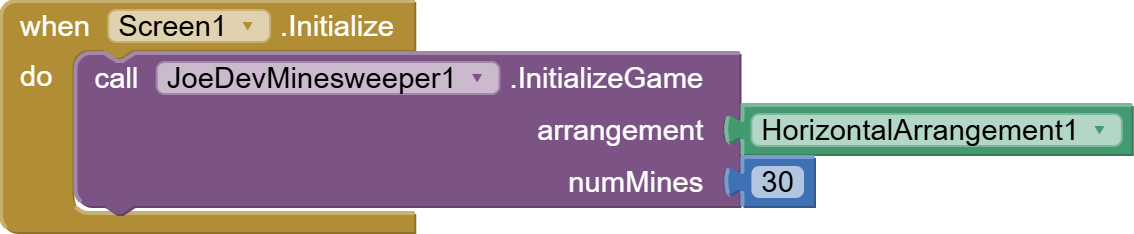
InitializeGame

Start the Minesweeper game in an HVArrangement.


ResetGame

Restart the game with the current settings.

component_method (13)


RevealCell

Reveals a cell at the specified position.

blocks (53)


ToggleFlag

Mark/unmark a cell with a flag.

blocks (67)


RevealAllCells

Reveal all cells.

component_method (11)


GetCellValue

Gets the value from a specific cell.


IsCellRevealed

Check if a cell is revealed.


IsCellFlagged

Check if a cell is flagged.


MineIcon

Set the mine icon from a file in assets.


FlagIcon

Set the flag icon from a file in assets.


ExplodedMineIcon

Set the exploded mine icon from a file in assets.


CorrectlyFlaggedIcon

Set the correct flag icon from a file in assets.


SetNumberColor

Change the color of a specific number (1-8).


GetNumberColor

It gets the color from a specific number (1-8).


HiddenCellLightColor

Change the color of hidden cells (light pattern).


HiddenCellDarkColor

Change the color of hidden cells (dark pattern).


RevealedCellLightColor

Change the color of the revealed cells (light pattern).


RevealedCellDarkColor

Change the color of the revealed cells (dark pattern).


FlaggedCellColor

Change the color of the flagged cells.


MineExplodedColor

Change the color of the exploited mines.


CorrectlyFlaggedColor

Change the color of correctly marked leads.


AllNumberColors

Configure all number colors at once.


AllCellColors

Configure all cell colors at once.


BoardState

Gets a string representing the state of the board.

component_method (12)


SetRows

Configure the number of rows.

blocks (47)


SetCols

Configure the number of columns.

blocks (46)


SetMines

Configure the number of mines.

blocks (66)


Rows

Gets the number of rows.

component_set_get (3)


Cols

Gets the number of columns.

component_set_get (4)


Mines

Get the number of mines.

component_set_get (6)


GameOver

Check if the game has ended.

component_set_get (5)


GameInitialized

It fires when the game has been initialized.


GameReset

It triggers when the game has been restarted.

component_event (12)


GameOver

It fires when the game ends.

component_event (14)


CellFlagged

It is triggered when a cell is marked/unmarked with a flag.

component_event (16)


CellRevealed

It is triggered when a cell is revealed.

component_event (15)


v1.0 Feb 21, 2026.

Minesweeper.aia (42.6 KB)

joejsanz.joedevminesweeper.aix (19.7 KB)


JDK: 11
Minimum API Level: 21
Updated On: 2026-02-21T08:00:00Z

Built using: FAST-CLI v5.3.2-premium


Thanks.

8 Likes

Hi, the game is very nice, but I didn't understand how to change the color of the cells and how to choose the number of rows, columns and bombs.
Even how to place the flags is not clear

That's right, I forgot to mention the flags. To add them, you have to press and hold the cell.


Regarding rows and columns, if you don't use the SetCols and SetRows functions, the necessary rows and columns will be automatically added to fill the arrangement.


This block changes the cell colors:

You can use int or rgb colors.


And with this you set the number of bombs you want:

Greetings friend, great contribution to the MIT2 community! I'm trying to load Minesweeper in an extension called com.gordonlu.daffydialog.aix, but it won't load and only shows me this. Is there a way to load Minesweeper in a DaffyDialog? Thanks.

Does the native Notifier component always need to be present?

1 Like
  • The notifier component is not necessary; I only put it on for testing and forgot to remove it.
  • It cannot be viewed with the extension you mentioned.
1 Like

thank you for this extension

1 Like

Okay, I understand, friend, but it would be a good idea to present Minesweeper in a floating window of the application.

Use this extension:

Specifically this block:

And applied in this way:

  • Don't hide the Arrangement; that should be done after the game has initialized so that the squares are applied without stretching.

1 Like

This post was flagged by the community and is temporarily hidden.