Here is the first extension - Pi.
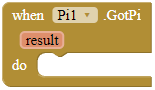
GotPi
This event is fired when the system has got the pi value from the GetPi block successfully.
Parameters: result = text
GetPi
Generates digits of pi according to the accuracy parameter. When the accuracy parameter increases, so does the number of digits and it will become closer to the real pi.
Parameters: accuracy = number (int)

What is accuracy?
These are the tests of the accuracy parameter.
3: 2933
10: 3140
25: 31415926
60: 31415926535897932379
100: 31415926535897932384626433832787
Download AIX: com.gordonlu.pi.aix (7.0 KB)
For the source code, here you go.
package com.gordonlu.pi;

import android.app.Activity;
import android.content.Context;
import com.google.appinventor.components.annotations.*;
import com.google.appinventor.components.common.ComponentCategory;
import com.google.appinventor.components.runtime.AndroidNonvisibleComponent;
import com.google.appinventor.components.runtime.ComponentContainer;
import com.google.appinventor.components.runtime.EventDispatcher;

import java.math.*;
import java.lang.*;
import java.lang.StringBuffer;
import java.util.Arrays;

@DesignerComponent(
        version = 1,
        description = "A non-visible extension that is used to celebrate Pi day by calculating digits of pi.",
        category = ComponentCategory.EXTENSION,
        nonVisible = true,
        iconName = "https://docs.google.com/drawings/d/e/2PACX-1vQCI87PHLBF0jb8QWyYmIRQSjjNW3EFXf-qpsWCvBYkUQ9vEgPAB8SpxcMpblxNpbIYrjCjLrRLIU2c/pub?w=16&h=16")

@SimpleObject(external = true)
//Libraries
@UsesLibraries(libraries = "")
//Permissions
@UsesPermissions(permissionNames = "")

public class Pi extends AndroidNonvisibleComponent {

    //Activity and Context
    private Context context;
    private Activity activity;

	public static BigDecimal pi =  BigDecimal.ZERO;
	public static BigDecimal denom1 =  BigDecimal.ONE;
	public static BigDecimal denom2 =  BigDecimal.ONE;
	public static BigDecimal term1 =  BigDecimal.ZERO;
	public static BigDecimal term2 =  BigDecimal.ZERO;

    public Pi(ComponentContainer container){
        super(container.$form());
        this.activity = container.$context();
        this.context = container.$context();
    }

    @SimpleFunction(description = "Generates digits of pi according to the accuracy parameter. When the accuracy parameter increases, " +
    "so does the number of digits and it will become closer to the real pi.")
    public void GetPi(int accuracy){
        String p = pi_digits(accuracy);
        GotPi(p);
    }
    public static String pi_digits(int digits){
        StringBuffer pi = new StringBuffer();
        int[] arr = new int[digits + 1];
        int carry = 0;

        for (int i = 0; i <= digits; ++i)
            arr[i] = ARRINIT;

        for (int i = digits; i > 0; i-= 14) {
            int sum = 0;
            for (int j = i; j > 0; --j) {
                sum = sum * j + SCALE * arr[j];
                arr[j] = sum % (j * 2 - 1);
                sum /= j * 2 - 1;
            }

            pi.append(String.format("%04d", carry + sum / SCALE));
            carry = sum % SCALE;
        }
        return pi.toString();
    }
    private static final int SCALE = 10000;
    private static final int ARRINIT = 2000;
    @SimpleEvent(description = "This event is fired when the system has got the pi value from the GetPi block successfully.")
    public void GotPi(String result) {
        EventDispatcher.dispatchEvent(this, "GotPi", result);
    }
}
http://www.codecodex.com/wiki/Calculate_digits_of_pi
If you want a decimal point, OK.
