It happened to me too. I used dictionaries to solve that. Got selection and used it as key of dictionary.
It works, plays correct song picking either way. However, it only works the first time you open the app. If you close it and open it again there is no list.
It only works after the very first time you accept allowing external files. You can search and pick as much as you want and it works. If you close it, it no longer works.
That's because it's only a snippet to prove the List and List + Search, not a complete solution - for example, it's also not creating it's own folders in the Music folder, and it's not loading a cue-instruction file when it loads a music file.
For it to work every time, it's necessary to store the state of permission in TinyDb. On App start, that record is checked - if permission = false, request it, if permission = true, list the files directly.
If you don't get this logic, I can expand the snippet for you later - got to do a couple of things around the house now 
I understand that you say it is necessary. Why has it not been necessary for anything I have done in the last three weeks that accesses the the external storage. Is it because this accesses the internal storage?
I checked it is reading only the internal folder Music.
That depends on the Android version - earlier Android did not have the current security measures.
So, here is the code, expanded to 'know' if read permission is already granted or not.
Since we do not want to build test every little change, especially when working on a main App rather than a snippet, we can add a Boolean condition (manually switched in the Blocks) to build the code for an APK test or a Companion Test:
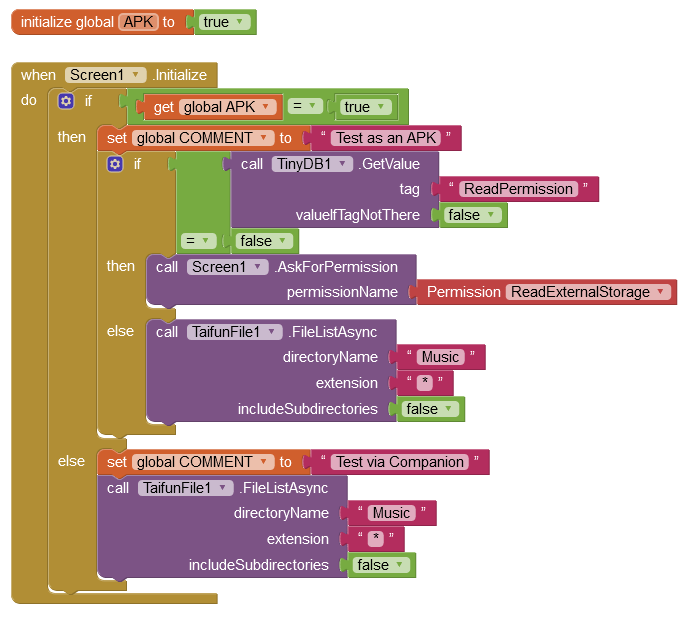
MusicTitles3.aia (39.9 KB)
Your cue-instruction HTML files - can I see a sample of them (change the ext to .txt).
This is what many look like, all similar
Fiddlesteppers Polka 2.txt (5.3 KB)
I have been using allfilespermission.aix by Anke
Thanks, I'm going to be out of commission tomorrow.
1 Like
You should definitely formulate your questions more precisely, show the blocks and post the aia. Your topics get out of hand (as so often) and most people - at least I - lose track of what's going on at some point.
As soon as we solve one of your problems, the next problem comes up. This is frustrating for both sides.
So specify what exactly it is about
- describe the goal and the steps in detail
- name the Android versions (on which it should work)
- show what you have already tried (blocks)
- post the aia
- explain where the files to be listed are located (especially the non-media files)
If the app should also work on devices with a removable (micro) SD card, explain whether it should only work there or also on the built-in storage.
If non-media (e.g. txt, pdf, html) files should also be listed, be aware that this is not possible without
SAForMANAGE_EXTERNAL_STORAGEpermission on devices running Android 11+ (at least not if they are not in one of the Shared folders).Note: This permission will most likely not be allowed by Google in case the app is going to be published on the Play Store.
As I can see from your last post (html example - post #36 by the way), it seems to be about a dance instruction. Why don't you tell us that right at the beginning?
1 Like
That's a handy extension to determine the API number (cross-ref this to the Android version number). There is no point in requesting the MANAGE_EXTERNAL_STORAGE permission if your App is to be distributed via Google Play.
Anke, I have cut Richard some slack because he got confused with all the different lines of advice. Most importantly, as in this case, Richard believed the Project should define the App in a certain way but didn't realise it would be difficult for Users to contribute their media. He also did not know for example that only one List Picker would suffice to select related files (Music and Cue files).
Sometimes people ask how to do something but that something can be far from the best solution - but they get several responses on how to do it the way it should not be done 
Hi Richard
I see the HTML file was produced with Serif Web Plus. There is a reason why Serif ditched that program - it would need to be completely re-written. For example, it does not cater for today's vast range of screen sizes and resolutions, it creates hard-coded sizes (in HTML 4, now superseded by HTML 5).
So I attach an edited version of your Fiddlesteppers Polka file, making it responsive (auto adapt to the screen size/resolution).
Fiddlesteppers Polka 2.txt (5.2 KB)
You can test HTML files for standards compliance on this site:
So you are probably thinking "How can my App Users make their own HTML Cue files?". Since the basic format of the cue files is the same, the App can present a form for the User to fill-in, and then auto-create the HTML file from their info. It can present the file names list to pick from to ensure the Cue file gets an identical name.
Note, the filenames of the Music files and the Cue files must be identical except for their extension, for the App to work as expected.
e.g:
Fiddlesteppers Polka 2.mp3
Fiddlesteppers Polka 2.html
For now, both sets of files should be directly in the Android Music folder.
Here is the expanded snippet code, which loads both files. By default, it's set to run via the Companion. Change the APK variable to 'true' to run as an APK.
MusicTitles4.aia (42.7 KB)
It's not finding any mp3 files running apk or companion.
Could this be done on a PC? That's way too much complicated typing to be done on anything without a keyboard. I did a bit of research but, didn't find much info. I'm probably just not looking in the right places.
That's odd, works very well here. Do you get a Notification message?
It can be done on a PC, a bespoke program to produce HTML files from an input form. App Inventor can't make programs for a PC though, you will need to use a text-based language.
Only MP3s in the root directory of the Shared folder /Music will be found. If there are none, a corresponding notification is displayed. MP3s in subdirectories of /Music are not listed.
We already achieved this with mp3 files alone, Snippet 4 collects mp3 and HTML files.
... which is obviously not the case with him.
Are you saying there is supposed to be some folder named music in some other location than these? This is Android 10. I have the same setup on another Android 10 tablet and an Android 7.1 phone. Same results on all three. It does give the files not found notice.
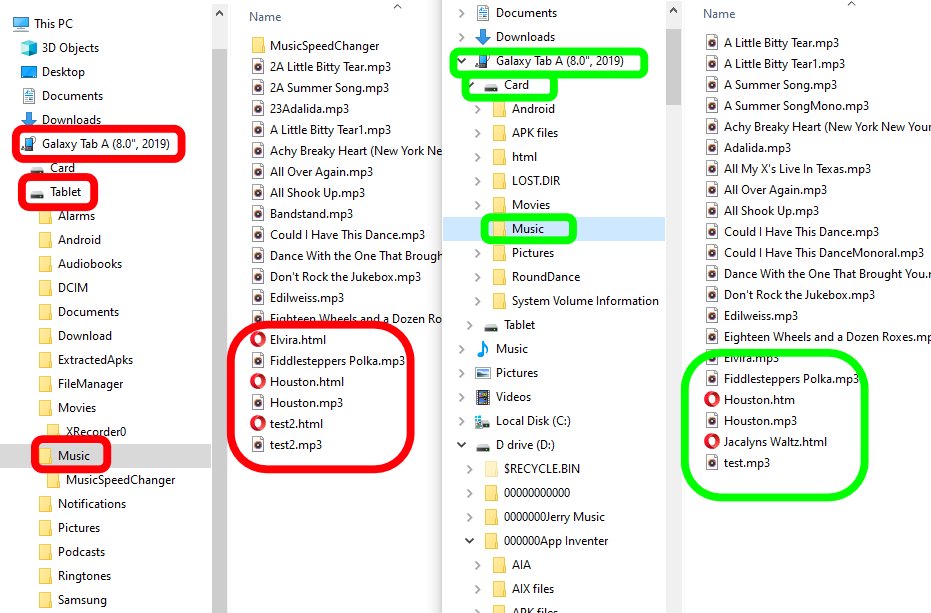
Hi Richard, for now, mp3 and Html files directly in the standard Android Music folder (no sub-folders searched). We did this (mp3 only) in the earlier test, which was successful your end.
Also in this test (4), try my Fiddlesteppers Polka 2.html