Try this:
[EDIT - html updated]
<!DOCTYPE html>
<html lang="en">
<head>
    <meta charset="UTF-8" >
    <title>Test Input</title>
    <meta name="viewport" content="width=device-width, initial-scale=1.0" >
</head>
<body>
    <form>
    <label for="value1">Value:</label>
    <input type="number" id="value1" name="value1" maxlength="7"
           min="10" max="9999999" autocomplete="off"
           data-rule-maxlength="7"
           oninput="javascript: if (this.value.length > this.maxLength)
                    this.value = this.value.slice(0, this.maxLength);
                    this.value = this.value.replace(/[^0-9.]/g, '')
                    .replace(/(\..*)\./g, '$1');" >
    </form>
    <script>
        document.getElementById("value1").focus();
    </script>
</body>
</html>
Everything works except for for autofocus....
[UPDATE]
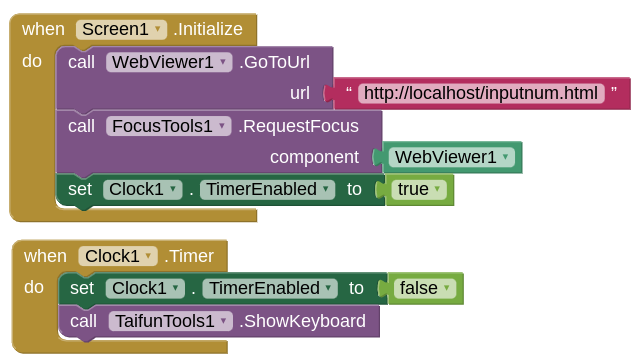
After some research, it seems that the webviewer itself needs to be given focus, in order for the javascript to give an input field focus. This can be achieved using this extension:
However, the webviewer requires a focus DOWN call in order to display the keyboard, which the extension does not deliver (it only gives focus to the input field - flashing cursor.)
You can further achieve the keyboard display by using Taifun's Tools extension, with the Show Keyboard method. You also need a clock component with an interval of @ 100ms to show the keyboard.
My blocks look like this, to load the webpage on Screen1. Initialise