EXAMPLE 1 [updated for Android 14]
Firebase using own project and the dataChanged event
Prerequisites:
- a project setup on Firebase
- in that project a node(tag), at top level, called itoo
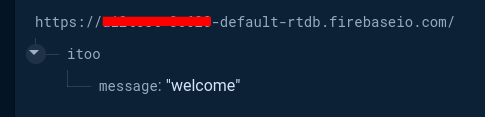
- secure rules for that node set to read:true / write:true
{
  "rules": {
    "SECURE": {
       "$uid": {
         ".read": "$uid === auth.uid",
         ".write": "$uid === auth.uid"
       }
     },
    "itoo": {
      ".read": true,
      ".write": true
    },
  }
}
Setup:
-
with the example aia, you will need to add your firebase project configuration data in both the designer for the firebase component, and in the blocks, and ensure the ProjectBucket is set to itoo. (This is required for the "admin" message changing to work)
-
in the blocks, please do not change the value for code in the ExecuteExternalScript method. Code "1" is for Firebase
-
in the execution script blocks, add
itooto the end of your firebase url:
https://xyz-123-default-rtdb.firebaseio.com/itoo
Blocks
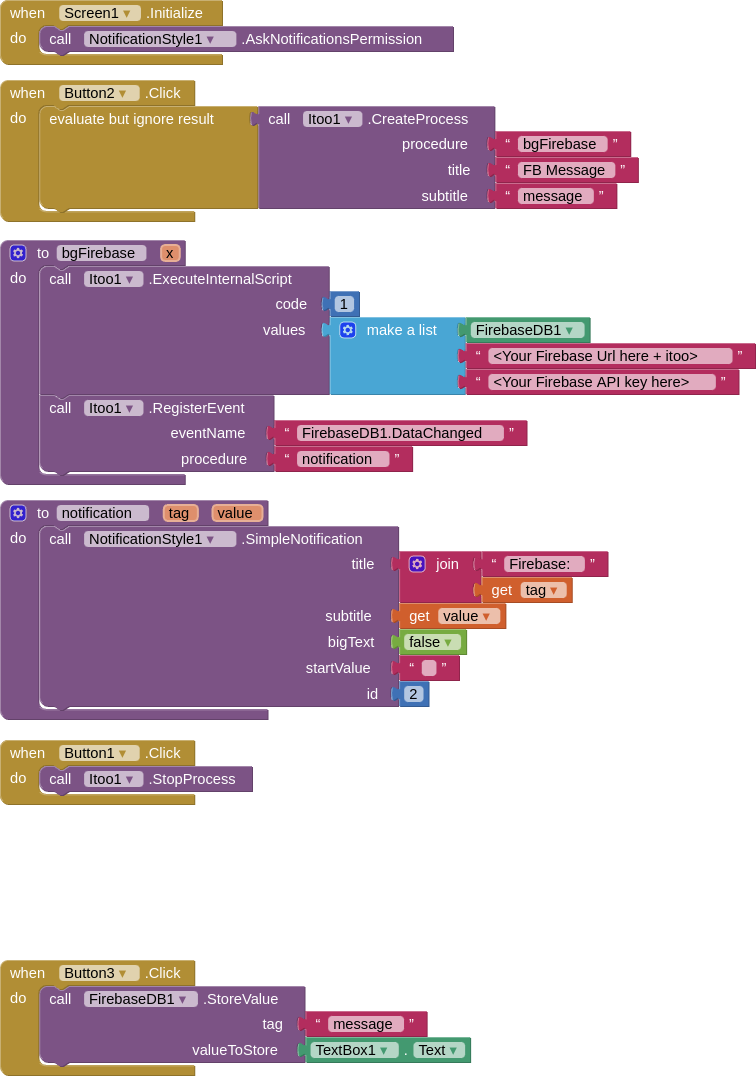
AIA (blank)
FBDataChanged_blank_2.aia (117.4 KB)