I don't need the color of the buttons, I need the correct left positioning from the buttons from every buttons, there I need only the buttons from the absolut arrangement, and this buttons I need that this buttons have that correct left positioning. So that the first button get s it's left by zero, and then the second button gets his left = the width of the first button. First time I will solve only this step, later we can luck the other steps. But first time only this step.
Ok, first time, here we have my project file:
Eaap1.aia (20.9 KB)
Now, there we have the buttons in the absolute arrangement, you see, the buttons are not orderly positioned.
In the program Block we have the program, that program first time takes from every blocks the width the left the top and his text or label name, and makes from this a list.
But, it takes all buttons in this list, but we need only the buttons that are in the absolute arrangement.
That's our first problem.
Now we need from the first list only the width of each button.
For this we need a second list, by this I agree.
No we need the possibility (for example in a selected list) to take the width from the first button, to be the left for the second button, and so on. And then to apply it to the buttons.
Sorry I was busy recently. I see you did not understand what I meant. Let me explain .
First select all af your button on the absolute arrangement. You can do it by holding CTRL and clicking one by one on every button on the absolute arrangement. Orange arrows on the picture I attached below. And you can see all the buttons was selected on the absolute arrangement. (Red oval)
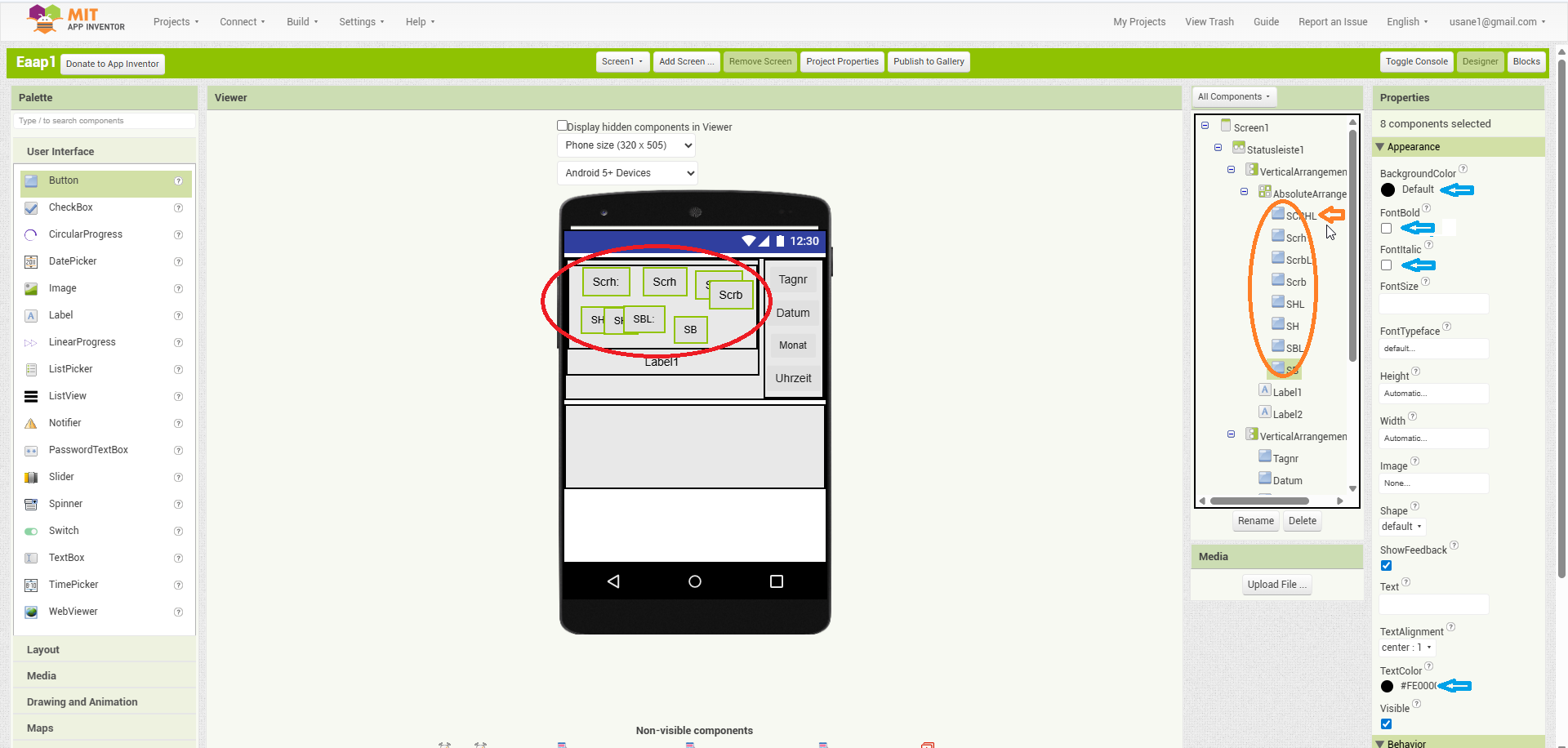
After the buttons selected set something differently from the other buttons. I recommend textcolor or background color because there are countless of colors and if you change one number in the RGB or the hex color code you can not see any difference but the program will know they are different. Althoug colors are a bit tricky.I have just found out myself recently. The color palette of the the visual design interface and the block design interface store the colors in different integer (32/64 bit). So you either have to set the colors in hexadecimal and use a hex converter like TIMAI2 suggested here : Does hexadecimal color codes in block editor not work? - #2 by TIMAI2 , or you have to set the colors in block editor like this:
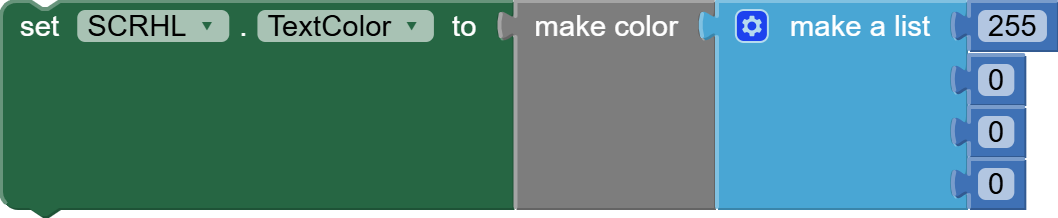
But then you have to do it for every button you want to chasnge separately. After the button’s parameter set you can select those buttons by that parameter. I send you the example in aia file. I chosed the color set in hexadecimal because it is more handy than set the colors in block editor one by one. This way you can use the any/every block to select those buttons on that arrangement.
Of course there are extensions out there that allows you to set mor text style or button parameters, or extensions that allow you to use it’s own blocks to select those buttons you want.
So here is the aia file.
Eaap1 (1).aia (106.9 KB)
Something like this?

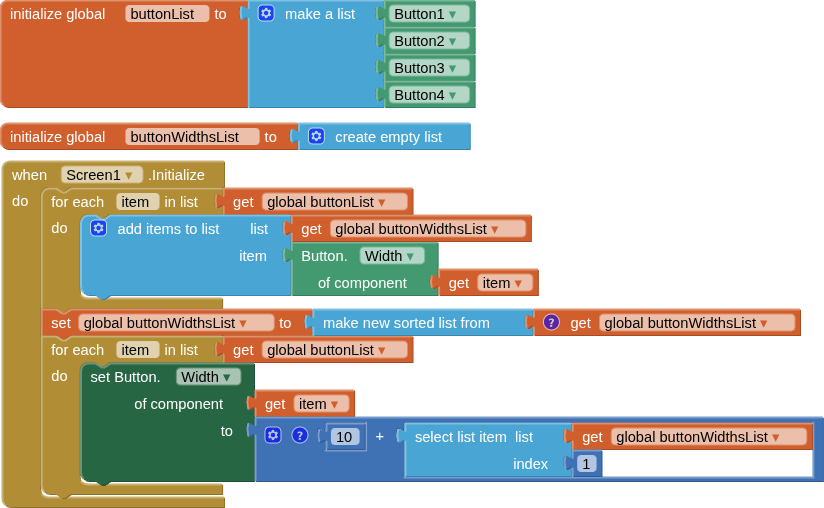
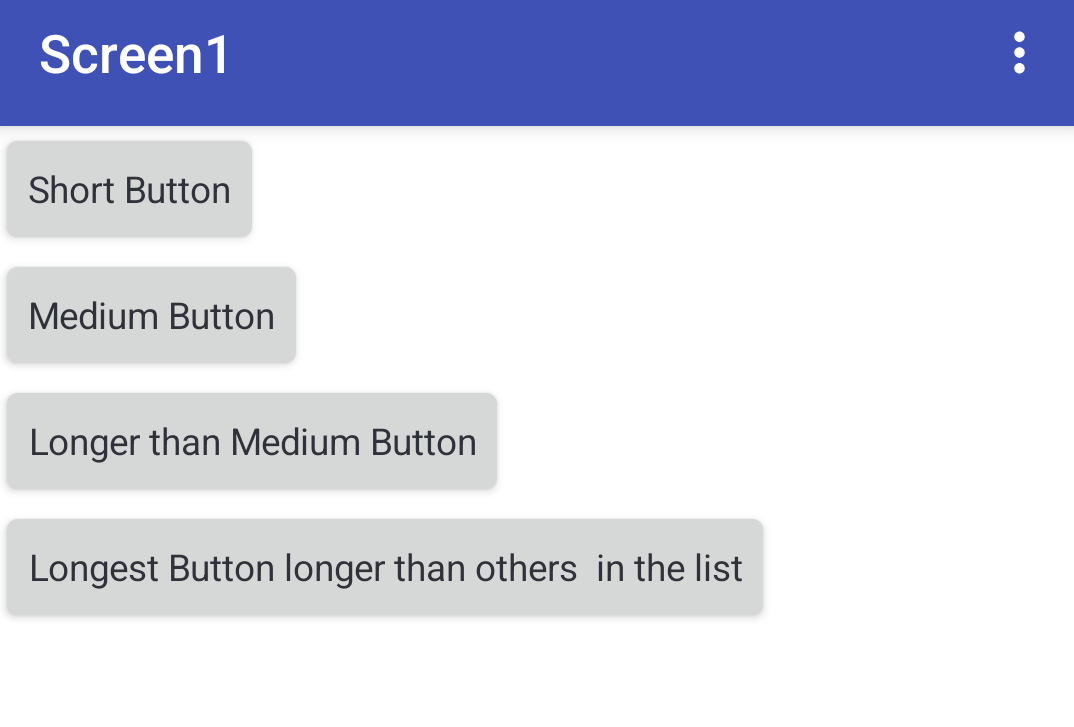
all physical buttons stay in position ( I didn't use an absolute arrangement), one just moves their properties around (width and text), ordered by width.
An anyButtonClicked event would be needed to handle button click actions (in this case based upon the text value)
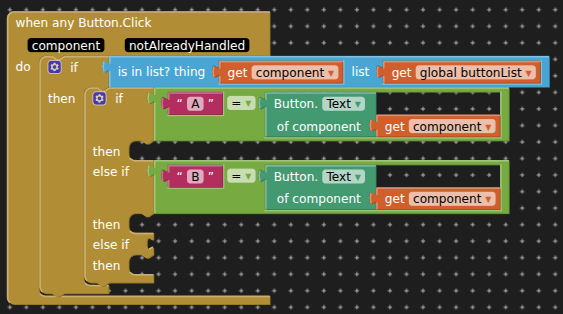
BEFORE
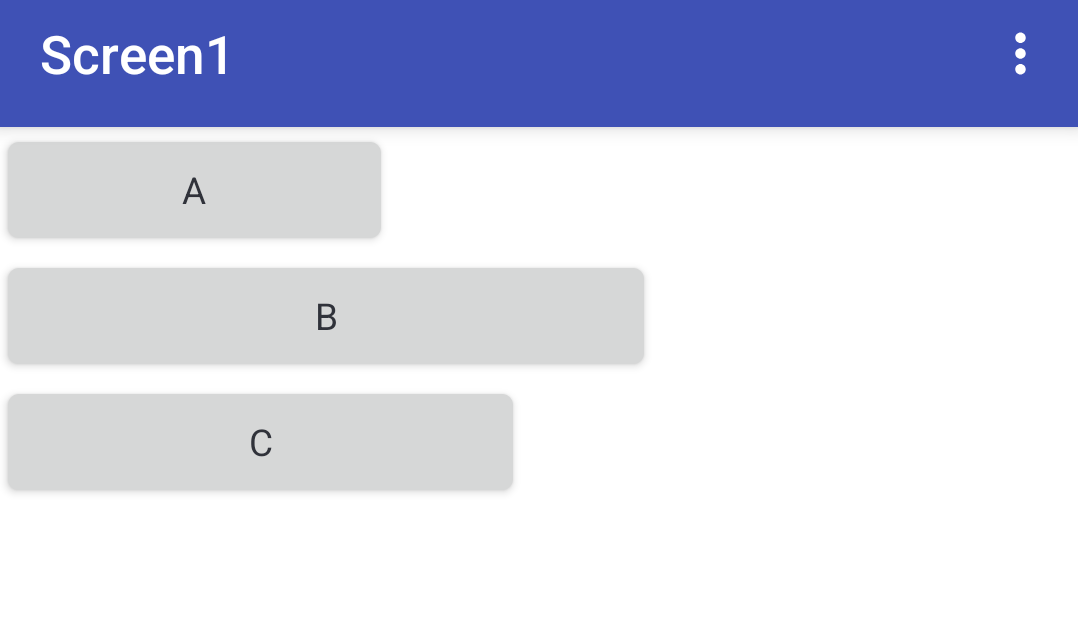
AFTER
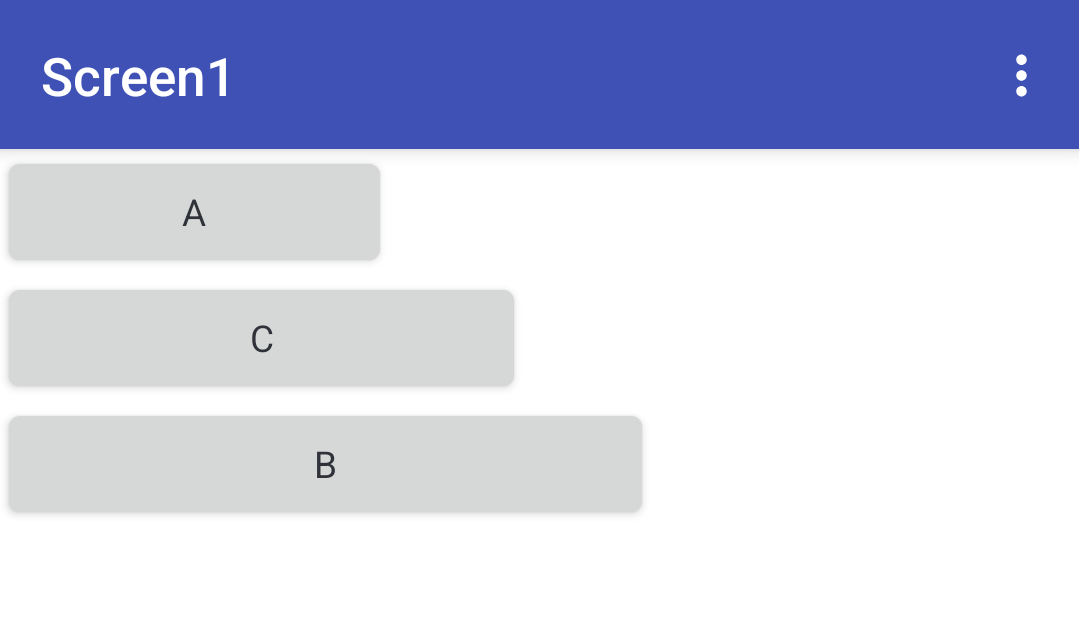
Hallo an alle, danke schön.
Einfach gesagt, ich brauche dass der zweite button sein Links an der Breite des ersten Buttons ausrichtet. Also links vom zweiten Button ist gleich breite vom ersten button.(entschuldigung dass ich das in Deutsch schreibe, aber ich bin zu müde um das ins Englische zu übersetzen) das heißt wir brauchen eine if-formel, die überprüft wenn der zweite Button sein links ist kleiner als die Breite des ersten buttons, dann soll er sein Links gleich die Breite vom ersten Button machen. Und das natürlich dann auch für alle anderen button, der dritte Button überprüft ob sein Links kleiner ist als die Breite vom zweiten Button und setzt sie dann wenn das so ist Links ist gleich breite von zweiten Button. Entschuldigung wenn ich das hier noch mal wiederhole, ich habe versucht das jetzt noch mal an das zu erklären, da ich den Eindruck habe dass ihr nicht ganz verstanden habt was ich brauche oder was ich suche.
Danke schön für eure Geduld mit mir
Based upon what you say, in its simplest form:
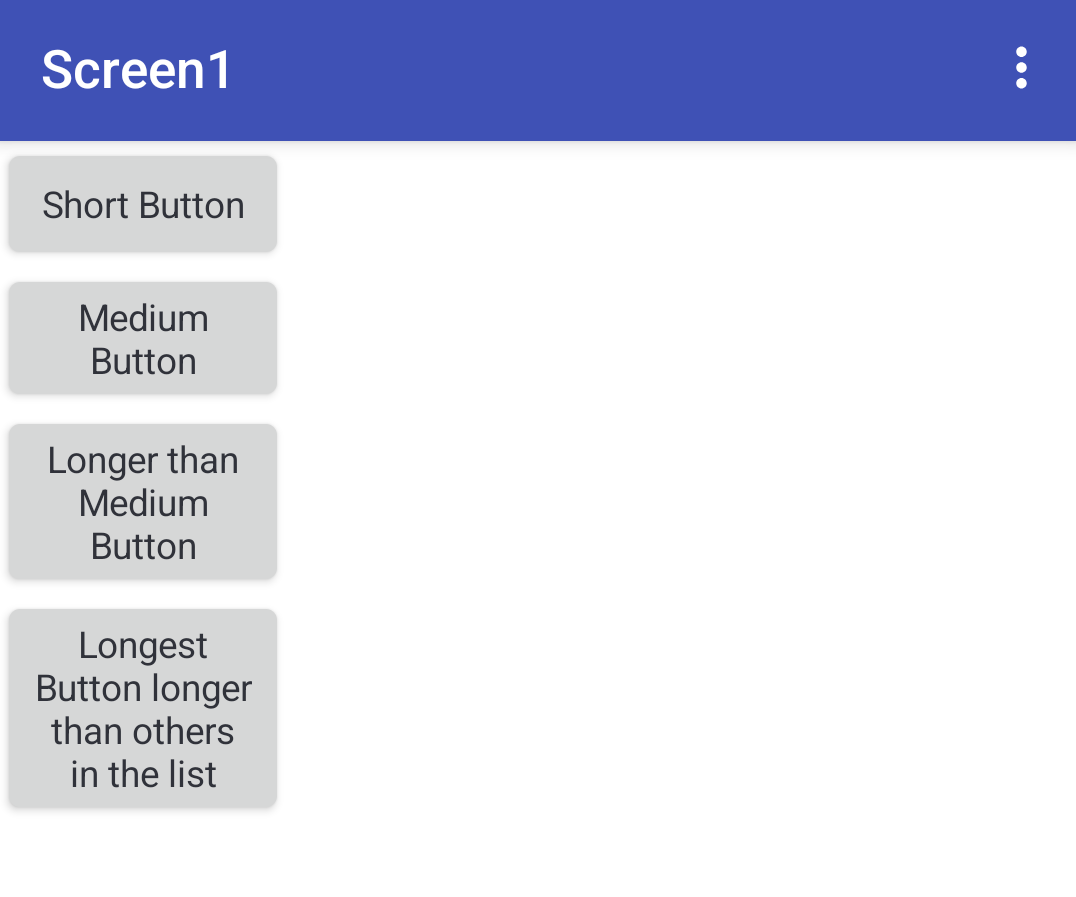
If you want all the buttons to be the same height, then the text in the longer button texts will need to be truncated:
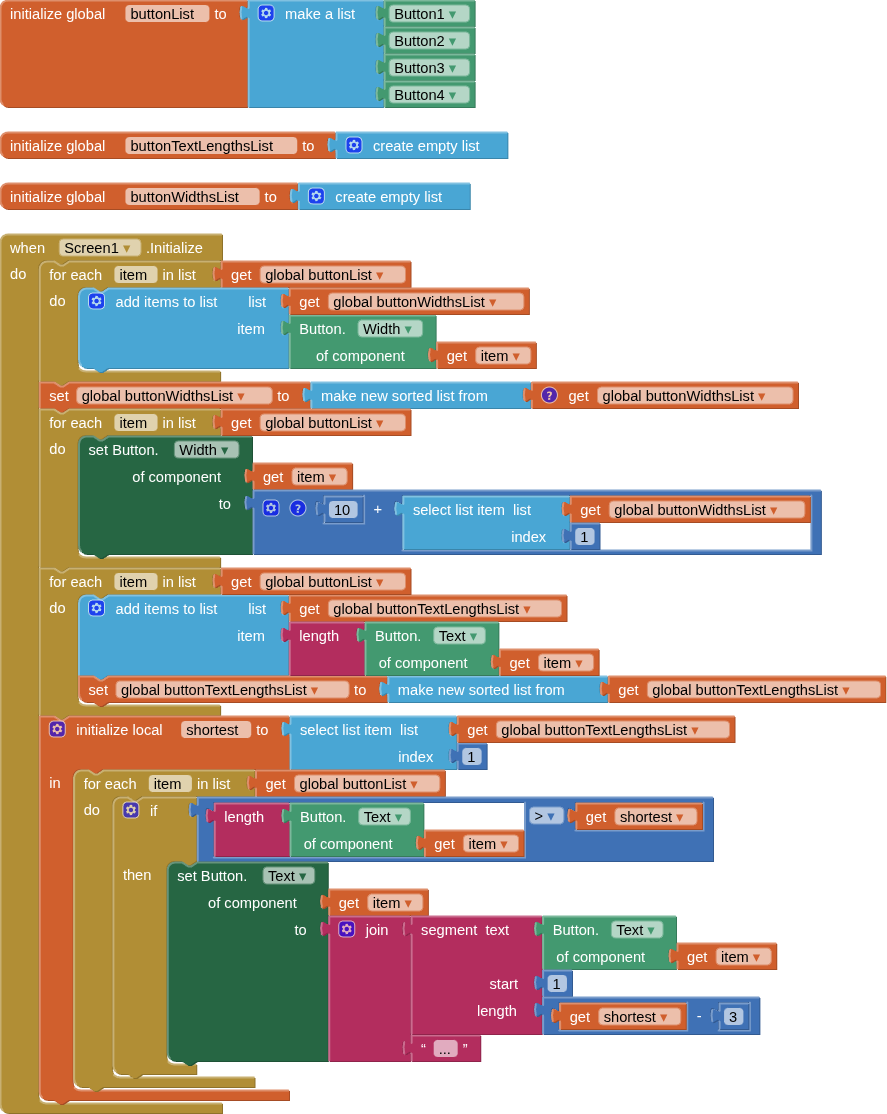
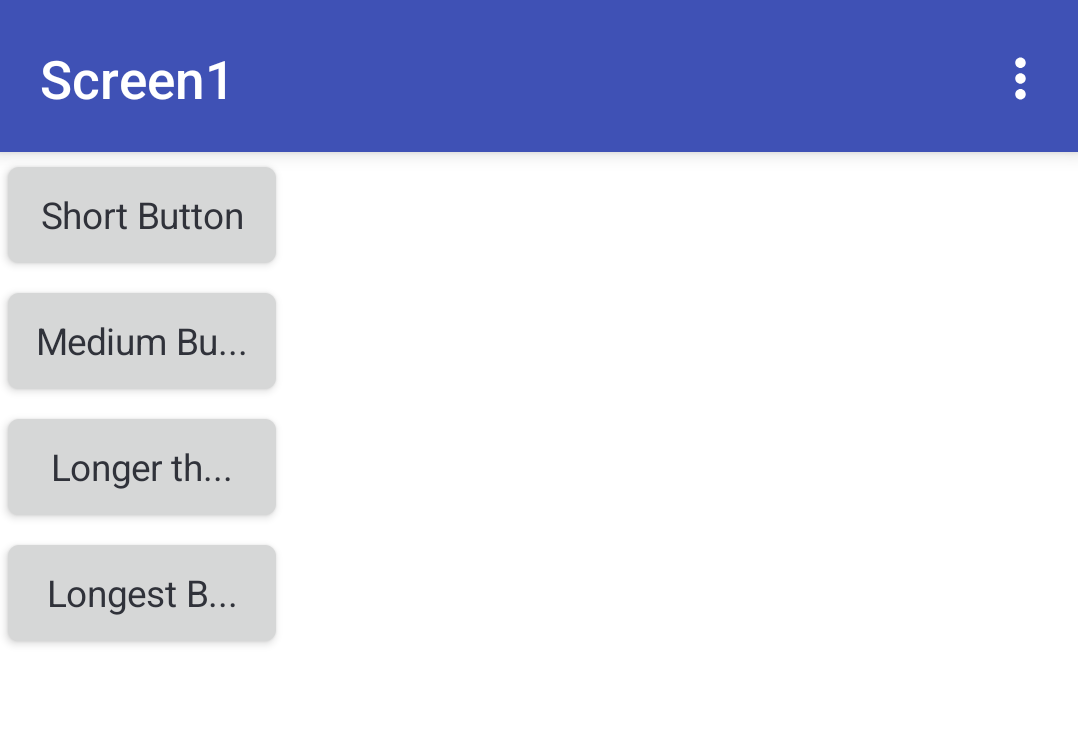
You should first make another list of the text content for each button, so that it is not lost! and can be used on button click etc.
Maybe you just need a horizontal ListView?
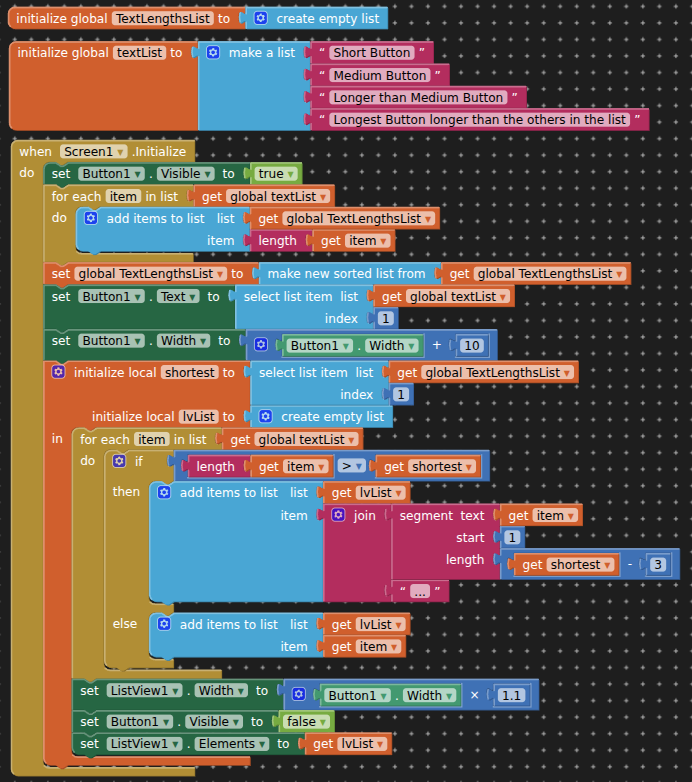
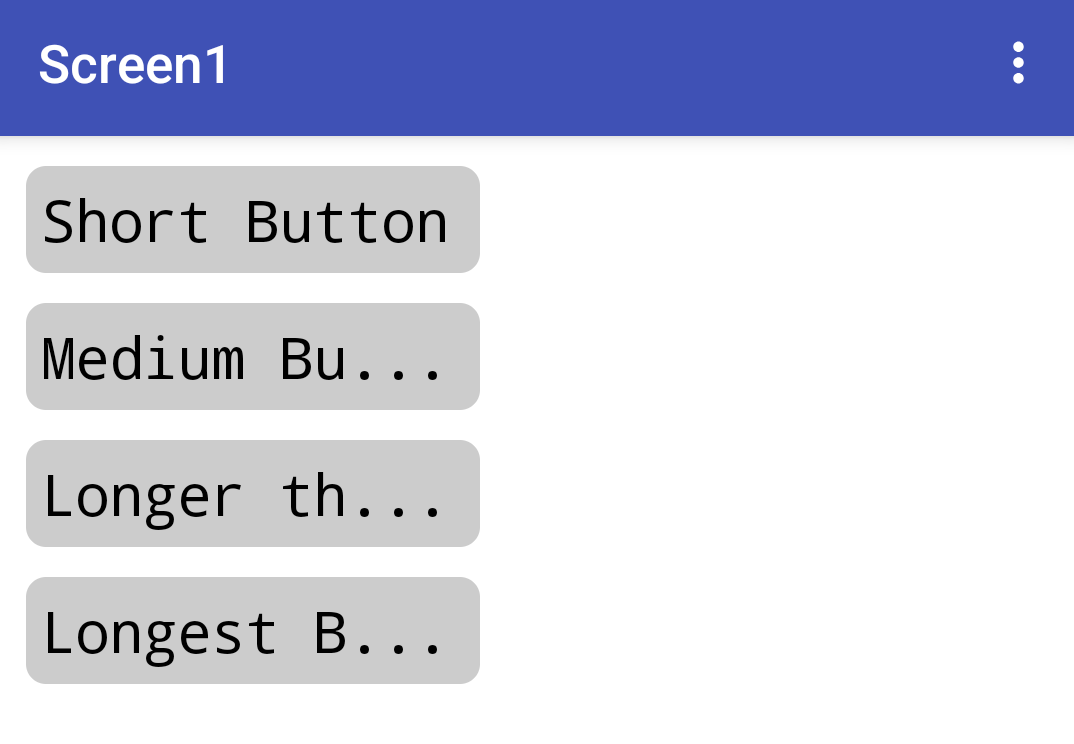
No, I need the possibility to make it like so:
First I make my creation in the designer: split my screen in parts by using arrangements.
For the statusbar using the absolute arrangement, because here I need the posibility that i can move the buttons inside the arrangement,. But in the first moment (for example when the screen intializes) i need that this buttons are arranged orderly, one besides each other automatically. And i will have all my buttons in a list, (this i will have by using the “evey button” thing) that i can later working with them, by selecting them from this list.
The automatic positioning must be accomplished by using the widths of the buttons. So that the width of the button before becomes the left for the following button.
This is all what i need in the moment. Noting more.
Pleeeease
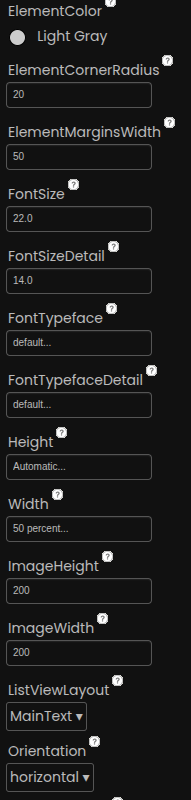
As suggested by @ABG use a horizontal listview ?
Can't help you with an Absolute Arrangement, never used one, probably never will either.
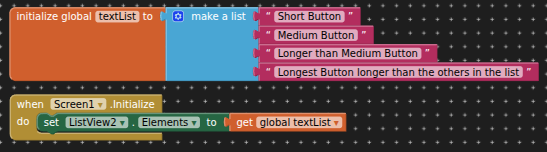
You can always rearrange the textList...
1 Like
What about the vertical coordinates. Do those matter? Because I do not think all af the buttons fit in one row. Do they?
Is this that you want to achieve? :

or this? :
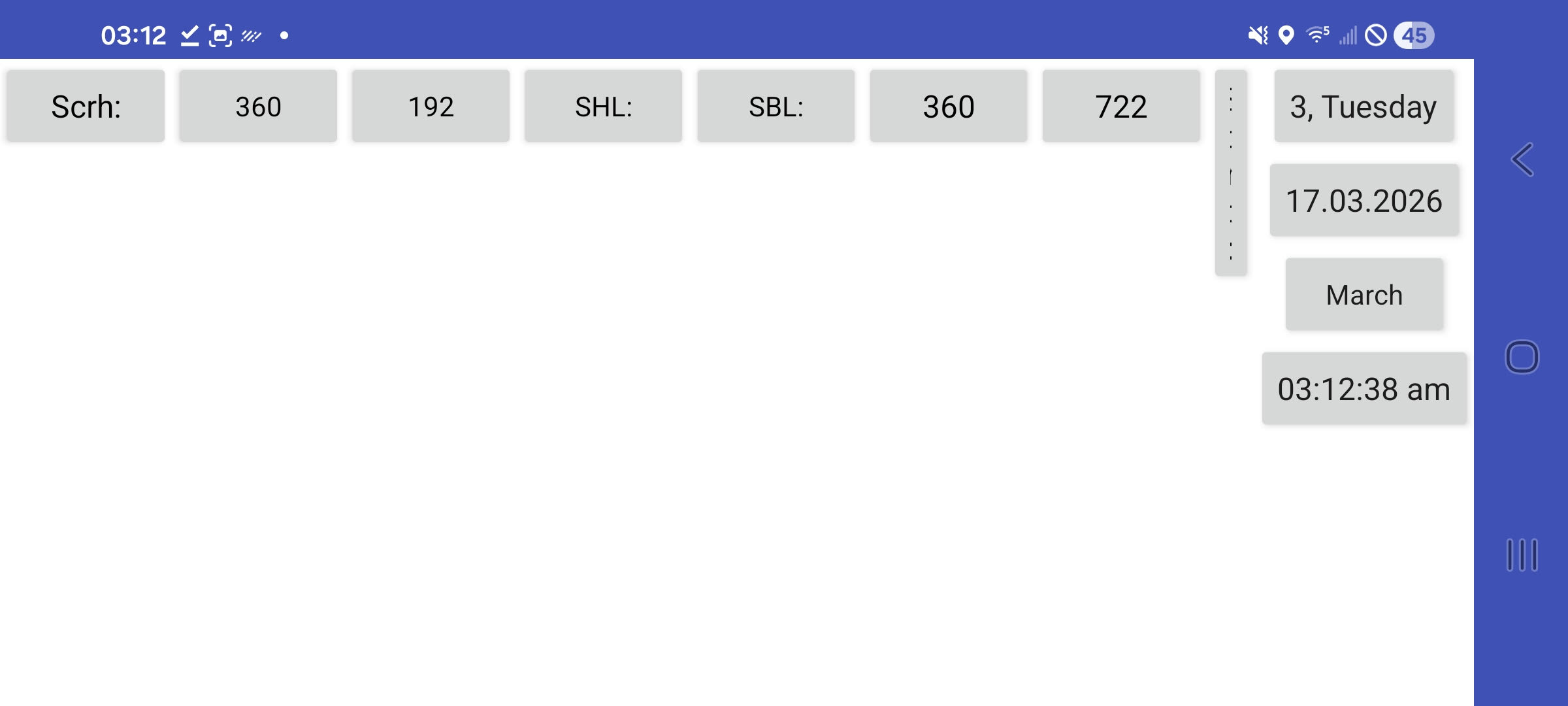
Edit: This is the order of their creation of course. If you want them in different order you have to create them in that order, or use extension like compcreator or dynamic component.
This. The second option.
Eaap1 (2).aia (106.7 KB)
Hello Usane, I will send you now a file, it is in HTML format, and there you will see and understand what I want to code or program or develope:
<html lang="de">
<head>
  <meta charset="UTF-8">
  <meta name="viewport" content="width=device-width, initial-scale=1.0">
  <title>Uhrzeit & Datum – Buttons</title>
</head>
<body>

<script>
// Globale Basis-Einstellungen für body
document.body.style.margin = "0"
document.body.style.padding = "0"
document.body.style.fontFamily = "Arial, Helvetica, sans-serif"
document.body.style.minHeight = "100vh"
document.body.style.background = "#f9f9f9"
document.body.style.fontSize = "18px"
// ────────────────────────────────────────────────
// MODUL: Uhrzeit
// ────────────────────────────────────────────────
Uhrzeit = {}
Uhrzeit.Tabelle = document.createElement("table")
    Uhrzeit.Tabelle.style.position = "fixed"
    Uhrzeit.Tabelle.style.top = "0px"
    Uhrzeit.Tabelle.style.right = "0px"
    Uhrzeit.Tabelle.style.zIndex = "100"
    Uhrzeit.Tabelle.style.borderCollapse = "collapse"
    Uhrzeit.Tabelle.style.backgroundColor = "#f8f8f8"
    Uhrzeit.Tabelle.style.boxShadow = "0 2px 8px rgba(0,0,0,0.15)"
// Zeilen
Uhrzeit.Zeile = []
Uhrzeit.Zeile[1] = document.createElement("tr")
Uhrzeit.Zeile[2] = document.createElement("tr")
Uhrzeit.Zeile[3] = document.createElement("tr")
Uhrzeit.Zeile[4] = document.createElement("tr")
// Buttons
Uhrzeit.Button = []
Uhrzeit.Button[1] = document.createElement("button")
Uhrzeit.Button[2] = document.createElement("button")
Uhrzeit.Button[3] = document.createElement("button")
Uhrzeit.Button[4] = document.createElement("button")
Uhrzeit.ButtonIndex = 1
while (Uhrzeit.ButtonIndex <= 4) {
    Uhrzeit.AktuellerButton = Uhrzeit.Button[Uhrzeit.ButtonIndex]

    Uhrzeit.AktuellerButton.style.width = "165px"

    Uhrzeit.AktuellerButton.style.height = "32px"

    Uhrzeit.AktuellerButton.style.border = "1px solid #888"

    Uhrzeit.AktuellerButton.style.margin = "0"

    Uhrzeit.AktuellerButton.style.padding = "0 4px"

    Uhrzeit.AktuellerButton.style.fontSize = "18px"

    Uhrzeit.AktuellerButton.style.backgroundColor = "#fff"

    Uhrzeit.AktuellerButton.style.color = "#222"

    Uhrzeit.AktuellerButton.style.cursor = "pointer"

    Uhrzeit.AktuellerButton.style.textAlign = "center"

    Uhrzeit.AktuellerButton.style.lineHeight = "1.3"

    Uhrzeit.AktuellerButton.style.borderRadius = "3px"

    Uhrzeit.AktuellerButton.style.boxShadow = "inset 0 1px 2px rgba(0,0,0,0.08)"

    Uhrzeit.ButtonIndex = Uhrzeit.ButtonIndex + 1
}
// ────────────────────────────────────────────────
// MODUL: Statusleiste
// ────────────────────────────────────────────────
Statusleiste = {}
Statusleiste.Tabelle = document.createElement("table")
    Statusleiste.Tabelle.style.position = "fixed"
    Statusleiste.Tabelle.style.top = "0px"
    Statusleiste.Tabelle.style.left = "0px"
    Statusleiste.Tabelle.style.zIndex = "100"
    Statusleiste.Tabelle.style.borderCollapse = "collapse"
    Statusleiste.Tabelle.style.backgroundColor = "#f8f8f8"
    Statusleiste.Tabelle.style.boxShadow = "0 2px 8px rgba(0,0,0,0.15)"
// Eine Zeile
Statusleiste.Zeile = document.createElement("tr")
// Buttons – 12 Stück
Statusleiste.Button = []
Statusleiste.Button[1]  = document.createElement("button")
Statusleiste.Button[2]  = document.createElement("button")
Statusleiste.Button[3]  = document.createElement("button")
Statusleiste.Button[4]  = document.createElement("button")
Statusleiste.Button[5]  = document.createElement("button")
Statusleiste.Button[6]  = document.createElement("button")
Statusleiste.Button[7]  = document.createElement("button")
Statusleiste.Button[8]  = document.createElement("button")
Statusleiste.Button[9]  = document.createElement("button")
Statusleiste.Button[10] = document.createElement("button")
Statusleiste.Button[11] = document.createElement("button")
Statusleiste.Button[12] = document.createElement("button")
Statusleiste.ButtonIndex = 1
while (Statusleiste.ButtonIndex <= 12) {
    Statusleiste.AktuellerButton = Statusleiste.Button[Statusleiste.ButtonIndex]

    Statusleiste.AktuellerButton.style.height = "32px"

    Statusleiste.AktuellerButton.style.border = "1px solid #888"

    Statusleiste.AktuellerButton.style.margin = "0"

    Statusleiste.AktuellerButton.style.padding = "0 8px"

    Statusleiste.AktuellerButton.style.fontSize = "18px"

    Statusleiste.AktuellerButton.style.backgroundColor = "#fff"

    Statusleiste.AktuellerButton.style.color = "#222"

    Statusleiste.AktuellerButton.style.cursor = "pointer"

    Statusleiste.AktuellerButton.style.textAlign = "center"

    Statusleiste.AktuellerButton.style.lineHeight = "1.3"

    Statusleiste.AktuellerButton.style.borderRadius = "3px"

    Statusleiste.AktuellerButton.style.boxShadow = "inset 0 1px 2px rgba(0,0,0,0.08)"

    Statusleiste.AktuellerButton.style.marginRight = "8px"

    Statusleiste.ButtonIndex = Statusleiste.ButtonIndex + 1
}
// Labels
Statusleiste.Button[1].textContent  = "Bildschirmbreite"
Statusleiste.Button[3].textContent  = "Ub:"
Statusleiste.Button[5].textContent  = "Uh:"
Statusleiste.Button[7].textContent  = "Sb:"
Statusleiste.Button[9].textContent  = "Sh:"
Statusleiste.Button[11].textContent = "Bildschirmhoehe:"
// ────────────────────────────────────────────────
// MODUL: Textarea
// ────────────────────────────────────────────────
Textarea = document.createElement("textarea")
    Textarea.style.position = "fixed";
    Textarea.style.fontFamily = "monospace"
    Textarea.style.fontSize = "18px"
    Textarea.style.width = Statusleiste.Bildschirmbreite + "px"
    //Textarea.style.maxWidth = "900px"
    Textarea.style.height = "180px"
    // Textarea.style.margin = "220px auto 40px"
    Textarea.style.display = "block"
    Textarea.style.padding = "12px"
    Textarea.style.border = "1px solid #aaa"
    Textarea.style.borderRadius = "6px"
    Textarea.style.resize = "vertical"
Textarea.placeholder = "Hier erscheint der Inhalt der angeklickten Buttons ..."
// ────────────────────────────────────────────────
// MODUL: Bausteine
// ────────────────────────────────────────────────
Bausteine = {}
Bausteine.Tabelle = document.createElement("table")
    Bausteine.Tabelle.style.position = "fixed";
    //Tabelle.style.margin = "40px auto"
    Bausteine.Tabelle.style.borderCollapse = "collapse"
Bausteine.Zeile = document.createElement("tr")
Bausteine.Button = []
Bausteine.Button[1] = document.createElement("button")
Bausteine.Button[2] = document.createElement("button")
Bausteine.Button[3] = document.createElement("button")
Bausteine.Button[4] = document.createElement("button")
Bausteine.Button[5] = document.createElement("button")
Bausteine.Button[6] = document.createElement("button")
Bausteine.Button[7] = document.createElement("button")
Bausteine.Button[8] = document.createElement("button")
Bausteine.Button[1].textContent = "Tabelle"
Bausteine.Button[2].textContent = "Button"
Bausteine.Button[3].textContent = "Label"
Bausteine.Button[4].textContent = "Textarea"
Bausteine.Button[5].textContent = "Status"
Bausteine.Button[6].textContent = "Live-Uhr"
Bausteine.Button[7].textContent = "Abstand"
Bausteine.Button[8].textContent = "Kommentar"
Bausteine.ButtonIndex = 1
while (Bausteine.ButtonIndex <= 8) {
    Bausteine.AktuellerButton = Bausteine.Button[Bausteine.ButtonIndex]

    Bausteine.AktuellerButton.style.width = "140px"

    Bausteine.AktuellerButton.style.height = "36px"

    Bausteine.AktuellerButton.style.border = "1px solid #888"

    Bausteine.AktuellerButton.style.margin = "4px"

    Bausteine.AktuellerButton.style.padding = "0 8px"

    Bausteine.AktuellerButton.style.fontSize = "17px"

    Bausteine.AktuellerButton.style.backgroundColor = "#eef"

    Bausteine.AktuellerButton.style.color = "#222"

    Bausteine.AktuellerButton.style.cursor = "pointer"

    Bausteine.AktuellerButton.style.textAlign = "center"

    Bausteine.AktuellerButton.style.lineHeight = "1.3"

    Bausteine.AktuellerButton.style.borderRadius = "4px"

    Bausteine.AktuellerButton.style.boxShadow = "inset 0 1px 2px rgba(0,0,0,0.08)"

    Bausteine.ButtonIndex = Bausteine.ButtonIndex + 1
}
// ────────────────────────────────────────────────
// DOM-Zusammenbau
// ────────────────────────────────────────────────
// Uhrzeit DOM
Uhrzeit.Zeile[1].appendChild(Uhrzeit.Button[1])
Uhrzeit.Zeile[2].appendChild(Uhrzeit.Button[2])
Uhrzeit.Zeile[3].appendChild(Uhrzeit.Button[3])
Uhrzeit.Zeile[4].appendChild(Uhrzeit.Button[4])
Uhrzeit.Tabelle.appendChild(Uhrzeit.Zeile[1])
Uhrzeit.Tabelle.appendChild(Uhrzeit.Zeile[2])
Uhrzeit.Tabelle.appendChild(Uhrzeit.Zeile[3])
Uhrzeit.Tabelle.appendChild(Uhrzeit.Zeile[4])
// Statusleiste DOM
Statusleiste.Zeile.appendChild(Statusleiste.Button[1])
Statusleiste.Zeile.appendChild(Statusleiste.Button[2])
Statusleiste.Zeile.appendChild(Statusleiste.Button[3])
Statusleiste.Zeile.appendChild(Statusleiste.Button[4])
Statusleiste.Zeile.appendChild(Statusleiste.Button[5])
Statusleiste.Zeile.appendChild(Statusleiste.Button[6])
Statusleiste.Zeile.appendChild(Statusleiste.Button[7])
Statusleiste.Zeile.appendChild(Statusleiste.Button[8])
Statusleiste.Zeile.appendChild(Statusleiste.Button[9])
Statusleiste.Zeile.appendChild(Statusleiste.Button[10])
Statusleiste.Zeile.appendChild(Statusleiste.Button[11])
Statusleiste.Zeile.appendChild(Statusleiste.Button[12])
Statusleiste.Tabelle.appendChild(Statusleiste.Zeile)
// Bausteine DOM
Bausteine.ButtonIndex = 1
while (Bausteine.ButtonIndex <= 8) {
    Bausteine.Zeile.appendChild(Bausteine.Button[Bausteine.ButtonIndex])

    Bausteine.ButtonIndex = Bausteine.ButtonIndex + 1
}
Bausteine.Tabelle.appendChild(Bausteine.Zeile)
// Alle Module in den Body
document.body.appendChild(Statusleiste.Tabelle)
document.body.appendChild(Uhrzeit.Tabelle)
document.body.appendChild(Textarea)
document.body.appendChild(Bausteine.Tabelle)
// ────────────────────────────────────────────────
// Einfache Text-Einfüge-Funktion
// ────────────────────────────────────────────────
function insertText(text) {
    Textarea.StartPos = Textarea.selectionStart

    Textarea.EndPos = Textarea.selectionEnd

    Textarea.value =
        Textarea.value.substring(0, Textarea.StartPos) +
        text +
        Textarea.value.substring(Textarea.EndPos)

    Textarea.selectionStart = Textarea.selectionEnd = Textarea.StartPos + text.length

    Textarea.focus()

    Textarea.scrollTop = Textarea.scrollHeight
}
// ────────────────────────────────────────────────
// Klick-Handler
// ────────────────────────────────────────────────
Uhrzeit.Button[1].onclick = function() { insertText(Uhrzeit.Button[1].textContent) }
Uhrzeit.Button[2].onclick = function() { insertText(Uhrzeit.Button[2].textContent) }
Uhrzeit.Button[3].onclick = function() { insertText(Uhrzeit.Button[3].textContent) }
Uhrzeit.Button[4].onclick = function() { insertText(Uhrzeit.Button[4].textContent) }
Statusleiste.Button[1].onclick  = function() { insertText("Bildschirmbreite") }
Statusleiste.Button[2].onclick  = function() { insertText(Statusleiste.Button[2].textContent) }
Statusleiste.Button[3].onclick  = function() { insertText("Uhrzeit.Breite") }
Statusleiste.Button[4].onclick  = function() { insertText(Statusleiste.Button[4].textContent) }
Statusleiste.Button[5].onclick  = function() { insertText("Uhrzeit.Hoehe") }
Statusleiste.Button[6].onclick  = function() { insertText(Statusleiste.Button[6].textContent) }
Statusleiste.Button[7].onclick  = function() { insertText("Statusleiste.Breite") }
Statusleiste.Button[8].onclick  = function() { insertText(Statusleiste.Button[8].textContent) }
Statusleiste.Button[9].onclick  = function() { insertText("Statusleiste.Hoehe") }
Statusleiste.Button[10].onclick = function() { insertText(Statusleiste.Button[10].textContent) }
Statusleiste.Button[11].onclick = function() { insertText("Bildschirmhoehe") }
Statusleiste.Button[12].onclick = function() { insertText(Statusleiste.Button[12].textContent) }
// Bausteine – alle mit maximal luftiger Variante E
Bausteine.Button[1].onclick = function() {
  insertText(
"NeueTabelle = {}\n\n" +
"    NeueTabelle.Tabelle = document.createElement(\"table\")\n\n" +
"    NeueTabelle.Tabelle.style.position = \"relative\"\n\n" +
"    NeueTabelle.Tabelle.style.margin = \"20px auto\"\n\n" +
"    NeueTabelle.Tabelle.style.borderCollapse = \"collapse\"\n\n" +
"    NeueTabelle.Tabelle.style.border = \"1px solid #888\"\n\n" +
"    NeueTabelle.Tabelle.style.backgroundColor = \"#ffffff\"\n\n" +
"document.body.appendChild(NeueTabelle.Tabelle)\n"
  )
}
Bausteine.Button[2].onclick = function() {
  insertText(
"NeuerButton = document.createElement(\"button\")\n\n" +
"    NeuerButton.textContent = \"Neuer Button\"\n\n" +
"    NeuerButton.style.width = \"165px\"\n\n" +
"    NeuerButton.style.height = \"32px\"\n\n" +
"    NeuerButton.style.border = \"1px solid #888\"\n\n" +
"    NeuerButton.style.margin = \"8px\"\n\n" +
"    NeuerButton.style.padding = \"0 4px\"\n\n" +
"    NeuerButton.style.fontSize = \"18px\"\n\n" +
"    NeuerButton.style.backgroundColor = \"#ffffff\"\n\n" +
"    NeuerButton.style.color = \"#222\"\n\n" +
"    NeuerButton.style.cursor = \"pointer\"\n\n" +
"    NeuerButton.style.textAlign = \"center\"\n\n" +
"    NeuerButton.style.lineHeight = \"1.3\"\n\n" +
"    NeuerButton.style.borderRadius = \"3px\"\n\n" +
"    NeuerButton.style.boxShadow = \"inset 0 1px 2px rgba(0,0,0,0.08)\"\n\n" +
"document.body.appendChild(NeuerButton)\n"
  )
}
Bausteine.Button[3].onclick = function() {
  insertText(
"NeuesLabel = document.createElement(\"div\")\n\n" +
"    NeuesLabel.textContent = \"Überschrift oder Beschreibung\"\n\n" +
"    NeuesLabel.style.fontSize = \"18px\"\n\n" +
"    NeuesLabel.style.margin = \"15px 0\"\n\n" +
"    NeuesLabel.style.fontWeight = \"bold\"\n\n" +
"    NeuesLabel.style.color = \"#222\"\n\n" +
"document.body.appendChild(NeuesLabel)\n"
  )
}
Bausteine.Button[4].onclick = function() {
  insertText(
"NeueTextarea = document.createElement(\"textarea\")\n\n" +
"    NeueTextarea.placeholder = \"Hier Text eingeben ...\"\n\n" +
"    NeueTextarea.style.fontFamily = \"monospace\"\n\n" +
"    NeueTextarea.style.fontSize = \"18px\"\n\n" +
"    NeueTextarea.style.width = \"90%\"\n\n" +
"    NeueTextarea.style.maxWidth = \"900px\"\n\n" +
"    NeueTextarea.style.height = \"180px\"\n\n" +
"    NeueTextarea.style.margin = \"20px auto\"\n\n" +
"    NeueTextarea.style.display = \"block\"\n\n" +
"    NeueTextarea.style.padding = \"12px\"\n\n" +
"    NeueTextarea.style.border = \"1px solid #aaa\"\n\n" +
"    NeueTextarea.style.borderRadius = \"6px\"\n\n" +
"    NeueTextarea.style.resize = \"vertical\"\n\n" +
"document.body.appendChild(NeueTextarea)\n"
  )
}
Bausteine.Button[5].onclick = function() {
  insertText(
"NeueStatusleiste = {}\n\n" +
"    NeueStatusleiste.Div = document.createElement(\"div\")\n\n" +
"    NeueStatusleiste.Div.textContent = \"Status: Breite = \" + window.innerWidth\n\n" +
"    NeueStatusleiste.Div.style.position = \"fixed\"\n\n" +
"    NeueStatusleiste.Div.style.bottom = \"10px\"\n\n" +
"    NeueStatusleiste.Div.style.left = \"10px\"\n\n" +
"    NeueStatusleiste.Div.style.backgroundColor = \"#f0f0f0\"\n\n" +
"    NeueStatusleiste.Div.style.padding = \"8px 12px\"\n\n" +
"    NeueStatusleiste.Div.style.border = \"1px solid #ccc\"\n\n" +
"    NeueStatusleiste.Div.style.borderRadius = \"4px\"\n\n" +
"document.body.appendChild(NeueStatusleiste.Div)\n"
  )
}
Bausteine.Button[6].onclick = function() {
  insertText(
"LiveUhrzeit = {}\n\n" +
"    LiveUhrzeit.Tabelle = document.createElement(\"table\")\n\n" +
"    LiveUhrzeit.Tabelle.style.position = \"absolute\"\n\n" +
"    LiveUhrzeit.Tabelle.style.top = \"200px\"\n\n" +
"    LiveUhrzeit.Tabelle.style.right = \"20px\"\n\n" +
"    LiveUhrzeit.Tabelle.style.zIndex = \"90\"\n\n" +
"    LiveUhrzeit.Tabelle.style.borderCollapse = \"collapse\"\n\n" +
"    LiveUhrzeit.Tabelle.style.backgroundColor = \"#f8f8f8\"\n\n" +
"    LiveUhrzeit.Tabelle.style.boxShadow = \"0 2px 8px rgba(0,0,0,0.15)\"\n\n" +
"    LiveUhrzeit.Zeile = []\n\n" +
"    LiveUhrzeit.Zeile[1] = document.createElement(\"tr\")\n\n" +
"    LiveUhrzeit.Zeile[2] = document.createElement(\"tr\")\n\n" +
"    LiveUhrzeit.Zeile[3] = document.createElement(\"tr\")\n\n" +
"    LiveUhrzeit.Zeile[4] = document.createElement(\"tr\")\n\n" +
"    LiveUhrzeit.Button = []\n\n" +
"    LiveUhrzeit.Button[1] = document.createElement(\"button\")\n\n" +
"    LiveUhrzeit.Button[2] = document.createElement(\"button\")\n\n" +
"    LiveUhrzeit.Button[3] = document.createElement(\"button\")\n\n" +
"    LiveUhrzeit.Button[4] = document.createElement(\"button\")\n\n" +
"    LiveUhrzeit.ButtonIndex = 1\n\n" +
"    while (LiveUhrzeit.ButtonIndex <= 4) {\n\n" +
"      LiveUhrzeit.AktuellerButton = LiveUhrzeit.Button[LiveUhrzeit.ButtonIndex]\n\n" +
"      LiveUhrzeit.AktuellerButton.style.width = \"165px\"\n\n" +
"      LiveUhrzeit.AktuellerButton.style.height = \"32px\"\n\n" +
"      LiveUhrzeit.AktuellerButton.style.border = \"1px solid #888\"\n\n" +
"      LiveUhrzeit.AktuellerButton.style.margin = \"0\"\n\n" +
"      LiveUhrzeit.AktuellerButton.style.padding = \"0 4px\"\n\n" +
"      LiveUhrzeit.AktuellerButton.style.fontSize = \"18px\"\n\n" +
"      LiveUhrzeit.AktuellerButton.style.backgroundColor = \"#fff\"\n\n" +
"      LiveUhrzeit.AktuellerButton.style.color = \"#222\"\n\n" +
"      LiveUhrzeit.AktuellerButton.style.cursor = \"pointer\"\n\n" +
"      LiveUhrzeit.AktuellerButton.style.textAlign = \"center\"\n\n" +
"      LiveUhrzeit.AktuellerButton.style.lineHeight = \"1.3\"\n\n" +
"      LiveUhrzeit.AktuellerButton.style.borderRadius = \"3px\"\n\n" +
"      LiveUhrzeit.AktuellerButton.style.boxShadow = \"inset 0 1px 2px rgba(0,0,0,0.08)\"\n\n" +
"      LiveUhrzeit.ButtonIndex = LiveUhrzeit.ButtonIndex + 1\n\n" +
"    }\n\n" +
"    function LiveUhrzeitUndDatumAktualisieren() {\n\n" +
"      LiveUhrzeit.Jetzt = new Date()\n\n" +
"      LiveUhrzeit.StundeZahl = LiveUhrzeit.Jetzt.getHours().toString().padStart(2, \"0\")\n\n" +
"      LiveUhrzeit.MinuteZahl = LiveUhrzeit.Jetzt.getMinutes().toString().padStart(2, \"0\")\n\n" +
"      LiveUhrzeit.SekundeZahl = LiveUhrzeit.Jetzt.getSeconds().toString().padStart(2, \"0\")\n\n" +
"      LiveUhrzeit.UhrzeitString = LiveUhrzeit.StundeZahl + \":\" + LiveUhrzeit.MinuteZahl + \":\" + LiveUhrzeit.SekundeZahl\n\n" +
"      LiveUhrzeit.Button[4].textContent = LiveUhrzeit.UhrzeitString\n\n" +
"    }\n\n" +
"    setInterval(LiveUhrzeitUndDatumAktualisieren, 1000)\n\n" +
"    LiveUhrzeitUndDatumAktualisieren()\n\n" +
"    LiveUhrzeit.Zeile[1].appendChild(LiveUhrzeit.Button[1])\n\n" +
"    LiveUhrzeit.Zeile[2].appendChild(LiveUhrzeit.Button[2])\n\n" +
"    LiveUhrzeit.Zeile[3].appendChild(LiveUhrzeit.Button[3])\n\n" +
"    LiveUhrzeit.Zeile[4].appendChild(LiveUhrzeit.Button[4])\n\n" +
"    LiveUhrzeit.Tabelle.appendChild(LiveUhrzeit.Zeile[1])\n\n" +
"    LiveUhrzeit.Tabelle.appendChild(LiveUhrzeit.Zeile[2])\n\n" +
"    LiveUhrzeit.Tabelle.appendChild(LiveUhrzeit.Zeile[3])\n\n" +
"    LiveUhrzeit.Tabelle.appendChild(LiveUhrzeit.Zeile[4])\n\n" +
"    document.body.appendChild(LiveUhrzeit.Tabelle)\n"
  )
}
Bausteine.Button[7].onclick = function() {
  insertText("AbstandElement = document.createElement(\"div\")\n\n" +
             "    AbstandElement.style.height = \"60px\"\n\n" +
             "document.body.appendChild(AbstandElement)\n")
}
Bausteine.Button[8].onclick = function() {
  insertText("// ========================================================\n" +
             "//   Neuer Code-Abschnitt – " + new Date().toLocaleString() + "\n" +
             "// ========================================================\n\n")
}
// ────────────────────────────────────────────────
// Aktualisierungs-Funktionen
// ────────────────────────────────────────────────
function UhrzeitUndDatumAktualisieren() {
    Uhrzeit.Jetzt = new Date()
    Uhrzeit.WochentageArray = ["Sonntag", "Montag", "Dienstag", "Mittwoch", "Donnerstag", "Freitag", "Samstag"]

    Uhrzeit.WochentagNummerRaw = Uhrzeit.Jetzt.getDay()

    Uhrzeit.WochentagNummer = Uhrzeit.WochentagNummerRaw === 0 ? 7 : Uhrzeit.WochentagNummerRaw

    Uhrzeit.WochentagName = Uhrzeit.WochentageArray[Uhrzeit.WochentagNummerRaw]
    Uhrzeit.MonateArray = ["Januar","Februar","März","April","Mai","Juni","Juli","August","September","Oktober","November","Dezember"]

    Uhrzeit.MonatNummer = Uhrzeit.Jetzt.getMonth() + 1

    Uhrzeit.MonatName = Uhrzeit.MonateArray[Uhrzeit.Jetzt.getMonth()]
    Uhrzeit.TagZahl = Uhrzeit.Jetzt.getDate().toString().padStart(2, "0")

    Uhrzeit.MonatZahl = Uhrzeit.MonatNummer.toString().padStart(2, "0")

    Uhrzeit.JahrZahl = Uhrzeit.Jetzt.getFullYear()

    Uhrzeit.DatumString = Uhrzeit.TagZahl + "." + Uhrzeit.MonatZahl + "." + Uhrzeit.JahrZahl
    Uhrzeit.StundeZahl = Uhrzeit.Jetzt.getHours().toString().padStart(2, "0")

    Uhrzeit.MinuteZahl = Uhrzeit.Jetzt.getMinutes().toString().padStart(2, "0")

    Uhrzeit.SekundeZahl = Uhrzeit.Jetzt.getSeconds().toString().padStart(2, "0")

    Uhrzeit.UhrzeitString = Uhrzeit.StundeZahl + ":" + Uhrzeit.MinuteZahl + ":" + Uhrzeit.SekundeZahl
    Uhrzeit.Button[1].textContent = Uhrzeit.WochentagNummer + ", " + Uhrzeit.WochentagName

    Uhrzeit.Button[2].textContent = Uhrzeit.MonatNummer + ", " + Uhrzeit.MonatName

    Uhrzeit.Button[3].textContent = Uhrzeit.DatumString

    Uhrzeit.Button[4].textContent = Uhrzeit.UhrzeitString
    StatusleisteUndDimensionenAktualisieren()
}
function StatusleisteUndDimensionenAktualisieren() {
    Statusleiste.BildschirmBreite = window.innerWidth

    Statusleiste.BildschirmHoehe = window.innerHeight

    Statusleiste.UhrzeitBreite    = Uhrzeit.Tabelle.offsetWidth

    Statusleiste.UhrzeitHoehe     = Uhrzeit.Tabelle.offsetHeight
    Statusleiste.Breite = Statusleiste.BildschirmBreite - Statusleiste.UhrzeitBreite

    Statusleiste.Tabelle.style.width = (window.innerWidth - Uhrzeit.Tabelle.offsetWidth) + "px";

    Statusleiste.Hoehe  = Statusleiste.Tabelle.offsetHeight;

    if (Statusleiste.Hoehe < Statusleiste.UhrzeitHoehe) {

    Textarea.style.top = Statusleiste.UhrzeitHoehe + "px";}

    else {

    Textarea.style.top = Statusleiste.Hoehe + "px";}

    Textarea.Breite = Statusleiste.BildschirmBreite;

    Textarea.style.width = Textarea.Breite + "px";

    Textarea.Hoehe = Textarea.offsetHeight;

    Bausteine.Tabelle.style.top = (Textarea.offsetTop + Textarea.Hoehe) + "px";

    Statusleiste.Button[2].textContent  = Statusleiste.BildschirmBreite

    Statusleiste.Button[4].textContent  = Statusleiste.UhrzeitBreite

    Statusleiste.Button[6].textContent  = Statusleiste.UhrzeitHoehe

    Statusleiste.Button[8].textContent  = Statusleiste.Breite

    Statusleiste.Button[10].textContent = Statusleiste.Hoehe

    Statusleiste.Button[12].textContent = Statusleiste.BildschirmHoehe
}
// Start
setInterval(UhrzeitUndDatumAktualisieren, 1000)
window.addEventListener('resize', StatusleisteUndDimensionenAktualisieren)
UhrzeitUndDatumAktualisieren()
</script>

</body>
</html>"
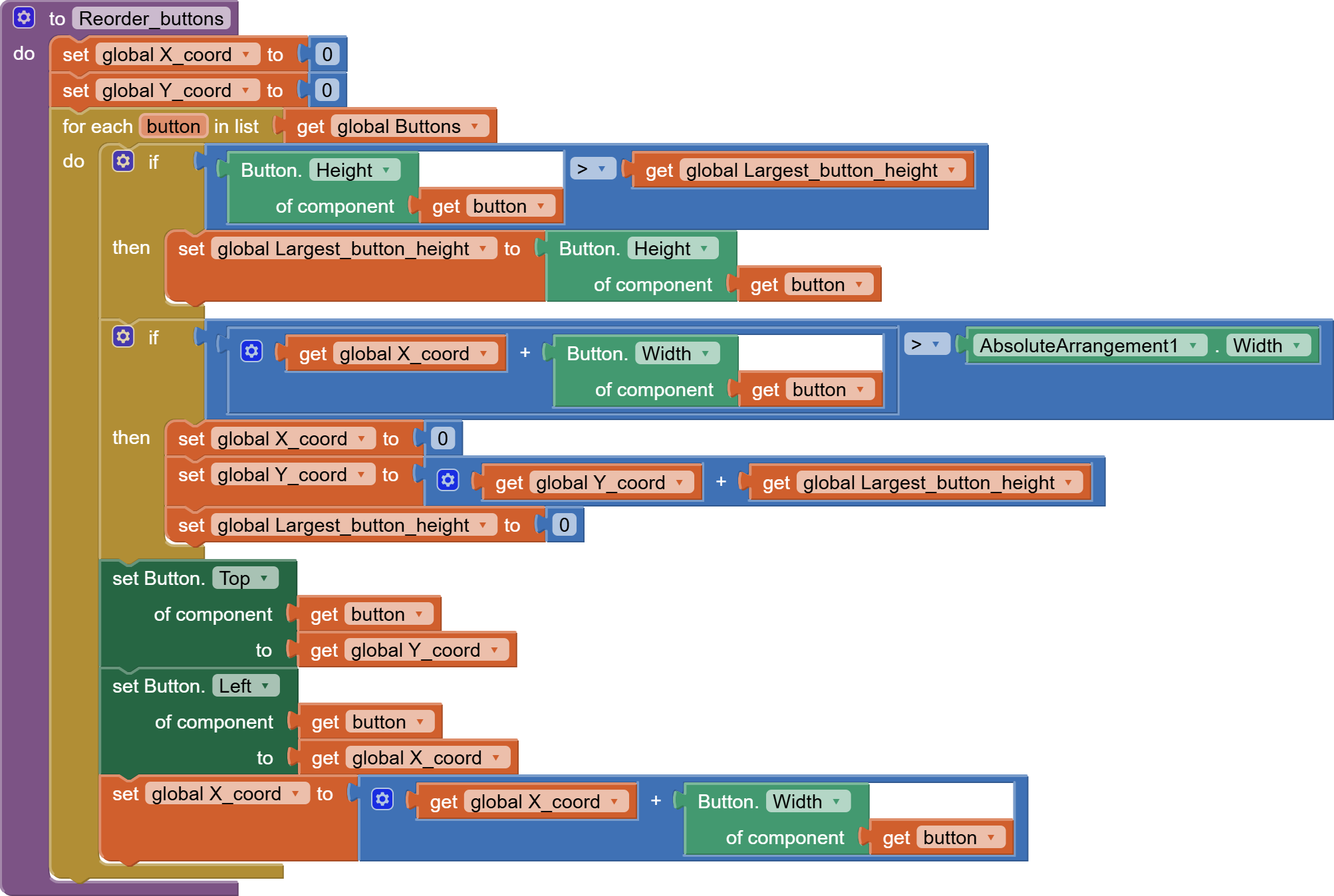
That is our next step: an algorithm that measures, if all buttons enter in one row, and if not, then to bring it to another row.
That is not a difficult task. I have put it into a procedure so you can reuse it after screen init, for example if you want to handle screen reorientation. This procedure handles buttons with different height in the same row. Althoug it could use a little refinement if you want to aling every button in the middle of the row. But for now I just assume every button has the same height.
So here is the procedure:
Also the full aia file.
Eaap1 (3).aia (107.7 KB)
Hi, you really looked on my HTML? And it really Max sense for you?
Thanks 

There was no HTML file. You probably messed up the attachment. Check your comment here:
I was put the HTML File directly as the text. It was not attached as a File.