Hi
Google has introduced a raft of security measures. One of them was to deny 3rd Party Apps the ability to send SMS directly - the App has to pass the msg to the device's messenger instead.
So if you use App Inventor's SendMessage, that's what should happen. This means that Google will accept your App for the Google Play Store. If your App is not going to be distributed via Google Play, you can use App Inventor's SendMessageDirect.
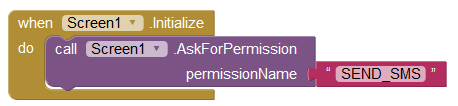
Both of the App Inventor functions should already have the permissions sorted. You can try:
From the Help:
A component that will, when the SendMessage method is called, launch the device’s preferred texting app to send the text message specified in the SendMessage property to the phone number specified in the PhoneNumber property. You may also send text messages without user interaction by calling SendMessageDirect instead, but this adds dangerous permissions to your final app.
If the ReceivingEnabled property is set to 1 messages will not be received. If ReceivingEnabled is set to 2 messages will be received only when the application is running. Finally if ReceivingEnabled is set to 3, messages will be received when the application is running and when the application is not running they will be queued and a notification displayed to the user.
When a message arrives, the MessageReceived event is raised and provides the sending number and message.
An app that includes this component will receive messages even when it is in the background (i.e. when it’s not visible on the screen) and, moreso, even if the app is not running, so long as it’s installed on the phone. If the phone receives a text message when the app is not in the foreground, the phone will show a notification in the notification bar. Selecting the notification will bring up the app. As an app developer, you’ll probably want to give your users the ability to control ReceivingEnabled so that they can make the phone ignore text messages.
If the GoogleVoiceEnabled property is true, messages can be sent over Wifi using Google Voice. This option requires that the user have a Google Voice account and that the mobile Voice app is installed on the phone. The Google Voice option works only on phones that support Android 2.0 (Eclair) or higher. Unfortunately, receiving no longer works in Google Voice due to changes introduced in Google Voice App.
To specify the phone number (e.g., 650-555-1212), set the PhoneNumber property to a Text string with the specified digits (e.g., 6505551212). Dashes, dots, and parentheses may be included (e.g., (650)-555-1212) but will be ignored; spaces may not be included.
Another way for an app to specify a phone number would be to include a PhoneNumberPicker component, which lets the users select a phone numbers from the ones stored in the the phone’s contacts.