Hmmm, needed more work as a standalone script...
BLOCKS
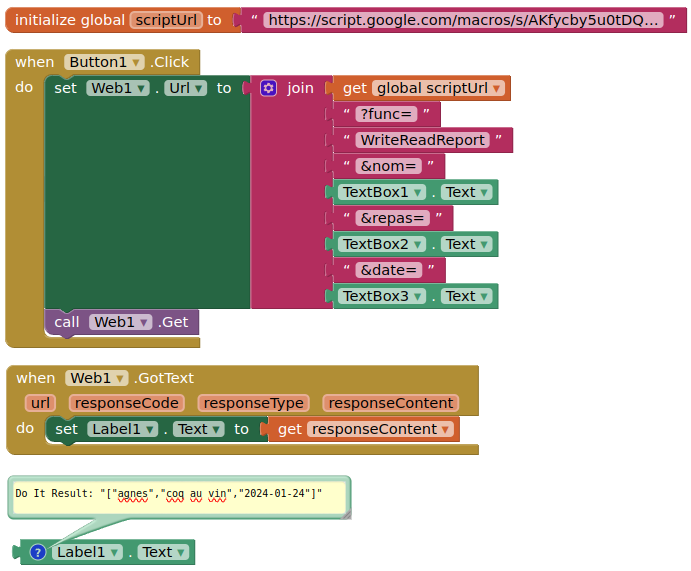
SCRIPT
var ss = SpreadsheetApp.openById('1anRffATqaLdmm9uacIThgLKdmEF_mVvmEm12zwu3ZGY');
var sh = ss.getSheetByName('reports');

function doGet(e) {
if (e.parameter.func == "WriteReadReport") {
  var nom = e.parameter.nom;
  var date = e.parameter.date;
  var repas = e.parameter.repas ;

  sh.appendRow([nom,repas,date]);
  SpreadsheetApp.flush();

  var ref = [];
  var rg = sh.getDataRange().getValues();
  for (var i=0;i<rg.length;i++) {
    if (rg[i][0] == nom) {
      ref.push(rg[i][0]);
      ref.push(rg[i][1]);
      ref.push(Utilities.formatDate(rg[i][2], "GMT", 'YYYY-MM-dd'));
    }
  }
  return ContentService.createTextOutput(JSON.stringify(ref)).setMimeType(ContentService.MimeType.JSON);
}
}
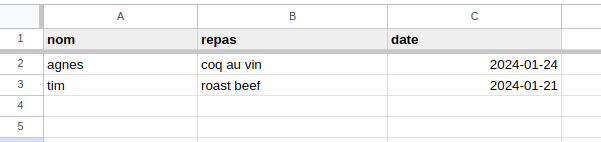
SHEET
SCREEN
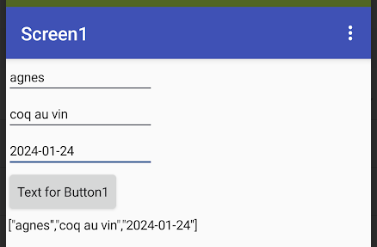
I have shown the Web1.GotText output in a label. You should be able to use the jsontextencode block to convert the responseContent back into an AI2 list, and then extract each element.
If you have the variables rg or ref elsewhere in your script as global variables, then use another variable name for these, that is not declared elsewhere.
Make sure you run your script in the script editor, to ensure that permissions are set.