Are you looking for extention that tell you which key is pressed on keyboard?
 keyboard listener is a non visible component that listen and return unicode of any keys from external keyboard. include
  back press, OK, enter(new line), space, Go and all other key based on their unique character code.
you can see unicode of all characters here Unicode of characters
 Blocks
Block 1: Register textbox for input

Registers a TextBox to listen for all input from the on-screen keyboard, including Backspace and keyboard hiding.
Block 2: Character received
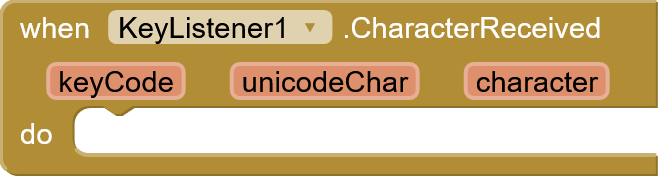
Triggered when a character is received from the on-screen keyboard. The keyCode will be 0.
Block 3: Backspace pressed
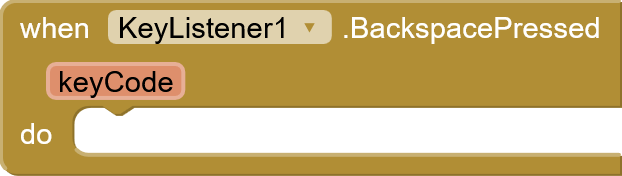
Triggered when the backspace key is pressed. Returns the standard key code for backspace (67).
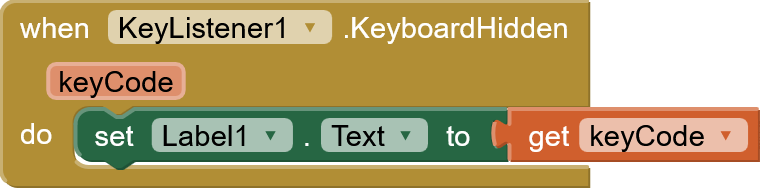
Block 4: KeyboardHidden
Some times your textbox may not be multiple line. in case of that enter will be changed to hide, go, ok or search button. so this event will return -2 when ever you click enter or ok in this case.
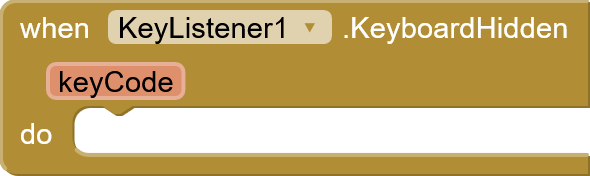
Triggered when the on-screen keyboard is hidden/dismissed. Returns a custom key code of -2.
Block 5: Unregister Textbox

Stops listening for input from the previously registered TextBox.
 Example Blocks
Instruction to use
Step 1: add Registertextboxforinput function in the screen initializing event with text box component name you want to retrieve Unicode.

Step 2: Accepting Unicode when ever keyboard keys are clicked. in my case i use label to show Unicode of every clicked keys on keyboard.

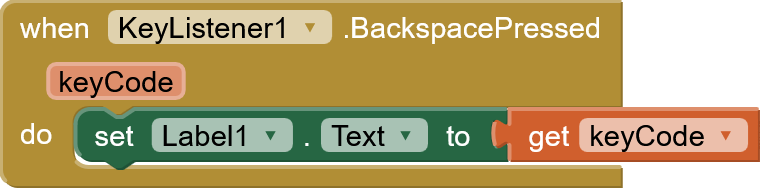
Output screen record
Download link
Extension
com.KeyListener.KeyListener.aix (8.3 KB)
Sample .aia file
keyboard1.aia (10.6 KB)
 Happy koding


