Version 4.1
Overview :
In this version, I've changed the internal working of methods GetAllRows & GetColumn. In version 3, these methods used to wait for an error(internally) when fetching all available data of the table. Now, it doesn't wait for any error. It will calculate counts and is able to fetch size of data user needs, which make it one response faster than of V3.
Six new methods are added in this version for getting filtered, ordered, and/or searched data.
Blocks :
1. Filter
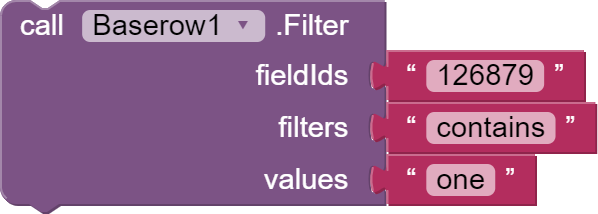
This method help to filter table data. fieldIds , filters and values can accept both list or string which means you can provide single as well as multiple filters. After this method, you should call GetAllRows or GetColumn method to get filtered values in GotAllRows or GotColumn events respectively. Below, it is a table of different filters and example value. (Copied from Baserow Api Documentation)
| Filter | Example value | Full example |
|---|---|---|
| equal | string | field is 'string' |
| not_equal | string | field is not 'string' |
| date_equal | 2020-01-01 | field is date '2020-01-01' |
| date_not_equal | 2020-01-01 | field is not date '2020-01-01' |
| date_equals_today | field is today | |
| date_equals_month | field in this month | |
| date_equals_year | field in this year | |
| date_equals_day_of_month | 1 | field day of month is '1' |
| date_before | 2020-01-01 | field is before date '2020-01-01' |
| date_after | 2020-01-01 | field is after date '2020-01-01' |
| contains | contains | field contains 'string' |
| filename_contains | string | field filename contains 'string' |
| has_file_type | image | document | field has file type 'image | document' |
| contains_not | string | field contains not 'string' |
| length_is_lower_than | 5 | field length is lower than '5' |
| higher_than | 100 | field higher than '100' |
| lower_than | 100 | field lower than '100' |
| single_select_equal | 1 | field is '1' |
| single_select_not_equal | 1 | field is not '1' |
| boolean | true | field is 'true' |
| link_row_has | 1 | field has '1' |
| link_row_has_not | 1 | field has not '1' |
| multiple_select_has | 1 | field has '1' |
| multiple_select_has_not | 1 | field has not '1' |
| empty | field is empty | |
| not_empty | field is not empty |
2. FilterType

FilterType can either be OR or AND . FilterType can be used when you are using multiple filters.
AND: Indicates that the rows must match all the provided filters.OR: Indicates that the rows only have to match one of the filters.
3. Search

This method helps to search particular text from table. After this method, you should call GetAllRows or GetColumn method to get searched values in GotAllRows or GotColumn events respectively.
4. OrderAscendingTo

This block helps to get data in ascending order of a particular column. After this method, you should call GetAllRows or GetColumn method to get ordered values in GotAllRows or GotColumn events respectively.
5. OrderDescendingTo

This block helps to get data in descending order of a particular column. After this method, you should call GetAllRows or GetColumn method to get ordered values in GotAllRows or GotColumn events respectively.
6. AutoReset

This block accepts boolean, and true as default. When true, if you have used some filter in GetAllRows or GetColumn of Baserow1 component then again you are using these method for second time, then it will clear the filter and you again have to add a filter for next GetAllRows or GetColumn method.