Webview2File Extension Documentation
Overview
The Webview2File extension allows App Inventor developers to easily convert the content of a WebView or WebViews inside a container into PDF files or images. The extension is designed for block programming and offers a straightforward way to manage WebView content as files.
Features
- Convert WebView to PDF: Save the content of a WebView as a PDF file.
- Convert WebView to Image: Save the WebView content as an image in the gallery.
- Convert All WebViews in a Container to PDF: Process multiple WebViews within a container and generate individual PDF files.
- Convert All WebViews in a Container to Images: Save the content of multiple WebViews as images.
- Immediate Gallery Update: Automatically update the gallery when a file is saved.
- Error Handling: Triggers events if errors occur during file generation.
Blocks Overview
Functions
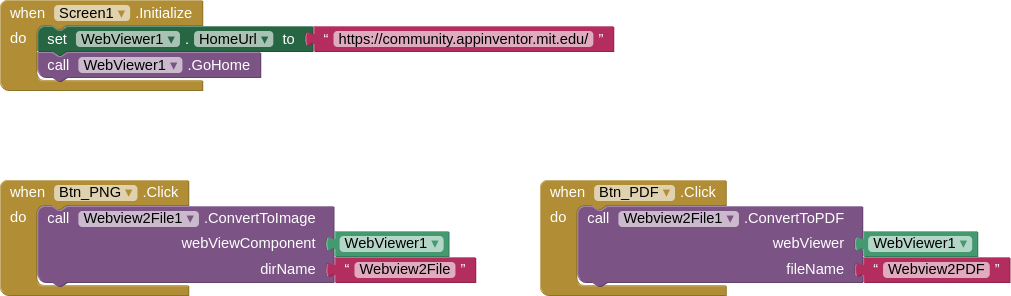
1. ConvertToPDF
Converts the content of a single WebView to a PDF file.
Parameters:
WebViewer: The WebView component to process.fileName: The name of the PDF file.
2. ConvertToImage
Converts the content of a single WebView to an image and saves it in the gallery.
Parameters:
WebViewer: The WebView component to process.dirName: The name of the folder in the gallery where the image will be saved.
3. ConvertContainerToPDF
Converts the content of all WebViews within a container (e.g., HorizontalArrangement or VerticalArrangement) to PDF files.
Parameters:
Container: The container holding WebViews.fileName: The base name for the generated PDF files. Each WebView will be saved as a separate PDF file with an index appended.
4. ConvertContainerToImages
Converts the content of all WebViews within a container to images and saves them in the gallery.
Parameters:
Container: The container holding WebViews.dirName: The folder name in the gallery where the images will be saved.
Events
1. OnImageSaved
Triggered when an image is successfully saved to the gallery.
Parameter:
uri: The URI of the saved image.
2. OnPDFGenerated
Triggered when a PDF file is successfully generated.
Parameter:
message: A message indicating the success of the operation.
3. OnImageGenerated
Triggered when images from a container are successfully generated.
Parameter:
filePath: The path to the saved images.
4. OnError
Triggered when an error occurs during any operation.
Parameter:
message: A description of the error.
Usage Guide
Webview2File
Extension to convert WebView content to PDF and image.
Events:
OnImageSaved

Triggered when the image is successfully saved to the gallery.
| Parameter | Type |
|---|---|
| uri | text |
OnPDFGenerated

Triggered when a PDF is generated.
| Parameter | Type |
|---|---|
| message | text |
OnImageGenerated

Triggered when an image is generated.
| Parameter | Type |
|---|---|
| filePath | text |
OnError

Triggered when an error occurs.
| Parameter | Type |
|---|---|
| message | text |
Methods:
ConvertToPDF
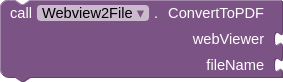
Converts the content of the WebView to a PDF file.
| Parameter | Type |
|---|---|
| webViewer | component |
| fileName | text |
ConvertToImage
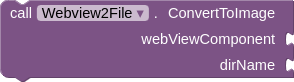
Converts the content of the WebView to an image and saves it to the gallery.
| Parameter | Type |
|---|---|
| webViewComponent | component |
| dirName | text |
ConvertContainerToPDF
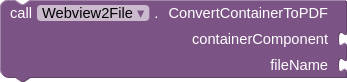
Converts the content of all WebViews within a container to a PDF file.
| Parameter | Type |
|---|---|
| containerComponent | component |
| fileName | text |
ConvertContainerToImages
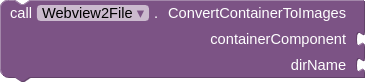
Converts the content of all WebViews within a container to images and saves them to the gallery.
| Parameter | Type |
|---|---|
| containerComponent | component |
| dirName | text |
This documentation was generated using Akshat Developer's Documentation Generator.
Notes
- Permissions: The extension requires storage access to save files. Make sure your app includes the necessary permissions.
- File Names: Ensure unique file names to avoid overwriting existing files.
- Gallery Update: Files saved as images are immediately visible in the gallery.
Files
AIX (by Fast Cli Builder): com.bosonshiggs.webview2file.aix (11.5 KB)
AIA: Webview2File.aia (14.0 KB)
Click Here and see the GitHub files!
 Support My Work
If my projects, tutorials, extensions, components, or other resources have been useful to you, consider supporting my work with a voluntary contribution.
Your support helps me continue creating, maintaining, and sharing free resources with the community.
 Click here to support my work: Click here to support my work
Thank you for your support!

