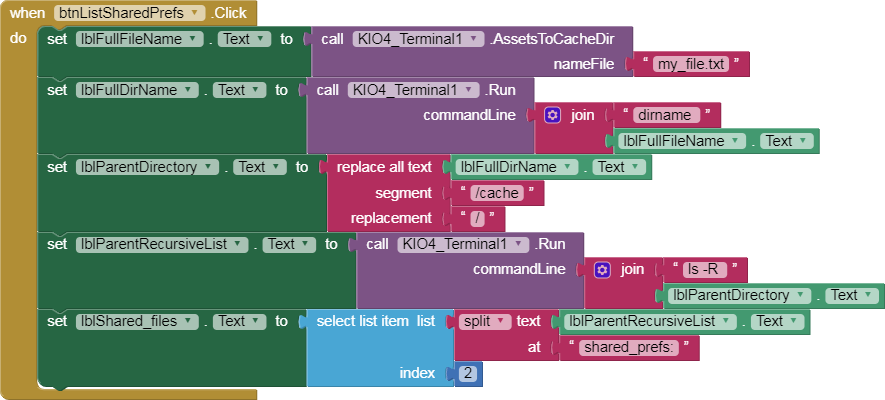
I ran some experiments, and found I had to customize the kio4 sample,
and to save it in an AI2 server under the original app project name.
(Export your original project as an .aia file to keep the source safe.)
Also save that .aia export file somewhere safe, as usual.
Download this .aia file and rename it to your project file .aia in a temporary location, and
build it on the code.appinventor.mit server to get a new .apk file with your original project name.
Now comes the leap of faith: load the .apk file onto your phone, replacing the executable of your app but keeping the old data there. (I tested this on a Genymotion emulator and successive runs found the old namespace.xml files from prior installs.)
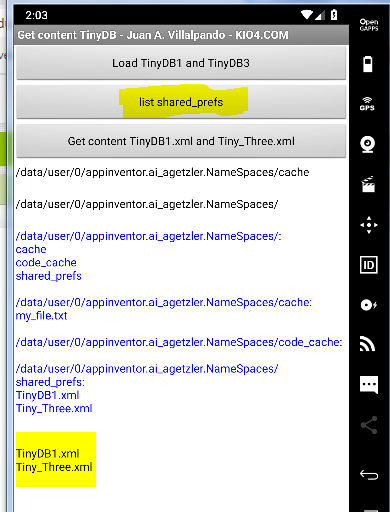
Hit the button to list shared_prefs and look in the label with the yellow background.
If it looks good, you should be able to extend that button click event to strip off .xml suffixes, split at \n to get a list, and write whatever blocks you need to export your namespaces.
I suggest consolidating them into a single merged namespace under tag /namespace/oldtag
for each tag oldtag in namespace namespace.