2.- Web Server in ESP32 with a web page.
Through this page we can turn on-off an LED. Check the status of the LED.
- ESP32 Station of Router.
- Install Web Server in ESP32, port 80.
- Set a web page in Web Server.
- We can turn on/off LED2 (LED2 is a BUILT-IN LED in Board) through a web page.
- We can also check the status of LED2.
// Juan A. Villalpando.
// KIO4.COM
// Enciende y apaga LED. Botones.

#include <WiFi.h>
const char* ssid = "Name_WiFi_net";
const char* password = "Password_WiFi_net";

WiFiServer server(80); // Port 80

#define LED2  2    // LED2 is a Built-in LED.
String estado = "";
int wait30 = 30000; // time to reconnect when connection is lost.

void setup() {
  Serial.begin(115200);
  pinMode(LED2, OUTPUT);

// Connect WiFi net.
  Serial.println();
  Serial.print("Connecting with ");
  Serial.println(ssid);

  WiFi.begin(ssid, password);

  while (WiFi.status() != WL_CONNECTED) {
    delay(500);
    Serial.print(".");
  }
  Serial.println("Connected with WiFi.");

  // Start Web Server.
  server.begin();
  Serial.println("Web Server started.");

  // Esta es la IP
  Serial.print("This is IP to connect to the WebServer: ");
  Serial.print("http://");
  Serial.println(WiFi.localIP());
}

void loop() {
// If disconnected, try to reconnect every 30 seconds.
  if ((WiFi.status() != WL_CONNECTED) && (millis() > wait30)) {
    Serial.println("Trying to reconnect WiFi...");
    WiFi.disconnect();
    WiFi.begin(ssid, password);
    wait30 = millis() + 30000;
  }
  // Check if a client has connected..
  WiFiClient client = server.available();
  if (!client) {
    return;
  }

  Serial.print("New client: ");
  Serial.println(client.remoteIP());

  // Espera hasta que el cliente envíe datos.
  // while(!client.available()){ delay(1); }

  /////////////////////////////////////////////////////
  // Read the information sent by the client.
  String req = client.readStringUntil('\r');
  Serial.println(req);

  // Make the client's request.
       if (req.indexOf("on2") != -1) {digitalWrite(LED2, HIGH); estado = "ON";}
       if (req.indexOf("off2") != -1){digitalWrite(LED2, LOW); estado = "OFF";}
	   if (req.indexOf("consulta") != -1){
         if (digitalRead(LED2)){estado = "LED2 now is ON";}
         else {estado = "LED2 now is OFF";}
          }

  //////////////////////////////////////////////
  //  WEB PAGE. ////////////////////////////
  client.println("HTTP/1.1 200 OK");
  client.println("Content-Type: text/html");
  client.println(""); //  Important.
  client.println("<!DOCTYPE HTML>");
  client.println("<html>");
  client.println("<head><meta charset=utf-8></head>");
  client.println("<body><center><font face='Arial'>");
  client.println("<h1>Servidor web con ESP32.</h1>");
  client.println("<h2><font color='#009900'>KIO4.COM - Juan A. Villalpando</font></h2>");
  client.println("<h3>Página web.</h3>");
  client.println("<br><br>");
  client.println("<a href='on2'><button>Click to ON LED2</button></a>");
  client.println("<a href='off2'><button>Click to OFF LED2</button></a>");
  client.println("<a href='consulta'><button>Consult status LED2</button></a>");
  client.println("<br><br>");
  client.println(estado);
  client.println("</font></center></body></html>");

  Serial.print("Client disconnected: ");
  Serial.println(client.remoteIP());
  client.flush();
  client.stop();
}
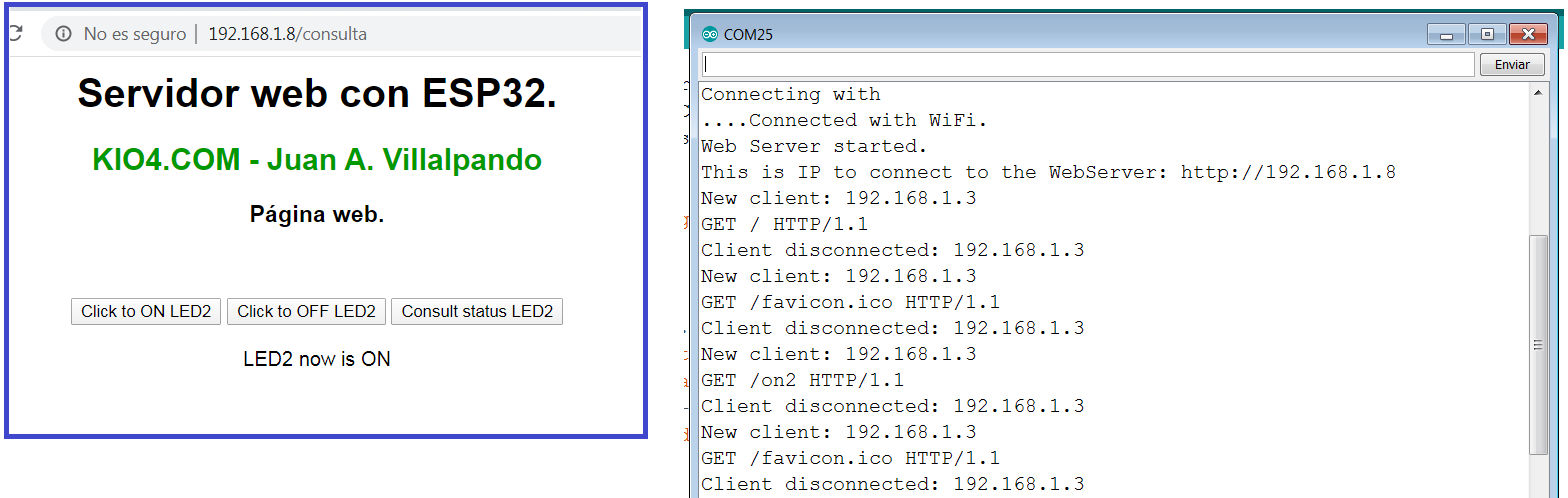
Now in a Browser, we write the local IP of the server. We will get a page with three buttons, we can turn on-off and check the status of LED2.
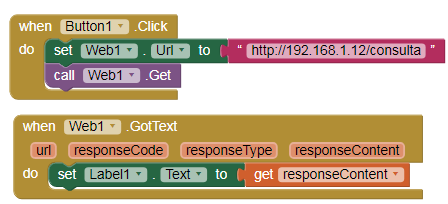
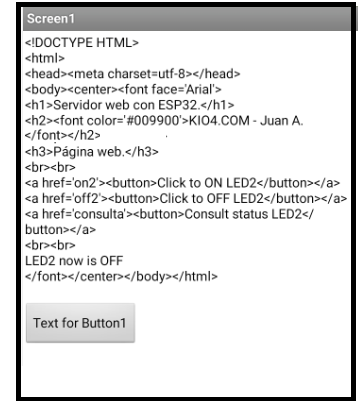
- If we wanted to obtain the source code of the page, we would put these blocks: