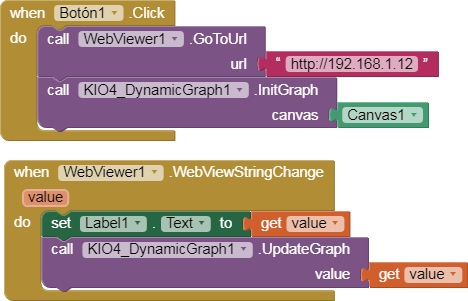
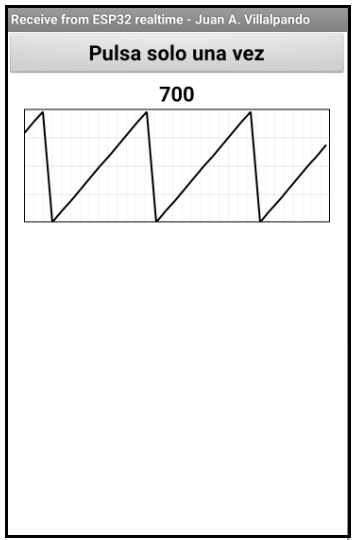
2.- Another example. ESP32 increments a variable and is displayed in a dynamic graph in the app.
- To create the dynamic graphic that scrolls to the left, we will use this extension:
-
- Here the code in file ESP32_realtime_2.ino
/*
 * ESP32 AJAX Demo
 * Updates and Gets data from webpage without page refresh
 * https://circuits4you.com
 */
#include <WiFi.h>
#include <WiFiClient.h>
#include <WebServer.h>

#include "index.h"  //Web page header file

WebServer server(80);

//Enter your SSID and PASSWORD
const char* ssid     = "Red_Wifi";
const char* password = "Contraseña";

char caracter = '0';
String texto = "";
String texto_send = "";
int a = 0;

//===============================================================
// This routine is executed when you open its IP in browser
//===============================================================
void handleRoot() {
 String s = MAIN_page; //Read HTML contents
 server.send(200, "text/html", s); //Send web page
}

void handleADC() {
 // a = analogRead(A0);      // ORIGINAL CODE
 // a = random(1,1023);      // RANDOM NUMBER
 a = a + 100;                // INCREASE
 if (a >= 1024){a = 0;}
String adcValue = String(a);
// String adcValue = texto_send; // SEND TEXT FROM SERIAL MONITOR.
 server.send(200, "text/plane", adcValue); //Send ADC value only to client ajax request
}

//===============================================================
// Setup
//===============================================================

void setup(void){
  Serial.begin(115200);
  Serial.println();
  Serial.println("Booting Sketch...");

/*
//ESP32 As access point
  WiFi.mode(WIFI_AP); //Access Point mode
  WiFi.softAP(ssid, password);
*/
//ESP32 connects to your wifi -----------------------------------
  WiFi.mode(WIFI_STA); //Connectto your wifi
  WiFi.begin(ssid, password);

  Serial.println("Connecting to ");
  Serial.print(ssid);

  //Wait for WiFi to connect
  while(WiFi.waitForConnectResult() != WL_CONNECTED){
      Serial.print(".");
    }

  //If connection successful show IP address in serial monitor
  Serial.println("");
  Serial.print("Connected to ");
  Serial.println(ssid);
  Serial.print("IP address: ");
  Serial.println(WiFi.localIP());  //IP address assigned to your ESP
//----------------------------------------------------------------

  server.on("/", handleRoot);      //This is display page
  server.on("/readADC", handleADC);//To get update of ADC Value only

  server.begin();                  //Start server
  Serial.println("HTTP server started");
}

//===============================================================
// This routine is executed when you open its IP in browser
//===============================================================
void loop(void){
  server.handleClient();

//////////////// TEXT FROM SERIAL MONITOR  ////////////
  if (Serial.available() > 0) { // ¿Hay algún caracter?
      caracter = Serial.read(); // Toma el caracter
      texto += caracter;

      if (caracter == '\n') {
      texto_send = texto;
      Serial.println("Write a text in Serial Monitor and 'Send'");
      Serial.print(texto);
      texto = "";
      }
}
/////////////////////////////////////////////////////
}
- In the index.h file we change the delay to 1000.
}, 1000); //1000mSeconds update rate // HERE DELAY
- App.
p248_esp32i_realtime_dynamic.aia (10.3 KB)
- Blocks.