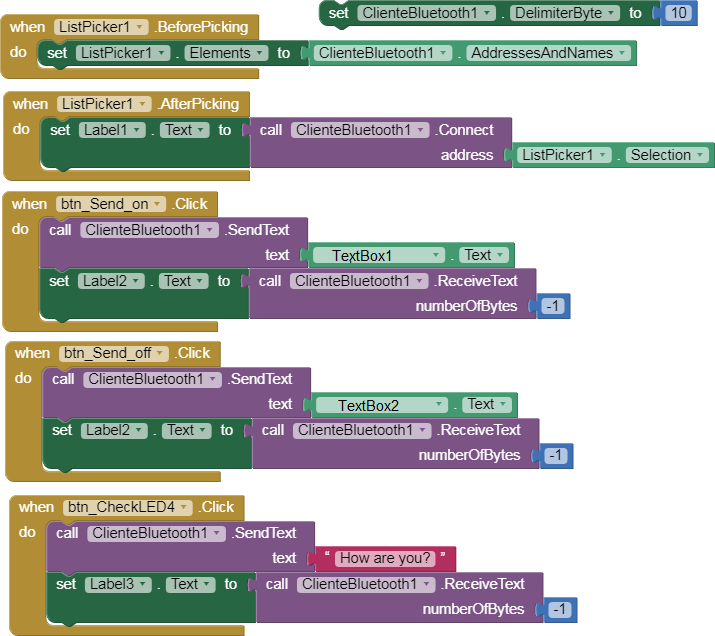
2.- App sends a message to ESP32.
p62D_esp32_bluetooth_2.aia (2.9 KB)

- If message contains "Set LED4 ON" then LED4 ON. Return response.
- If message contains "Set LED4 OFF" then LED4 OFF. Return response.
- If message contains "How are you?" then get status LED4.
#include "BluetoothSerial.h"
#define LED4 4

BluetoothSerial SerialBT;

void setup() {
  Serial.begin(115200);
  initBT();
  pinMode(LED4, OUTPUT);
}

void initBT(){
  if(!SerialBT.begin("ESP32CAM-CLASSIC-BT")){
    Serial.println("An error occurred initializing Bluetooth");
    ESP.restart();
  }else{
    Serial.println("Bluetooth initialized");
  }

  SerialBT.register_callback(btCallback);
  Serial.println("The device started, now you can pair it with bluetooth");
}

void btCallback(esp_spp_cb_event_t event, esp_spp_cb_param_t *param){
  if(event == ESP_SPP_SRV_OPEN_EVT){
    Serial.println("Client Connected!");
  }else if(event == ESP_SPP_DATA_IND_EVT){
    Serial.printf("ESP_SPP_DATA_IND_EVT len=%d, handle=%d\n\n", param->data_ind.len, param->data_ind.handle);
        String received = bluetoothReadLine();
        Serial.println(received);
        if(received.indexOf("Set LED4 ON") != -1){digitalWrite(LED4, HIGH); writeSerialBT("LED 4 is ON.");}
        else if(received.indexOf("Set LED4 OFF") != -1){digitalWrite(LED4, LOW); writeSerialBT("LED 4 is OFF.");}
        else if(received.indexOf("How are you?") != -1){
          if(digitalRead(LED4)){writeSerialBT("LED 4 now is ON.");}
          else {writeSerialBT("LED 4 now is OFF.");}
        }
        else {writeSerialBT("Message received: " + received);}
    }
}

String bluetoothReadLine(){
    String text_received = "";
    while(SerialBT.available())
    {
        byte r = SerialBT.read();
        if(r!=13 && r!=10 && char(r)!='\0')
            text_received = text_received + char(r);
    }
    return text_received;
}


void writeSerialBT(String respuesta){
  SerialBT.println(respuesta);
  SerialBT.flush();
}


void loop() { }