OK, my understanding is that you are using a Chromebook, with AppInventor Companion installed as an Android app, and that you are having trouble accessing files that are downloaded through the webviewer, using webviewextra.
I have an Acer 715 Chromebook, and can relate my experience with the above, and possibly how to resolve the issue.
-
The Chromebook creates a facsimile of the Android file system in a directory called "Play Files". You should see this if you open the Files app on your Chromebook.
-
A notable exception in the file/directory structure is the Download directory, which is not available in the Files app, nor through the companion app. This is most likely due to some Google nonsense about protecting your privacy/safety! Trying to open Download using FilePicker causes the companion app to crash/close.
-
When a file is downloaded through the webviewer/webviewextra it gets placed in the
Downloadsdirectory of the Chromebook! This is OK if you want to access the file through your Chromebook, but of no use whatsoever if you want to access it using the aia project running on your Companion app. -
However, you can add a setting to webviewextra that will place any downloaded files in the ASD of the aia project/companion app. This is accessible from the aia project/companion app.
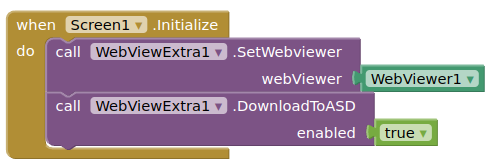
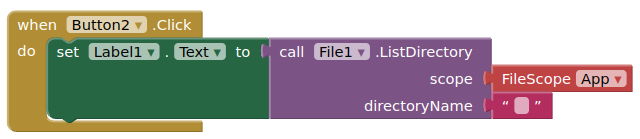
-
The good thing about using the ASD is that all files you download there will be read/write for your aia project.
-
You cannot use a filepicker or imagepicker to select files from the ASD, but as above, you can list the ASD directory, then you can select a file through a listview, and then carry out file operations (open/copy/move) after selection:
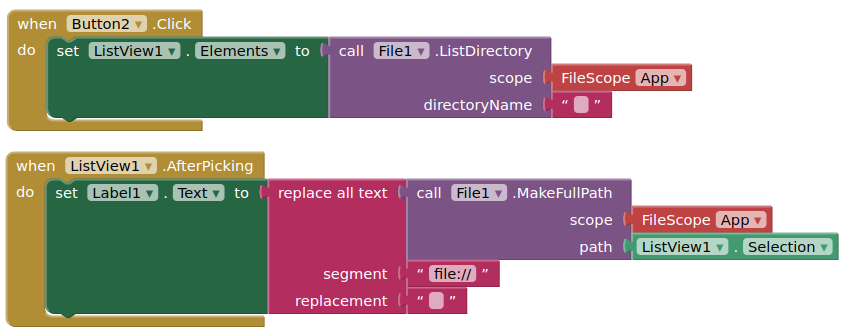
- The ASD is also accessible on the Chromebook through the Play Files directory (there is an option in the three dots menu to show all the directories in
Play Files:
Play Files > Android > data > edu.mit.appinventor.aicompanion3/files
Personally, I would recommend using an external device (Android phone/tablet) to run the companion app, this way you would get the same experience as most users running AI2 on a "normal" computer.
(Note: I have not tried it out, but I am guessing the experience is much the same if you were to install a compiled app to the Chromebook with download through webviewer functionality)