The json (I OCR'd the image)
{"kind": "identitytoolkit#GetAccountinfoResponse",
"users":
[
{
"localId": "nyrlBazCmLRD01PV2WUDiwow2162",
"email": "james@gmail.com",
"passwordHash": "UkVEQUNURUQ=",
"emailVerified":false,
"passwordUpdatedAt": 1667888398433,
"providerUserInfo": [
  {
  "providerId": "password",
  "federatedId": "james@gmail.com",
  "email": "james@gmail.com",
  "rawld": "james@gmail.com"
  }
],
"valid Since": "1667888398",
"lastLogin At": "1667938746668",
"createdAt": "1667888398433",
"lastRefreshAt": "2022-11-08T20:19:06.668Z"
}
]
}
Examples. I have done these "long hand" to help you see how you need to work through the json {...} and the lists [...] within the json
Get the email value from users

returns: "james@gmail.com"
Get the providerId from providerUserInfo from users
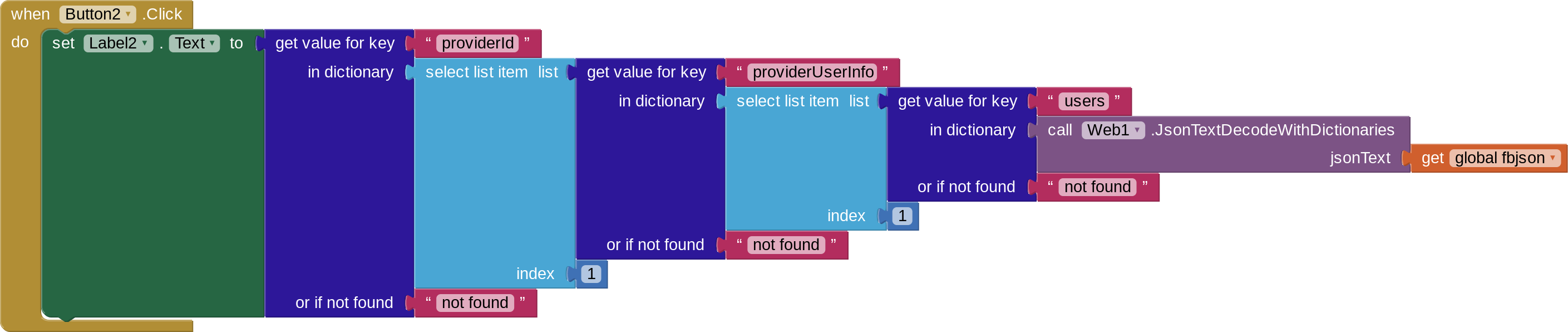
returns: "password"