Cher @Pilougne, ja vais continuer en Anglais car aussi @ABG peut lire et donner son aide.
As your first post, I have understood that the BT communication was working fine, that is: your app is receiving correctly the complete string containing ALL the values.
To be sure of that I suggest you to display in a dedicated label what is really incoming to your app.
In other words, the variable that contains the whole string (received from BT) shall be displayed without any modification into a label. In that way you can be sure that the communication works fine. If not, you shall investigate in those boundaries before applying the splitting procedure.
To this purpose I strongly suggest you to have a look to @ABG's FAQ regarding the BT communication (the link here below), and mainly to the Text receving procedure in order to be sure that from Arduino you send correctly the data and on the app you use the correct mode of reception.
Specifically, on Arduino side, you shall send the data by terminating only the LAST transmission with a BTserial.println() instruction so to send a Linefeed character (0x0A) that instructs the app to exit the polling block.
The BT FAQ can be found here:
Only after you are done with that and you are sure that the string is completely received (and shown in a label), you can apply the splitting method (mine, or that of @ABG).
Best wishes.
PS Since you say that you receive only the luminosity, it seems that you transmit each data with a SerialBT.println(). If this is true, this means that the BT receiving block in your app, stops to receive at the first data (luminosity) and does not wait for the other data. And this explains why the list has only one element. If this is the case, you shall transmit all the data with a SerialBT.print() instruction and only the last (i.e. "MODE") shall be transmitted by using a SerialBT.println(), If you want more help post also your .ino code.
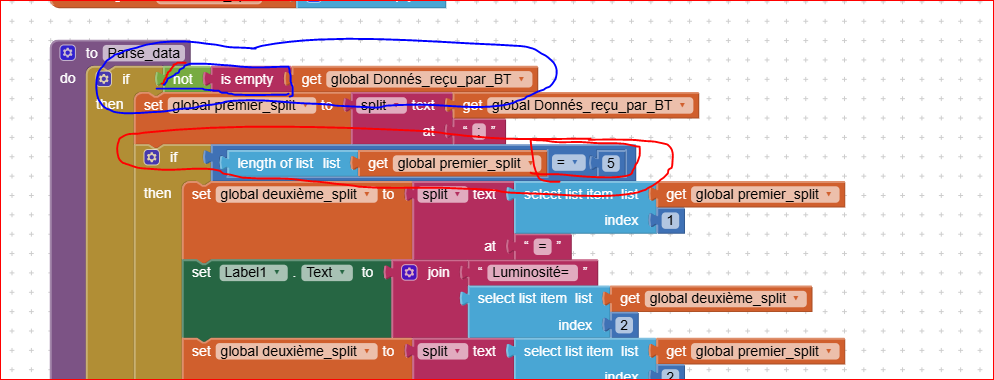
EDIT: before applying the splitting procedure, to be sure that the received string is not empty and all the 5 data have been received you can use a couple of "if" blocks in this way:
Meilleures salutations.