I don't know what that means though or how to do it. I know c++ and python very well but this java and html stuff I just don't know very well. I get app inventor and the concept behind how this all works but I have no clue as to how I would get this data upstream. I don't even know what upstream means. I know I can process the data once I get it, but I don't know how to even get it. I just need the data inside that file when I click "Get File" on the web page. I don't care is it comes formatted as base64 and I don't need it to save or anything. I know it's going somewhere and upstream keeps getting mentioned, but how do I get upstream data?
downstream = in your AppInventor App
upstream = in your python coding that is generating the blob url
Are you able to "get" the blob from the blob url and convert it to a base64 string in your python coding?
If so, can you download that base64 string to your Appinventor app, where you can use a base64 extension to convert it back to a binary file (and give it a filename) ?
There's actually no python, or anything upstream at all to change for what this is doing really. There is but there isn't. The device is hosting an HTML webpage and that's what I'm interacting with. While I could make changes to the upstream I'm very hesitant to do that, as this is the way it's all worked for many years, for millions of devices. And it does this VERY deep into the core of microPython. You don't code any of this, it's built-in. When you flash micropython to your device, it comes with that webpage working exactly how it does. And it works exactly that way for millions of devices. I only posted the source code to show how the webpage works but it comes hosting that. You don't write it. CustomWebView and WebView are the only things that have any sort of issue whatsoever. Normal android browsers get the file just fine, they just also do this really annoying zoom into full every time a command is sent thing. It only happens on android though, not on PCs or IOS. This project is not just something for me but for everybody, so making changes to something so deeply embedded into how microPython works really doesn't seem like a good idea. I'd rather just tell everybody to use their standard android browser and deal with the frustrations that come along with that. And honestly I think that's where I'm at because I can't get any sort of string or anything. Either the problem is in CustomWebView or I just can't figure out how to get a blob with it, but I very seriously doubt the issue is on the upstream side. There literally are millions of devices running the EXACT same code. As I said, all other android browsers can get the file just fine, they just also zoom on every command. CustomWebView prevents the zoom and does everything else, but can't get files like every other Android browser does. I cannot get anything. No strings, no files, no anything. Just notifications that data is being received, but no way to see that data. I keep being told android can't get blobs and okay cool, that's probably right, but all other android browsers get a file like it's requested, when it's requested. This isn't even an issue outside of this extension. I give up.
It is. Android's Webview can't download file from blob urls directly and CustomWebView is the same webview.
You can read about it on Stack overflow.
That's the difference between a Browser and Webview. All the features you see in browsers is not available in Webview.
Mostly browsers extend Webview class and implement their own methods to add more and more features.
However, downloading blob files might be possible with some workaround but not at this moment. You may be able to see this feature in near future, maybe months or a year.
Ok that actually makes sense. But what still doesn't make sense is why I can send a file but not get one. I'm limited in my understanding of HTML and JavaScript but it should be the same but opposite directions right? So WebView can send a blob but not receive one then?
Yes, this is somewhat right.
As far as I have read about blob it is like array of bytes or something like that which is easier to produce inside webpage but difficult to receive in webview.
This SO question may help ?
1 Like
I'll see.
I got the data! After reading the documentation that you shared, I was able to understand that yes, the data has to be somewhere; just sitting in a byte array that WebView can't process on it's own. So I started out by looking through the HTML file to see if I could figure out where this byte array is stored. It's stored as the variable "get_file_data". Through some research and experimentation, I found that you can manually call data with JavaScript and CustomWebView does indeed have a function for doing this. By calling "alert(get_file_data)" I was able to get an alert to give me that byte array, aka "blob". Using an extension I commissioned years back, it was really easy to convert that byte array and TaDa.... I now have the exact file displayed in a label. This probably isn't the best way to do it and I still have to figure out how to save it to my phone, but you can process a blob using this extension if you know what variable it's stored under.


EDIT: It turns out that not only is alert not the best way to do it, but it really shouldn't be used at all in most cases. Apparently alert freezes all current JavaScript functions so you can no longer do anything in the WebView. So when I tried to use it again to get the file name, not only could I not do it, but I couldn't do anything. This is a much better way to do it...

I learned a lot about JavaScript today but I'm still not what I would consider knowledgeable. It seems to me though that there should be a way for CustomWebView to get the name of the file, the name of the object, and convert the bytes to ASCII. It would then have the ability to download blobs without waiting on WebView to implement it.
There is a DismissJsAlert block which unfreezes webview.
Whenever you receive alert in browsers they show a dialog with ok button and this ok button calls DismissJsAlert.
Thank you, that could be useful in the future if I actually do want everything to halt until some other action. I just kept seeing it's not good practice so I tried to find a better way. I can definitely see how they can be useful though so I appreciate it.
Anyone give a solution
Did you enable DeepLink property?
Yes, enabled and also tried different websites also with overlay buttons.

Here's AIA for reference:
customweb.aia (77.3 KB)
Either handle new tab requests correctly or set SupportMultipleWindows property to false.
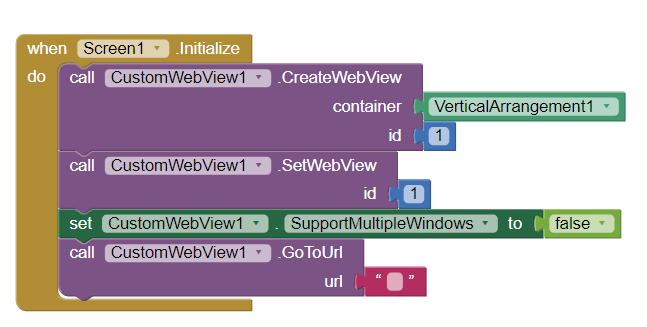
1 Like
Thanks, it works fine now
Hi everyone, my app doesn't allow file downloads, meaning when the download link is clicked nothing happens.
How can I solve this problem?
Thanks to anyone who will help me.
