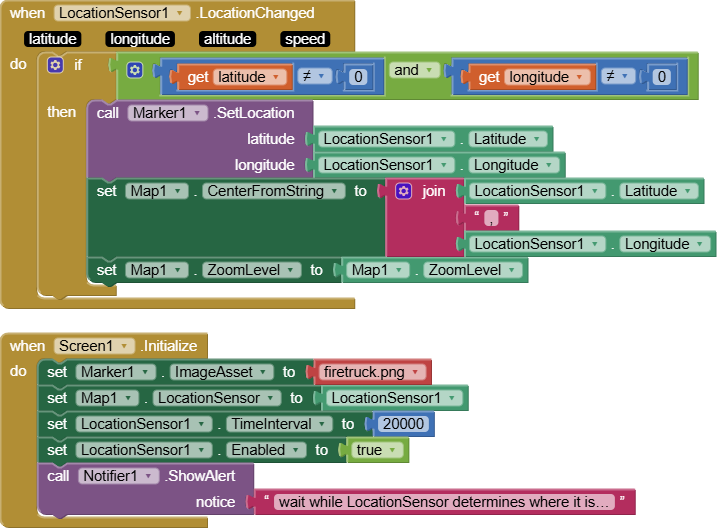
You do not show ALL the blocks you used. That makes it impossible to show you what might need to be changed in the code you are using. I don't have access to your Project. What have you coded and what happens?
The code I originally showed on May 6 included the Block set Map1.ShowUser to true. Evidently it is impossible to display the custom Marker when ShowUser is true. It hides the image of the set Marker1.ImageAsset to Block if the custom image is set to the device's current lat/lon . Consequently the ImageAsset will not display in your situation but it does work if the developer doesn't use the ShowUser option.
Said simply, do not use the ShowUser and set it to true as your custom marker for the user's location, otherwise the ImageAsset will not display. I guess that is your issue now?
The original code snippet I displayed works well if you do not use ShowUser and the Marker is not the user's location . (other locations work OK). I didn't expect using ShowUser to do this having never used ShowUser and with the Marker ImageAsset for the same location.
Try these Blocks. You must first modify the Marker1.ImageAsset to the name of your custom image (set it to whatever image you have in Media and replace my firetruck.png image).
After about 20 seconds of starting the app you should see your green image at your device's location.