Do you have a link?
It might save some retyping into a spreadsheet.
Do you have a link?
It might save some retyping into a spreadsheet.
I created it in a spreadsheet years ago and use it a lot, but the upload wont allow .xlsx files (excel)
Do a File->SaveAs Comma Separated Values (CSV) format.
This board should be able to accept that, and AI2 can load those.
Took me a few tries. The formulas were not showing in the csv file. So I had to set my settings to view formulas.
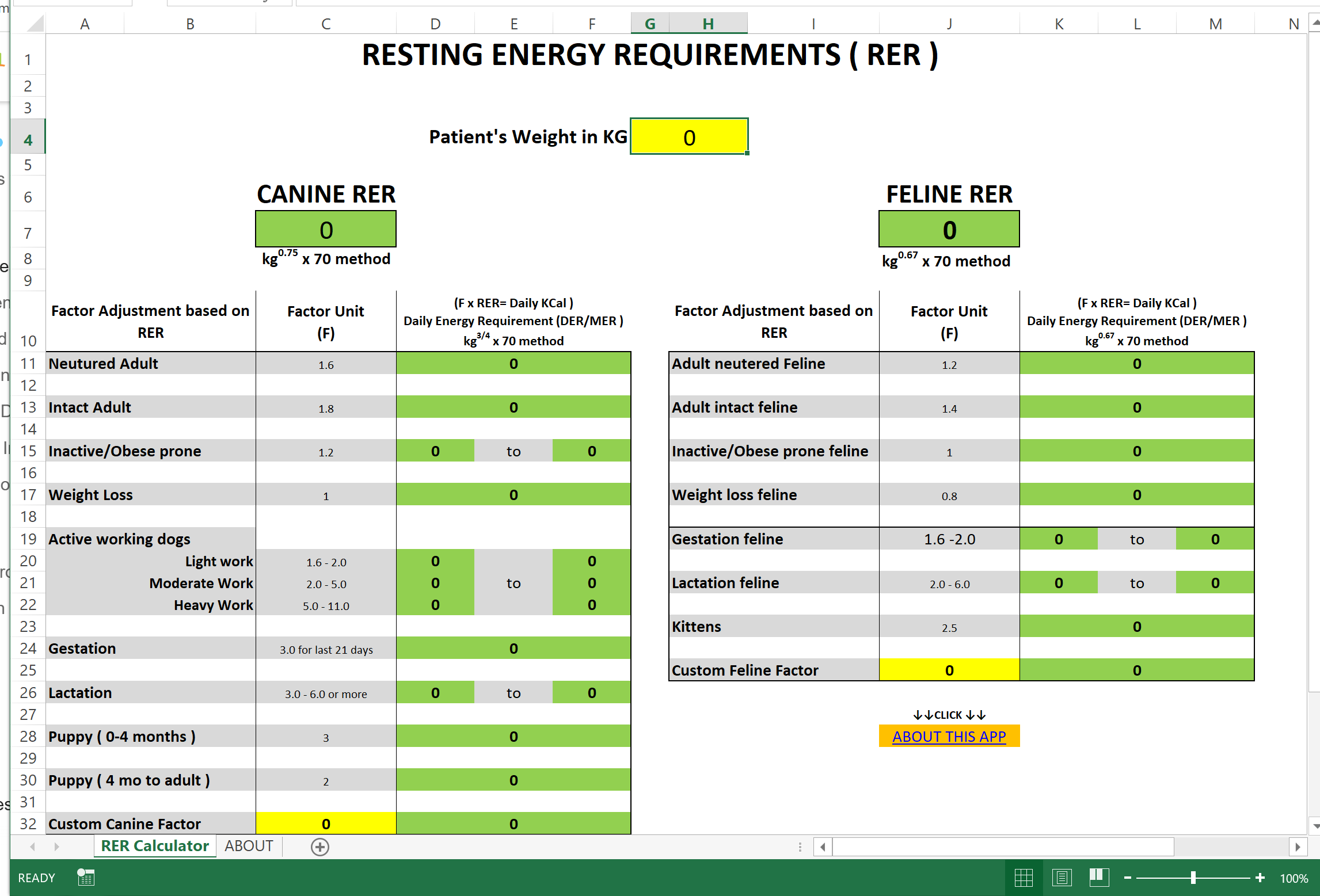
The pic is how it looks on the spreadsheet. In the app, my goal was a single screen.
Btw... in your original concept in post #16, is still turning gears in my head. Although I can see the workflow better in where I am now.
RER calorie formulasshare.csv (2.5 KB)
What does the MER in DER/MER stand for?
This is a more or less normalized extract from your sheet, with three columns
DER Factors - Sheet1.csv (564 Bytes)
Aside from the exponent lookup, it's got everything you had in blocks, to allow most runtime flexibility based on least code.
In cooking terms, it's like keeping food out of the silverware drawer.
dog,Neutured Adult,1.6
dog,Intact Adult,1.8
dog,Inactive/Obese prone,1.2
dog,Weight Loss,1
dog,Active working dogs - Light work,1.6 - 2.0
dog,Active working dogs - Moderate Work,2.0 - 5.0
dog,Active working dogs - Heavy Work,5.0 - 11.0
dog,Gestation for last 21 days,3
dog,Lactation,3.0 - 6.0
dog,Puppy ( 0-4 months ),3
dog,Puppy ( 4 mo to adult ),2
cat,Adult neutered Feline,1.2
cat,Adult intact feline,1.4
cat,Inactive/Obese prone feline,1
cat,Weight loss feline,0.8
cat,Gestation feline,1.6 - 2.0
cat,Lactation feline,2.0 - 6.0
cat,Kittens,2.5
Next step is to load it into the Media folder of your best looking aia Project, and load it from a file at startup into table variables.
Maintenance energy requirement.. pretty much the same thing as Daily.
Kind of like, I called a flashlight... In the UK it's a torch.
When I started out with Excel spreadsheets, it took me a good while to figure out how to do things. Nowadays I can whip a spreadsheet out quick. You are opening a whole new chapter of learning in my area when it comes to importing spreadsheets into the app. Ohhh myyy
I'm in the same boat with the app here lol. I'm really trying to understand the order of operation, and in that test file I sent you... I tried several blocks for operations, get list, call and item and trying to set it to the DER label spots.... It was not as easy as some of those listview and listpicker tutorials I went through. That one extra element of me wanting to calculate using The RER answer label sent me into a roadblock
I deleted those before sending that test file... Maybe I shouldn't have. Just like when I was building the dog list, when it came to the input blocks of where I needed to put a range value, I hit another roadblock.
My original concept was all the single global factors on the right side, that way I can individualize each single factor to include the low and the high.
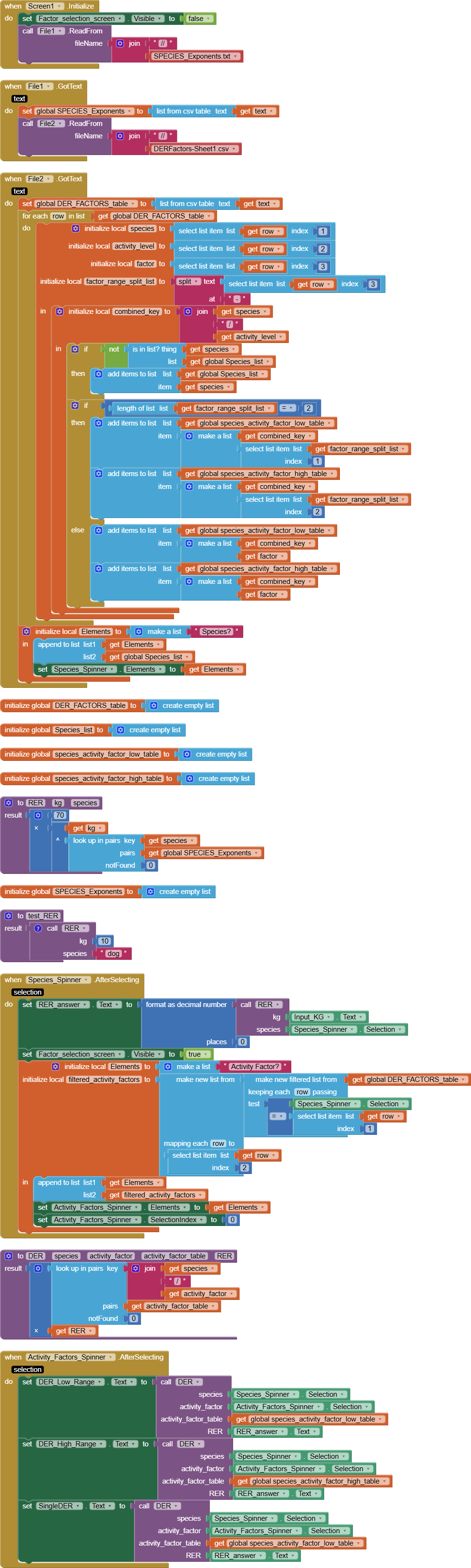
Here is a totally table based approach, which knows only the species it loads from its Media folder at startup.
That lets you add horses just by editting the two Media files.
VetRER_colistpicker_ABG.aia (24.8 KB)
The low and high factors are kept in two separate lookup tables, built dynamically from the factor ranges sheet I showed in an earlier post.
I wasn't quite sure what to show in the single DER value field at the bottom for the case where the low DER is different from the high DER.
With a table based approach, at least any mistake I made is only on one place, and not replicated all over via copy/paste.
You really like them tables! 
Its going to take some time for me to digest and reverse engineer all that. I see what its doing, I also see 2 media files uploaded that it calls for.... so now I get how you are using the data from the spreadsheet.
Awfully complex for my first real app attempt. A lot of new blocks/arguments and such to learn. Whew. This is good tho!
Which is probably why I ventured down the simplistic route initially, even though I had to do a bunch of copy and paste, it seems simpler without drop down boxes. My mind is thinking ideas for my next app that will be well suited for the tables and that spinner box style (baby steps for now)
I want to learn both ways.
I do appreciate it!
I have mixed feelings about spinners.
They're good for collapsing after selecting, but fussy about the header of the Elements list.
I would stick with a list view, but add a button to make them act like a List Picker, hiding the Elements after selecting.