2.- Arduino sends pozo_4.txt to App by Bluetooth HC-06.
App receives this string Base64 and converts it to file: /mnt/sdcard/el_pozo.jpg
Image component shows that image.
p9L2_Bluetooth_Base64_3.aia (89.4 KB)
pozo_4.txt (5.2 KB)
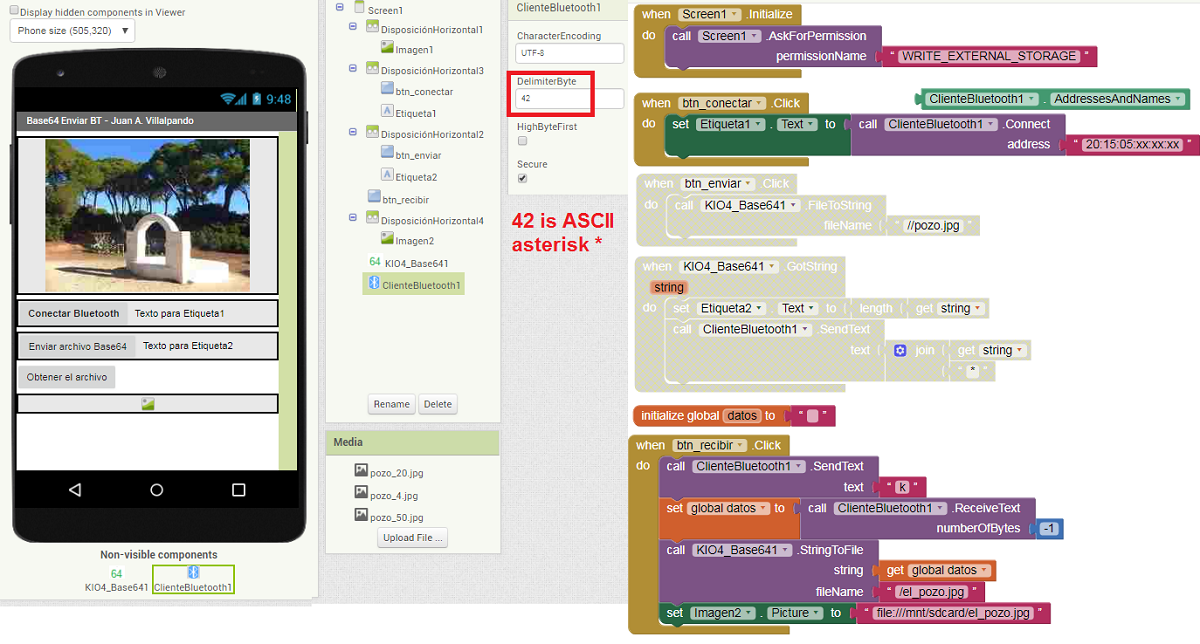
-
When btn_receive click, App sends character "k" to Arduino, then reception will start.
-
When App receives the asterisk * (code 42), it will interpret that the reception has finished.
-
Extension will convert the received string to /el_pozo.jpg. It will be displayed in the Image component.
-
Code Arduino:
#include <SD.h>
// const int CS = D8; // Para el NodeMcu
const int CS = 4; // Para el Arduino y Wemos ESP32
File miarchivo;
char caracter;

void setup() {
Serial.begin(9600);

  Serial.println("Iniciando SdCard...");
  if (!SD.begin(CS)) {
    Serial.println("Error al iniciar.");
    return;
  }
    Serial.println("SdCard iniciada.");
}

void loop() {
   if(Serial.available()) {
   caracter = Serial.read();
   if(caracter == 'k'){
   miarchivo = SD.open("pozo_4.txt"); // Abre el archivo lectura.
            if (miarchivo) {
              while (miarchivo.available()) {
                Serial.write(miarchivo.read());
                // delay(2);
              }
                Serial.print("*");
                miarchivo.close();
            }
            else {
              Serial.println("Error al abrir el archivo.");
            }
          }
   }
}
-
Arduino sends characters to App by Bluetooth. Last character is asterisk, Serial.print("*")
-
In App DelimiterByte= 42 (because 42 is ASCII asterisk *)
-
Default baud in HC-06 is 9600.
-
With these codes, the pozo_4.txt (5.2 K) file is transmitted from Arduino to the App in 7 seconds.