Additionally the following information from @Franklyn_A_Turbak is helpful to understand the model of event processing in App Inventor (taken from here)
Taifun
When a block execution e a bit long, all the display are executed at the end of th execution of the block.
Suppose you want to inform the user that the action he started may take some minutes !... When the code is executed The first message (on the title bar in this example) Must be shown before the begin of the loop execution !
If you try the code, you can see that the two messages are displayed at the same time, at the end of the loop..
Is someone with a solution for this question ? Thank you for your help !!
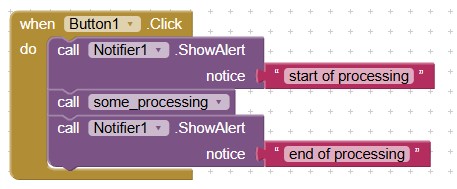
The model of event processing in App Inventor is not particularly intuitive and is full of surprises like the one that Christian has reported..
I and other members of the App Inventor educational team created this paper and this talk to explain App Inventor's event model and to provide guidance on how to express certain computational patterns in this model.
The essence of App Inventor's event model is the following five Event Rules:
- Only one event handler can be executing at any given time.
- Other events that occur while an event handler is executing are queued and handled later, in order.
- Any GUI changes during an event handler are not displayed until the event has completed.
- Certain system actions (playing a sound file, initiating a web request, etc.) are executed in a thread separate from the current event handler.
- Playing a sound on a Player component first terminates any sound currently playing except when the source file has not been reset, in which case the new play request is ignored if the sound is already playing.
To see if you understand these rules, take the quiz that starts on slide #17 of the talk.
In particular, Event Rule #3 explains the behavior that Christian is reporting: because no GUI changes made during the execution of an event handler are displayed until the event handler has completed, the setting of Screen1.Title and TextBox1.Text appear to happen simultaneously.
As noted in the paper, effective programming in the context of these rules requires using some different programming idioms than one may use in other programming languages.
- Many iterative processes expressed with loops in other languages must, in App Inventor, be expressed as global state machines in which each step of the iteration is triggered by an event.
- The Clock.Timer event is used to express iterations, delays, and the interleaving of actions. In Christian's case, Scott has recommended using a timer to program the delay between two messages.
- App Inventor actions that take a long or unpredictable amount of time are expressed as pairs of (1) a method that initiates the action and (2) a callback event handler that is executed when the action completes. Examples of such pairs are Camera.TakePicture/Camera.AfterPicture and TinyWebDB.GetValue/TinyWebDB.GotValue. To solve Christian's problem. Taifun has suggested using the pair Notifier.ShowChooseDialog/Notifier.AfterChoosing.
- lyn -