I have an app based off of the mole mash tutorial and I have 4 screens. after I click reset on screen 4 it goes to screen 1 then there is a play button there and when I click it the second time, not the first time to start the game but after I reset it, it crashes. Please help. PS I have my screens switching after you score a certain number of points.
| java.lang.OutOfMemoryError: Failed to allocate a 4888524 byte allocation with 4711808 free bytes and 4MB until OOM at dalvik.system.VMRuntime.newNonMovableArray(Native Method) at android.graphics.Bitmap.nativeCreate(Native Method) at android.graphics.Bitmap.createBitmap(Bitmap.java:905) at android.graphics.Bitmap.createBitmap(Bitmap.java:882) at android.graphics.Bitmap.createBitmap(Bitmap.java:813) at android.graphics.Bitmap.createScaledBitmap(Bitmap.java:689) at com.google.appinventor.components.runtime.util.MediaUtil$2.run(MediaUtil.java:646) at java.lang.Thread.run(Thread.java:761) Note: You will not see another error reported for 5 seconds |
This is the error message that shows up if it helps |
|---|
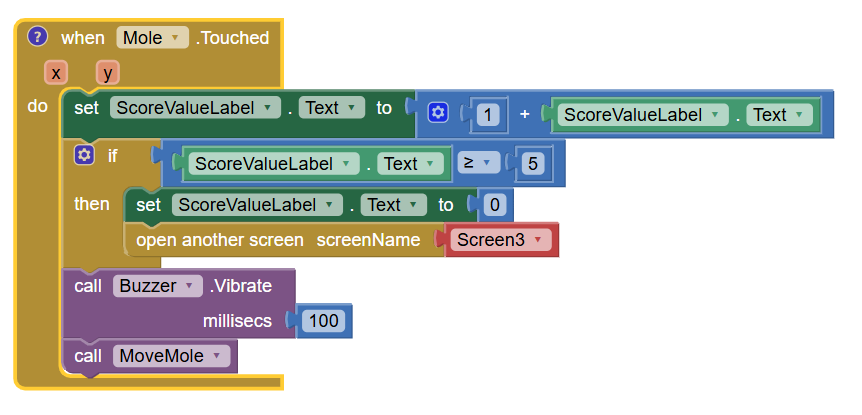
See the section on how to switch screens.
Basically, you have to close screens as often as you open them.
This should have been done in just one Screen.
Use Arrangements instead of Screens.
Make them Visible one at a time.
There might be something else going on in your app.
Could you export the aia and post it here?
My guess is you are opening screens without closing them.
Use the manager screen method to switch screens, see also Opening another screen AND closing the current one - #12 by ewpatton
Taifun
Also see tip 2 here
Taifun
(Canned Reply: ABG- Export & Upload .aia)
Export your .aia file and upload it here.
.
I reread your error message, and have changed my mind about the root of your problem.
(An aia export would prove me right or wrong)
Your error message happens in the code that deals with images.
It is a common error for AI2 users to load huge image files into their assets folder, often bigger than 4 MB, the memory limit mentioned in your error messages.
Try using one of the online services that shrink image files, like Tinypng.com
Mole_Mash.aia (436.0 KB)
I don’t think it is that it, might be but I only have a picture that is 289 KB and another one that is 41.3 KB (it is used 13 times, so that might be the problem) on the two screens that it crashes on.
Based on previous replies I still think that the screens are not closing so it saves the image files, then keeps the screen open and there is to much space taken up by images so it crashes.
I played the aia on the code2 server, using my MumuPlay Android emulator.
I couldn't get it to crash.
(I had to cheat on Screen3, the second level with 0.1 second Clock Timer, by picking a random hole and pounding on it until I got 5 hits.)
Does it still crash for you?
How many reset cycles did you play on it?
Did you use the Companion, or built an apk?
Did you use a real phone (with vibrate), or just an emulator?
ya, sorry I wanted to make level 2 hard, only 1 reset cycle (on an older android companion) and when I click play it crashes. Real phone
So it works first time, but second it crashes
you only open screens and never close them
as already mentioned earlier
Taifun
Yes, but I switch using a certain score, not buttons
I couldn't make it crash on my phone and Companion, even after 3 times around the two levels.
That is interesting, it might be because I use an older version of android.