there is an extension called joedev Rotate in this aia.. i cant find it on the comminity
but the video is not properly oriented.… kindly fix this
I’ve added brightness and saturation; as for mirror mode, it will only apply to photos, not video.
- I haven't published the Rotate extension yet; I'll do so soon.
- I've made some fixes to the camera; I'll publish it once I finish my tests.
1 Like
Updatev1.3
3 Likes
Nice
1 Like
Can you modify the extension to capture overlay? Both photo and video
1 Like
I’ve already modified the extension, but I’m considering whether it should be paid or free; it was completed a few days ago with that functionality, filters, and other adjustments.
2 Likes
pls make it free 
2 Likes
Yes pls
3 Likes
Waiting…
2 Likes
Updatev1.4
-
Added OpenGL support to enable the application of filters to videos, as well as a mirror mode for videos recorded with the selfie camera.
-
Added a feature to toggle mirror mode for the selfie camera on or off.
-
It is now possible to "burn" (embed) overlays onto photos and videos. For videos, this can be done in real-time, with animations rendered as they are applied; you can also upload GIFs to be embedded.
-
Additional features have been added—please refer to the documentation.
Burn-In:
Filters:
4 Likes
Omg….. Such a cool update
1 Like
nice 
testing companion
java.lang.ClassCastException: android.view.ViewGroup$LayoutParams cannot be cast to android.view.ViewGroup$MarginLayoutParams at android.view.ViewGroup.measureChildWithMargins(ViewGroup.java:7124) at android.widget.FrameLayout.onMeasure(FrameLayout.java:205) at android.view.View.measure(View.java:28994) at android.view.ViewGroup.measureChildWithMargins(ViewGroup.java:7132) at android.widget.LinearLayout.measureChildBeforeLayout(LinearLayout.java:1613) at android.widget.LinearLayout.measureVertical(LinearLayout.java:883) at android.widget.LinearLayout.onMeasure(LinearLayout.java:726) at com.google.appinventor.components.runtime.LinearLayout$1.onMeasure(LinearLayout.java:68) at android.view.View.measure(View.java:28994) at android.view.ViewGroup.measureChildWithMargins(ViewGroup.java:7132) at android.widget.FrameLayout.onMeasure(FrameLayout.java:205) at android.view.View.measure(View.java:28994) at android.view.ViewGroup.measureChildWithMargins(ViewGroup.java:7132) at android.widget.LinearLayout.measureChildBeforeLayout(LinearLayout.java:1613) at android.widget.LinearLayout.measureVertical(LinearLayout.java:883) at android.widget.LinearLayout.onMeasure(LinearLayout.java:726) at com.google.appinventor.components.runtime.LinearLayout$1.onMeasure(LinearLayout.java:62) at android.view.View.measure(View.java:28994) at android.widget.ScrollView.measureChildWithMargins(ScrollView.java:1641) at android.widget.FrameLayout.onMeasure(FrameLayout.java:205) at android.widget.ScrollView.onMeasure(ScrollView.java:559) at android.view.View.measure(View.java:28994) at android.view.ViewGroup.measureChild(ViewGroup.java:7104) at com.google.appinventor.components.runtime.ScaledFrameLayout.onMeasure(ScaledFrameLayout.java:136) at android.view.View.measure(View.java:28994) at android.view.ViewGroup.measureChildWithMargins(ViewGroup.java:7132) at android.widget.LinearLayout.measureChildBeforeLayout(LinearLayout.java:1613) at android.widget.LinearLayout.measureVertical(LinearLayout.java:883) at android.widget.LinearLayout.onMeasure(LinearLayout.java:726) at android.view.View.measure(View.java:28994) at android.view.ViewGroup.measureChildWithMargins(ViewGroup.java:7132) at android.widget.FrameLayout.onMeasure(FrameLayout.java:205) at androidx.appcompat.widget.ContentFrameLayout.onMeasure(ContentFrameLayout.java:143) at android.view.View.measure(View.java:28994) at android.view.ViewGroup.measureChildWithMargins(ViewGroup.java:7132) at androidx.appcompat.widget.ActionBarOverlayLayout.onMeasure(ActionBarOverlayLayout.java:401) at android.view.View.measure(View.java:28994) at android.view.ViewGroup.measureChildWithMargins(ViewGroup.java:7132) at android.widget.FrameLayout.onMeasure(FrameLayout.java:205) at android.view.View.measure(View.java:28994) at android.view.ViewGroup.measureChildWithMargins(ViewGroup.java:7132) at android.widget.LinearLayout.measureChildBeforeLayout(LinearLayout.java:1613) at android.widget.LinearLayout.measureVertical(LinearLayout.java:883) at android.widget.LinearLayout.onMeasure(LinearLayout.java:726) at android.view.View.measure(View.java:28994) at android.view.ViewGroup.measureChildWithMargins(ViewGroup.java:7132) at com.android.internal.policy.DecorView.measureChildWithMargins(DecorView.java:2981) at android.widget.FrameLayout.onMeasure(FrameLayout.java:205) at com.android.internal.policy.DecorView.onMeasure(DecorView.java:911) at android.view.View.measure(View.java:28994) at android.view.ViewRootImpl.performMeasure(ViewRootImpl.java:5741) at android.view.ViewRootImpl.measureHierarchy(ViewRootImpl.java:3957) at android.view.ViewRootImpl.performTraversals(ViewRootImpl.java:4346) at android.view.ViewRootImpl.doTraversal(ViewRootImpl.java:3625) at android.view.ViewRootImpl$TraversalRunnable.run(ViewRootImpl.java:12056) at android.view.Choreographer$CallbackRecord.run(Choreographer.java:2459) at android.view.Choreographer$CallbackRecord.run(Choreographer.java:2468) at android.view.Choreographer.doCallbacks(Choreographer.java:1693) at android.view.Choreographer.doFrame(Choreographer.java:1448) at android.view.Choreographer$FrameDisplayEventReceiver.run(Choreographer.java:2284) at android.os.Handler.handleCallback(Handler.java:1014) at android.os.Handler.dispatchMessage(Handler.java:102) at android.os.Looper.loopOnce(Looper.java:250) at android.os.Looper.loop(Looper.java:340) at android.app.ActivityThread.main(ActivityThread.java:9889) at java.lang.reflect.Method.invoke(Native Method) at com.android.internal.os.RuntimeInit$MethodAndArgsCaller.run(RuntimeInit.java:625) at com.android.internal.os.ZygoteInit.main(ZygoteInit.java:957)
Note: You will not see another error reported for 5 seconds.
when click on paint options
- Does it work correctly on the first click of the button?
- Did you click the Paint button a second time?
If you click the button twice, it will throw an error.
You’ll need to implement some logic to check if the drawing mode is already active, so that it doesn’t try to re-insert the canvas where one already exists.
I’ll need to add a couple of functions to the Paint extension: one to remove the canvas, and another to check whether the canvas already exists within the Arrangement.
1 Like
I checked… its giving error due to double click the paint button.
1 Like
Try this one; I’ve already added that function to Paint.
Camerav1_4_BtnDrawLogic.aia (543.1 KB)
2 Likes
I noticed an issue when overlaying a photo onto the camera feed while recording a video. Upon reviewing the output video, the photo transition appears choppy and lacks smoothness, resulting in a slight lag…. and it will helpful when click on camera..it will focous along with brightness and sturation sliders on left and right… also thickness, height, visibility of these sliders in the properties
Thanks for the report. The overlay is currently refreshed at 10 FPS while video records at 30 FPS, so fast-changing overlays will look slightly choppy by design. This is more noticeable with large images or on lower-end devices. I'll consider adding an OverlayFrameRate property and caching the overlay when it doesn't change. In the meantime, try using a smaller overlay image and let me know.
The brightness and saturation sliders you describe are not yet part of the component; currently, these values are available via the BrightnessLevel and SaturationLevel properties, which you can manage using blocks. You can create your own on-screen sliders: place two Slider components over the camera container (Arrangement) and, within their PositionChanged event, call BrightnessLevel and SaturationLevel.
Alternatively, in a couple of days I will be uploading some extensions that complement it, such as:
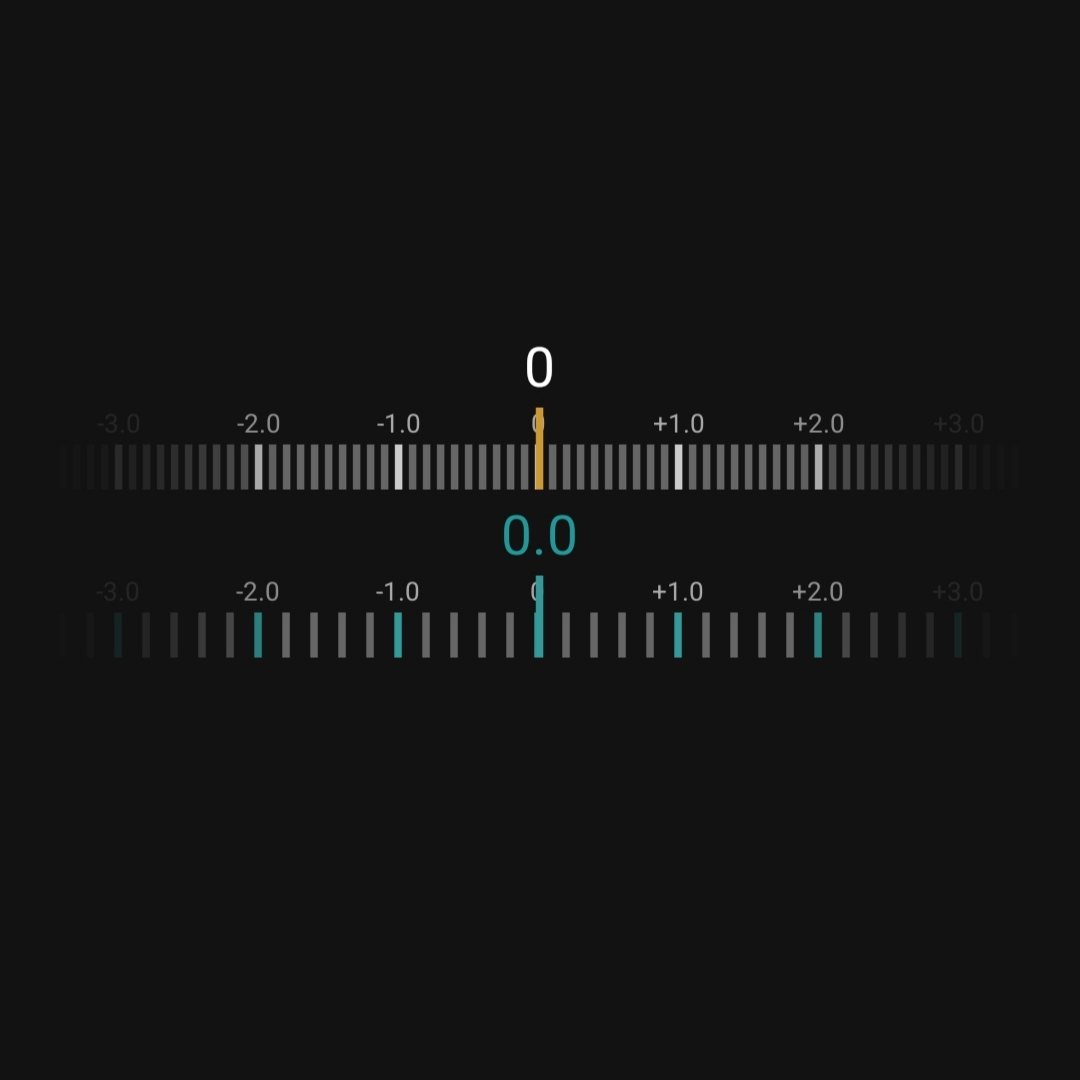
- RulerSlider
- FlyoutPanel
- Toolbar
- PopupColorPicker (for docking to the Toolbar)
- FiltersCamera
- TextShadow
And updated versions of the following extensions:
- PopupMenu (for docking to the Toolbar)
- ImageLoader
- AspectRatio
...Among others that are currently in development.
RulerSlider:
1 Like
Nice